EasyManua.ls Logo

Aroma Retail Professional - User Manual

Aroma Retail Professional
8 pages
Print Icon
To Next Page IconTo Next Page
Loading...
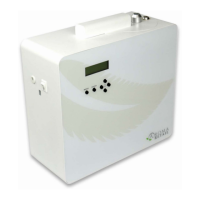
Scent Machine: Professional
User+Guide+
Startup+
Connect+the+power+cord+and+turn+on+the+white power+switch+on+the+side.+
The control module on the machine and the app are very intuitive with hints and notes to guide the user.
Using+the+BuDons
Press+MENU+to+light+up+the+screen.+
The buttons:
MENU takes you to the menu or back to home screen.
ENTER confirms your changes.
Change the values and move you to the next menu item.
Selects the menu item and moves you to the right as you’re entering settings.
Returns to previous screen or moves you to the left to re-enter settings.
Page+1+
Unlock the top assembly and lift it straight up from the machine.
Unscrew the 27 oz (800 ml) bottle, fill with fragrance oil. Check White Gasket in Cap to
ensure seated. Raise the bottle up onto the top assembly so that the draw-tube goes
into the bottle, screw the bottle in place.
Lower the top assembly back into the machine and lock it in place.
Installing+and+Changing+the+Oil
Scan for a
Digital Quick
Guide Version
If the machine is not scheduled to run at the current time, the home screen will display when the next Event is scheduled to come on.
Menu Categories:
Set Time/Day – for current day and time
Set Up Events – there are 5 Events. Only one is needed to run the machine. You would have multiple Events if you want the
machine to run at different times on the same day, and/or at different settings on different days. For example, if you want the
machine to run 9am-5pm Monday-Friday, and 9am-9pm on Saturday-Sunday, then you would use two Events:
o Event 1: start at 9am, end at 5pm, select M T W Th F as the on-days.
o Event 2: start at 9am, end at 9pm, select S S as the on-days.
Machine Info – holds information Customer Care might need to troubleshoot issues, like serial number and software version.
Keep scrolling and it also shows which Wi-Fi network the machine is currently set on. If you need to change this, go to the
Menu category: WiFi Reset.
Reset Events – returns all Event settings back to the default settings after you confirm “Yes.” Resetting Events on the machine
does NOT override the settings in the app. Setting in the app will override settings on the machine.
Reset WiFi – removes the WiFi network connection. You can enter the new WiFi connection from the app; this is done when
you add the machine in the app.
The initial setup can be done before using the mobile app.
Question and Answer IconNeed help?

Do you have a question about the Aroma Retail Professional and is the answer not in the manual?

Summary

Startup and Initial Setup

Using the Machine Buttons

Explains how to navigate the machine's menu and confirm settings using the physical buttons.

Installing and Changing Fragrance Oil

Oil Bottle Replacement Procedure

Guides on how to safely remove and replace the fragrance oil bottle in the machine.

Setting up the Aroma Retail APP

Account Creation and Login

Instructions for creating a new account or logging in to manage the scent machine via the mobile app.

Connecting to Wi-Fi Network

Steps to connect the scent machine to your local Wi-Fi network for app control.

Device Pairing and Management

How to add, access, and manage your scent machine within the Aroma Retail mobile application.

Event Scheduling via App

Setting up diffusion start/end times, work/pause cycles, and fan settings for automated operation.

Temporary Adjustments and Oil Level

How to make temporary overrides for diffusion and update the fragrance oil level in the app.

Vacation Hold Functionality

Setting a vacation hold to pause machine operation without losing programmed settings.

Oil Consumption and Lifespan

Estimating Bottle Duration

Provides a table and explanation for how long an 800ml bottle lasts based on diffusion settings.

Nozzle Maintenance

Cleaning Procedures

Instructions on cleaning the nozzle to prevent clogging or remove residual scents.

Free Standing Configuration

Optimal Location and Placement

Recommendations for the best placement of the machine for airflow and vibration absorption.

Wall Mounting Instructions

Guidance on securely mounting the machine to a wall using provided templates and hardware.

Scatter Fan Adjustment

How to adjust the scatter fan for fragrance dispersion direction or intensity.

Ventilation-Connected Setup

System Requirements and Airflow

Conditions for safe and effective connection to HVAC systems, including fan operation requirements.

Duct Connection Locations

Identifies optimal positions within the HVAC ductwork for connecting the scent machine.

Connecting the Tube for Ventilation

Tubing Installation and Slope

Instructions for installing the diffusion tube, ensuring proper slope to prevent condensation.

Optional Air Switch Integration

Introduction to the optional air switch for synchronizing diffusion with HVAC fan operation.

Installing the Air Switch

Mounting and Pressure Detection Setup

Guidelines for mounting the air switch and configuring it to detect pressure changes from the fan.

Tubing and Grommet Usage

Proper use of tubing and grommets to secure connections through duct panels.

Machine Connection and Notes

How to connect the air switch to the machine and important usage considerations.

Overview

The Aroma Retail Professional Scent Machine is a sophisticated fragrance diffusion system designed for both free-standing and HVAC-connected applications, offering customizable scenting solutions for various spaces. Its primary function is to disperse fragrance oil into an environment, creating a desired ambiance.

Function Description:

The scent machine operates by atomizing fragrance oil into a fine mist, which is then diffused into the air. It can be used as a standalone unit, directly scenting a space, or integrated into an existing HVAC system for broader and more even distribution of fragrance. The device is controlled via an intuitive on-board module with buttons and an LCD screen, or remotely through a dedicated mobile application available on both Google Play and the Apple App Store. This dual control capability provides flexibility for users to manage their scenting preferences.

The core functionality revolves around scheduled "Events," allowing users to program specific start and end times for diffusion, along with intensity settings. Up to five distinct events can be configured, enabling different scenting schedules and intensities for various days or times within a day. For instance, a user might set one event for weekday operation (e.g., 9 am-5 pm) and another for weekend operation (e.g., 9 am-9 pm) with different diffusion parameters.

When connected to an HVAC system, the machine ensures that fragrance is only dispensed when the air conditioning fan is running, preventing unnecessary oil consumption. An optional air switch (sold separately) can be integrated to achieve this synchronization, although it's noted that air switches are often not strictly necessary if the HVAC system operates regularly.

Important Technical Specifications:

The machine uses a 27 oz (800 ml) fragrance oil bottle. The oil consumption rate varies significantly based on the chosen intensity settings. For example, at the lowest intensity (L1: 3 seconds work / 160 seconds pause), a bottle can last up to 12 months when running 12 hours a day. At the highest intensity (L9: 80 seconds work / 20 seconds pause), the same bottle might last only 1 month under the same operating conditions. These figures are based on scenting areas of 2,000 to 15,000 square feet with standard to high ceilings, respectively.

The device features a Wi-Fi connection for app-based control. The app displays the machine's serial number and software version, which can be useful for troubleshooting.

Usage Features:

  • Dual Control: Users can operate the machine using the physical buttons (MENU, ENTER, arrow keys) on the device itself or through the Aroma Retail mobile app.
  • Intuitive App Interface: The mobile app guides users through the setup process, from creating an account to connecting the machine to their Wi-Fi network. It provides a clear overview of connected machines and allows for detailed event scheduling.
  • Event Scheduling: Up to five customizable events can be set, each with specific start/end times, days of the week, and work/pause cycles (intensity). This allows for highly tailored scenting schedules.
  • Work/Pause Cycles: The intensity of diffusion is controlled by adjusting the "Work" (diffusion duration) and "Pause" (rest duration) times within each cycle.
  • Fan Settings: The machine includes a fan that can be set to High, Medium, Low, or Off. For free-standing use, the fan helps scatter the fragrance. If connected to HVAC, the fan should typically be off as it won't significantly impact distribution.
  • Vacation Hold: The app allows users to set a "Vacation Hold," which temporarily suspends machine operation for specified dates without altering the programmed events.
  • Oil Level Monitoring: The app includes a meter to estimate current oil levels, and users are prompted to update the oil level in the app after refilling the bottle.
  • Flexible Placement: The machine can be placed as a free-standing unit on a hard surface (utilizing rubber feet to absorb vibration) or wall-mounted using a provided template. For HVAC connection, specific locations within the ductwork are recommended for optimal diffusion.
  • HVAC Connection: The machine can be connected to an HVAC system using a tube and a quick disconnect adapter. The manual provides detailed instructions on how to secure the tube through the duct panel and recommends keeping the tubing short (4 feet or less) and sloped upwards to prevent condensation.
  • Wi-Fi Reset: A "Reset WiFi" option is available on the machine's control module to clear existing network connections, facilitating setup on a new Wi-Fi network.

Maintenance Features:

  • Oil Bottle Installation/Replacement: Fragrance oil is filled into a removable 27 oz (800 ml) bottle. The bottle screws into the top assembly, ensuring the draw-tube is properly seated.
  • Nozzle Cleaning: To prevent clogging, address whistling, or switch fragrance scents, the nozzle can be cleaned by rinsing the bottle with alcohol (isopropyl or vodka) and running the machine for a few cycles with a small amount of alcohol.
  • Grommets: Rubber grommets are provided for securing tubing and electrical wires when connecting to HVAC, protecting them as they pass through duct panels.
  • Troubleshooting Information: The "Machine Info" section in the app provides details like serial number and software version, which are helpful for customer support. The manual also includes contact information for customer care.

Aroma Retail Professional Specifications

General IconGeneral
BrandAroma Retail
ModelProfessional
CategoryAccessories
LanguageEnglish