The Arovec Smart Plus True HEPA Air Purifier, model AV-P500, is designed to enhance indoor air quality by effectively removing airborne contaminants. It utilizes an internal fan system to draw air through a high-efficiency filtration system, ensuring a healthier environment. The device is equipped with an air quality sensor that provides real-time updates on the air quality in your room.
Function Description
The primary function of the AV-P500 is air purification. It incorporates a multi-stage filtration system to capture a wide range of harmful airborne pollutants. The device features a PM2.5 value display and an air quality indicator, which uses an infrared dust sensor to detect particulate matter (PM) levels in micrograms per cubic meter (µg/m³). PM2.5 refers to particles 2.5 microns or smaller in diameter. The air quality status is visually represented by four different colors on the screen, reflecting real-time changes in air quality.
The Smart Sensor and Auto-Mode feature allows the air purifier to intelligently detect PM2.5 levels and automatically adjust the purification speed to effectively manage pollution. This ensures optimal performance without constant manual intervention. For undisturbed rest, the Peaceful Sleep feature enables the air purifier to operate quietly in Sleep-Mode. Users can also turn off the display and lights to create a dark sleeping environment.
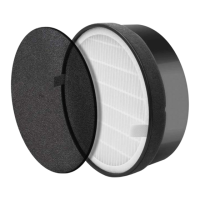
The high-efficiency filtration system is capable of filtering out 99.97% of airborne harmful pollutants as small as 0.3 µm, operating completely ozone-free and safely. This system comprises three stages:
- Preliminary Filter: This stage is designed to capture larger particles such as dust, pet dander, and hair.
- Korean H13 True HEPA Filter: This high-grade filter traps fine particles, including PM2.5, dust mites, allergens, airborne bacteria, pollen, mold, and other airborne contaminants as small as 0.3 µm.
- High-Efficiency Activated Carbon Filter: This filter is responsible for adsorbing various odors and smokes, such as cigarette smoke, fumes, cooking smells, pet odors, hazardous gases, and volatile organic compounds (VOCs).
Usage Features
Before initial use, it is crucial to remove the plastic packaging from the filter, which is pre-installed inside the air purifier. Failure to do so poses a fire hazard. To prepare the device, place it on a stable, upright surface. Unlock the base cover by turning the base lock button to the left, then carefully lift the air purifier to remove the filter from its packaging. After removing the packaging, place the filter back into the air purifier and secure the base cover by turning the lock button to the right.
For optimal performance, the air purifier should be placed on a flat and level surface with the control panel facing upwards. It is recommended to maintain at least 40 cm of clear space around each side of the purifier when it is operating. To maximize air cleaning efficiency, close nearby windows when the air purifier is in use. For best results, operate the air purifier at maximum fan speed for 15-20 minutes initially, then adjust the fan speed as needed.
The control panel offers several functions:
- Power Button: A single tap turns the air purifier ON or OFF.
- Fan Speed Button: There are four fan speed levels: LOW, MED, HIGH, and TURBO. Each tap toggles to the next speed level. The TURBO mode is particularly useful for rapid air purification in situations with extreme smoke, such as from a bushfire.
- Memory Function: The air purifier retains its last control settings when turned OFF, provided it remains plugged in. Upon turning ON again, it will recall the previous fan setting.
- AUTO MODE Button: Tapping this button activates AUTO mode, where the air quality indicator changes color based on detected air quality, and the fan speed adjusts automatically. It takes approximately 1 minute for the dust sensor to detect air quality after the air purifier is turned ON.
- CHILD-LOCK Button: This feature deactivates the control panel. To activate child-lock mode, press and hold the button for 3-5 seconds. To exit child-lock mode and reactivate the control panel, press and hold the button again for 3-5 seconds.
- TIMER Button: Users can set a timer for 1 to 12 hours. Repeatedly tapping the button selects the desired time. The timer display counts down, and the air purifier automatically turns OFF once the timer expires. If no timer is set, the device operates continuously until manually turned OFF. To cancel the timer, tap the button repeatedly until the timer display disappears.
- SLEEP MODE Button: In sleep mode, the air purifier operates at the lowest fan speed, and all indicators, including lights, turn OFF, except for the sleep mode icon. Tapping the button enters sleep mode, and the icon blinks for 3 seconds before the air purifier enters sleep mode. The sleep mode icon will change to a dim light after 8 seconds for an undisturbed environment.
- NIGHT LIGHT AND DARK MODE Button: This button controls the night light and dark mode.
- Night Light: The LED night light offers two colors (blue and orange) with a dimmable option. Tapping the button selects the light color, adjusts brightness, or turns it OFF, toggling through the settings.
- Dark Mode: Pressing and holding the button for 3-5 seconds turns OFF all display indicators and lights, allowing the air purifier to operate with zero light for no disturbance.
- REPLACE FILTER Indicator: This indicator lights up to remind users to replace the filter. After replacing the filter, press and hold the button for 3-5 seconds to reset the air purifier. The indicator light will turn OFF once successfully reset.
Maintenance Features
Regular maintenance is essential for the longevity and efficiency of the air purifier.
- Cleaning: Always turn OFF and unplug the air purifier before cleaning. The exterior of the device should be wiped down regularly with a soft, clean cloth. Avoid using harsh cleaning agents such as bleach or alcohol on any part of the air purifier.
- Filter Cleaning: To extend the life and efficiency of the filter, clean it at least once a month using a soft brush or vacuum cleaner to remove large particles, hair, and dust. Do not clean the filter with water or any other liquids.
- Filter Replacement: The filter should ideally be changed every 4-5 months (approximately 3000 hours of use). However, the frequency may vary depending on usage and air pollution levels. The "REPLACE FILTER" indicator light will signal when a replacement is needed. Users may also consider changing the filter if they notice increased noise from the air purifier, no effective difference in air quality, decreased airflow, unusual odors, or a clogged filter. Only use Arovec AV-P500-RF replacement filters to ensure effective operation and prolong the life of the air purifier. The filter should be removed from its packaging before installation.
- Steps for Replacing the Filter:
- Turn OFF and unplug the air purifier. Place it on a stable, upright surface. Turn the base lock button to the left to unlock the base cover.
- Hold the air purifier and lift it up carefully. Remove the used filter.
- Clean any remaining dust or hair inside the air purifier with a vacuum cleaner. Do not use water or any liquids to clean the air purifier.
- Remove the new filter from its packaging.
- Insert the new filter and set the air purifier on the base.
- Turn the base lock button to the right to lock the base cover.
- Resetting the Air Purifier After Filter Replacement: After installing a new filter, turn ON the air purifier. Press and hold the "REPLACE FILTER" button for 3-5 seconds. The indicator light should turn OFF, confirming that the air purifier has been reset and is ready for use with the new filter.
- Storage: If the air purifier will not be used for an extended period, it is advisable to wrap it in plastic packaging and store it in a dry place to prevent moisture damage. It is not recommended to store used filters for long periods. Always store the air purifier in an upright position and avoid placing anything on top of it.
- Disposal: To prevent environmental harm or health risks from uncontrolled waste disposal, separate the unneeded air purifier and its accessories from other types of waste. Contact your local council for proper disposal instructions. Do not dispose of the air purifier or its accessories with normal household waste.

 Need help?
 General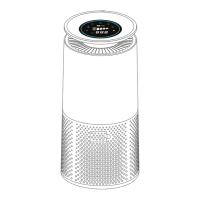

 To Next Page