Setting a maximum height
Mechanical reset
0 position reset
Lock and unlock
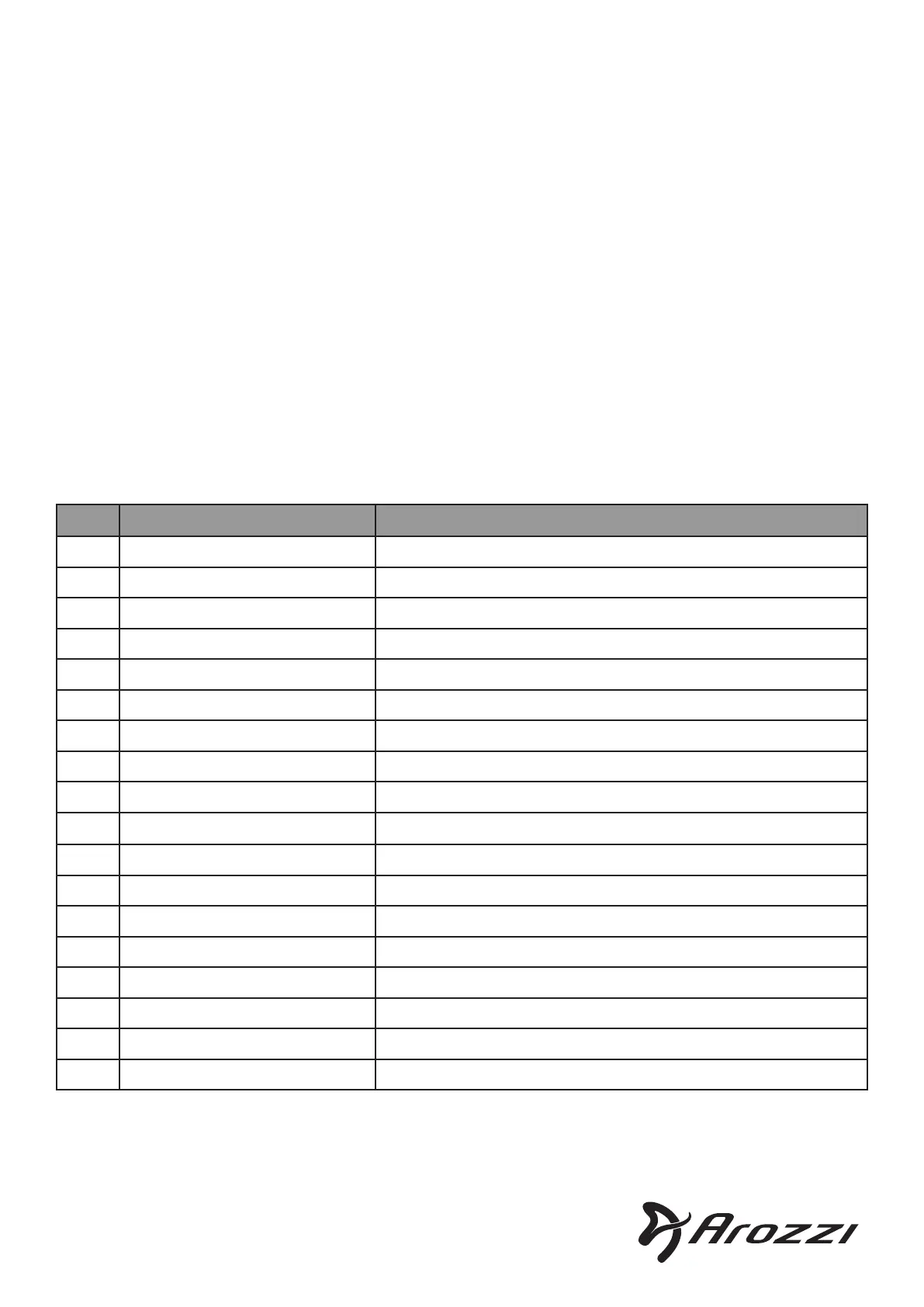
Error codes
• To set the current height as maximum height for the desk, hold down both Up + M buttons until the
display shows ”-up” indicating that the maximum height has been stored. Storing a maximum height
ensures that the desk never goes above this position.
• To delete the saved maximum height, let the desk run upwards until it stops. Then press the Up button
again and the display shows ”-hI”. Then hold down Up + M buttons until the display shows ”-up”
indicating that the stored maximum height has been deleted.
• Hold down both Up + Down buttons at the same time until the display shows ”---”. Let the desk run.
After it has stopped, the reset is complete. This resets maximum height and minimum height.
• Hold down the Down button until the display shows ”---”. The desk will run downwards to recognize
the 0 height. It will then move up to its xed position.
• Lock/unlock the controller unit by holding down the M + 4 buttons until the display shows ” L” for
locked, or returns from ” L” to regular numbers for unlocked.
* Contact Arozzi support.
EU: arozzi.se/support --- US: arozzi.com/support
Code Description Clear method
E01 Motor A - Not connected Press up / down button -> Check motor A cable
E02 Motor B - Not connected Press up / down button -> Check motor B cable
E03 Motor A - Overcurrent Press up / down button -> Reduce load -> Replace motor A *
E04 Motor B - Overcurrent Press up / down button -> Reduce load -> Replace motor B *
E05 Motor A - Internal sensor failure Press up / down button -> Check A cable -> Replace motor A*
E06 Motor B - Internal sensor failure Press up / down button -> Check B cable -> Replace motor B*
E07 Main power supply problem Unplug the desk. Plug it in again -> Replace power supply *
E08 Motor A - Abnormal current Unplug the desk. Plug it in again -> Replace motor A *
E09 Motor B - Abnormal current Unplug the desk. Plug it in again -> Replace motor B *
E10 Motor A - Power device failure Unplug the desk. Plug it in again -> Replace motor A *
E11 Motor B - Power device failure Unplug the desk. Plug it in again -> Replace motor B *
E12 Position set failure Perform 0 position reset (See above)
E13 Overheat protection Wait for temperature to drop
E14 Motor A - Stalled Press up / down button -> Reduce load -> Replace motor A *
E15 Motor B - Stalled Press up / down button -> Reduce load -> Replace motor B *
E16 Unbalanced position Perform mechanical reset (See above)
E17 Critical data loss Perform mechanical reset (See above)
RST Overload protection Reduce load on desk
© Arozzi Europe AB. 2024
®
Designed in Sweden


 To Previous Page
 Loading...