4
Follow the TV screen prompts for activation
The activation of your video equipment is automatic and will complete within 30 minutes.
Press the STB power button on the remote control, turn the TV on and follow the prompts for activation
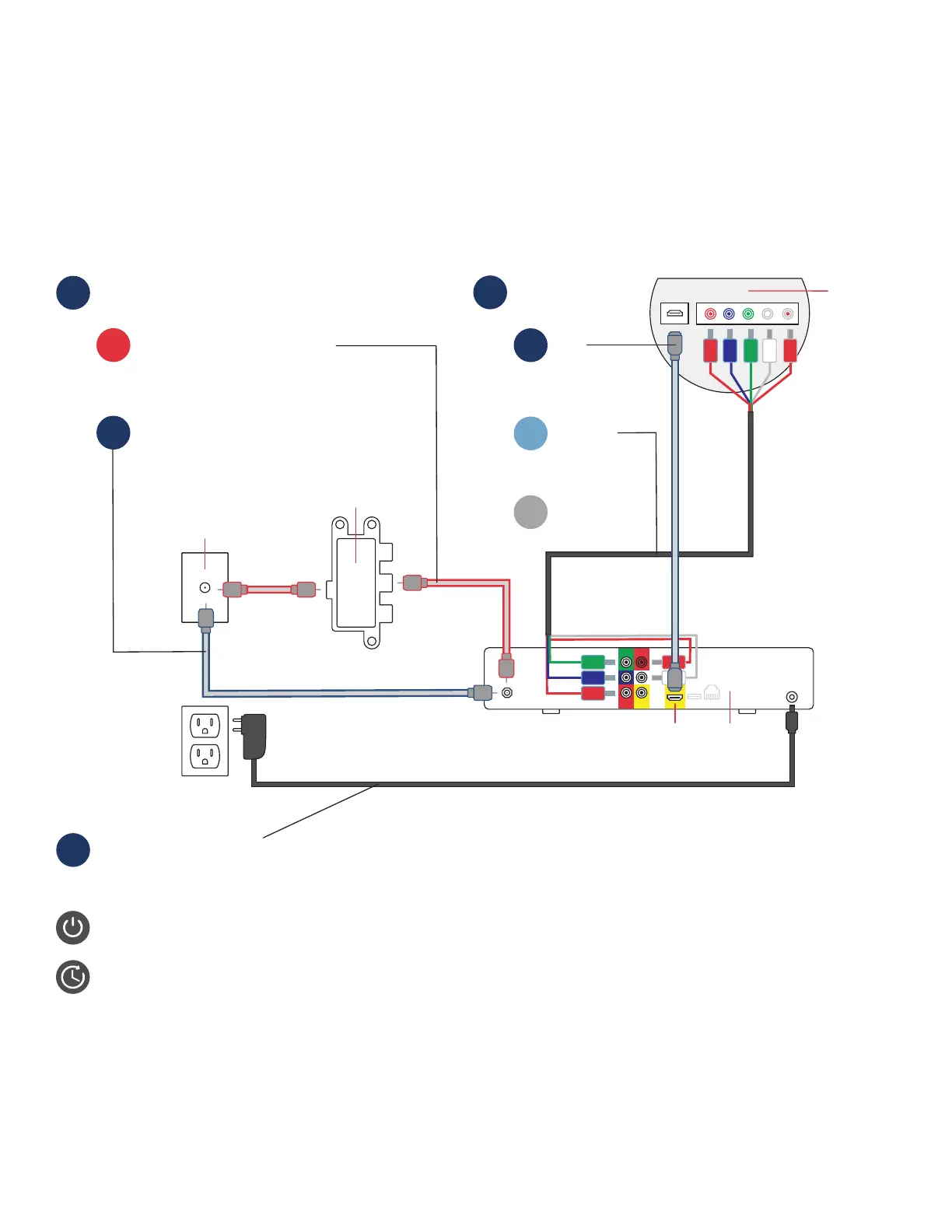
Step 2 | TV Equipment Set Up
Coax jack
Connect the DVR/STB power
cord to the DVR/STB and plug
into the electric outlet
3
If you connected your internet router
with a MoCA adapter, connect the
main DVR/STB to the center port on
the splitter using a coax cable.
A
If you did NOT connect your internet router
with a MoCA adapter, connect the main
DVR/STB directly to the coax outlet using
a coax cable. Additional STBs also connect
directly to your coax outlets using coax cables.
B
Connect your coax wall jack to:
1
–OR—
–OR—
–OR—
Component
cables
RCA cables
(not shown)
BACK OF TV
DVR/
STB
Connect the DVR/
STB to TV using:
2
HDMI
C
Splitter
HDMI
port
A
B
Tips
• Your router must be connected to the internet before installing and activating your TV equipment
• If you received a DVR device, this box must be installed/activated before the other Set-Top Boxes (STB)



 To Next Page