NOTE:
Do not use any power supply other than the
one supplied with the product. Doing so may
cause re or seriously damage your set-top
box.
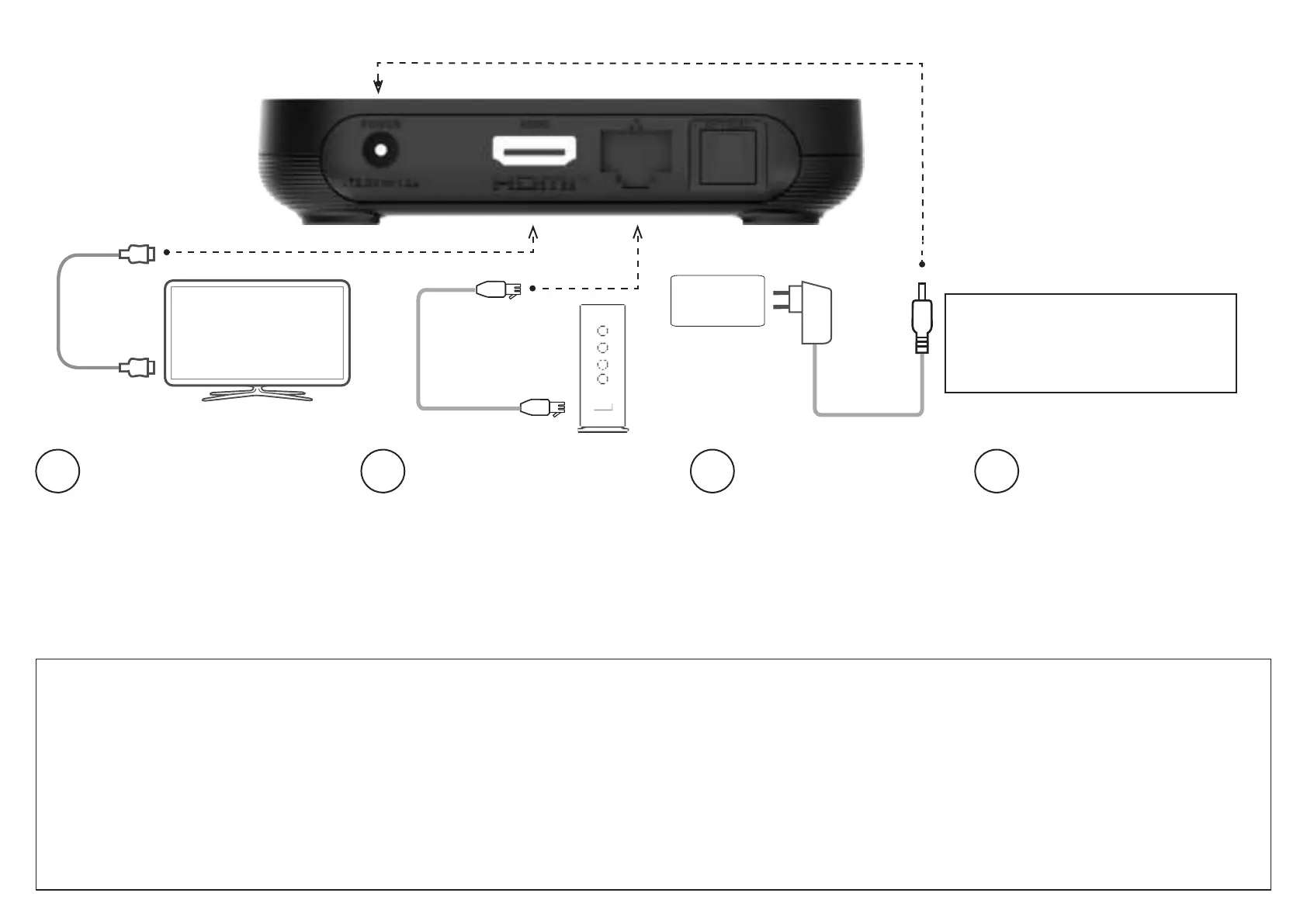
INSTALLING YOUR SET-TOP BOX
Power outlet
Connect one end of the power
supply to POWER port on your
set-top box and to the power
outlet.
Connect your set-top box to your home
Wi-Fi network.
1
2
3
Connect one end of the HDMI cable to
the HDMI port on your set-top box and
the other end to the HDMI connector on
to your TV.
To display a picture from your set-top
box, your TV must be switched to the
correct external input. This is either done
automacally or manually, using a buon
on the TV remote control. See your TV
user’s guide for instrucons.
Insert the baeries into your remote
control.
The remote control will iniate
pairing with your set-top box when
baeries are inserted and any key is
pressed.
4
NOTE:When removing the Ethernet/
LAN cable make sure to rmly press the
underside latching tab on the Ethernet/
LAN cable; to unlock the cable from the
Ethernet/LAN port on the product.
IMPORTANT SAFETY INSTRUCTIONS
• Never place the product on top of or close to any
heat sources such as other electronic devices. Doing
so will reduce lifeme and may cause irreparable
damage or malfuncon. Do not use the product near
water. Note that the ambient temperature must be
below 104° F/40 C. Be sure to maintain necessary
space around the product to allow for proper
venlaon.
• Never use the product outside. The product is
designed to stand on a horizontal surface.
• Do not use any power supply other than the one
supplied with the product. Doing so may cause re or
seriously damage the product.
Federal Communicaon Commission Interference
Statement:This device complies with Part 15 of the
FCC Rules. Operaon is subject to the following two
condions: (1) This device may not cause harmful
interference, and (2) this device must accept any
interference received, including interference that
may cause undesired operaon.
This equipment has been tested and found to
comply with the limits for a Class B digital device,
pursuant to Part 15 of the FCC Rules. These limits
are designed to provide reasonable protecon
against harmful interference in a residenal
installaon. This equipment generates, uses and can
radiate radio frequency energy and, if not installed
dierent from that to which the receiver is connected.
- Consult the dealer or an experienced radio/ TV
technician for help.
FCC Cauon: Any changes or modicaons not
expressly approved by the party responsible for
compliance could void the user’s authority to operate
this equipment. This transmier must not be co-
located or operang in conjuncon with any other
antenna or transmier.
Radiaon Exposure Statement:This equipment
complies with FCC radiaon exposure limits set forth
for an uncontrolled environment. This equipment
should be installed and operated with minimum
distance 20cm between the radiator and your body.
and used in accordance with the instrucons,
may cause harmful interference to radio
communicaons. However, there is no guarantee
that interference will not occur in a parcular
installaon. If this equipment does cause harmful
interference to radio or television recepon, which
can be determined by turning the equipment o
and on, the user is encouraged to try to correct
the interference by one of the
following measures.
- Reorient or relocate the receiving antenna.
- Increase the separaon between the equipment
and receiver.
- Connect the equipment into an outlet on a circuit
Alternavely: Connect one end of the
Ethernet cable (not included) to the
Ethernet port on your set-top box and
the other end to your home router.



 To Next Page
 Loading...


