2
ENGLISH
Specications
Max. DPI/CPI: 24000
Sensor: Avago 9800
Illumination: 4 level RGB
Max. polling rate: 1000
Mouse feet: PTFE
Cable: Braided 1.8 m
Dimensions (LxWxH): 127x82x39 mm
Weight (w/o weights): 130 g w/o weights, 150 g with weights
Operating system: Windows
Use
Asteroid can be congured with a simple software, which is available in the download section of our site.
If you want to get the maximum use of all the Asteroid’s features including macro settings, acceleration,
prole settings and more, then the software should be your next destination.
Installation
1. Plug the mouse into the USB port of your computer.
2. Download (http://www.arrogantbastard.co.uk) and run the software.
3. The Setup screen appears. Choose NEXT and install the software.
4. Restart your system. After the reboot the software is ready to use.
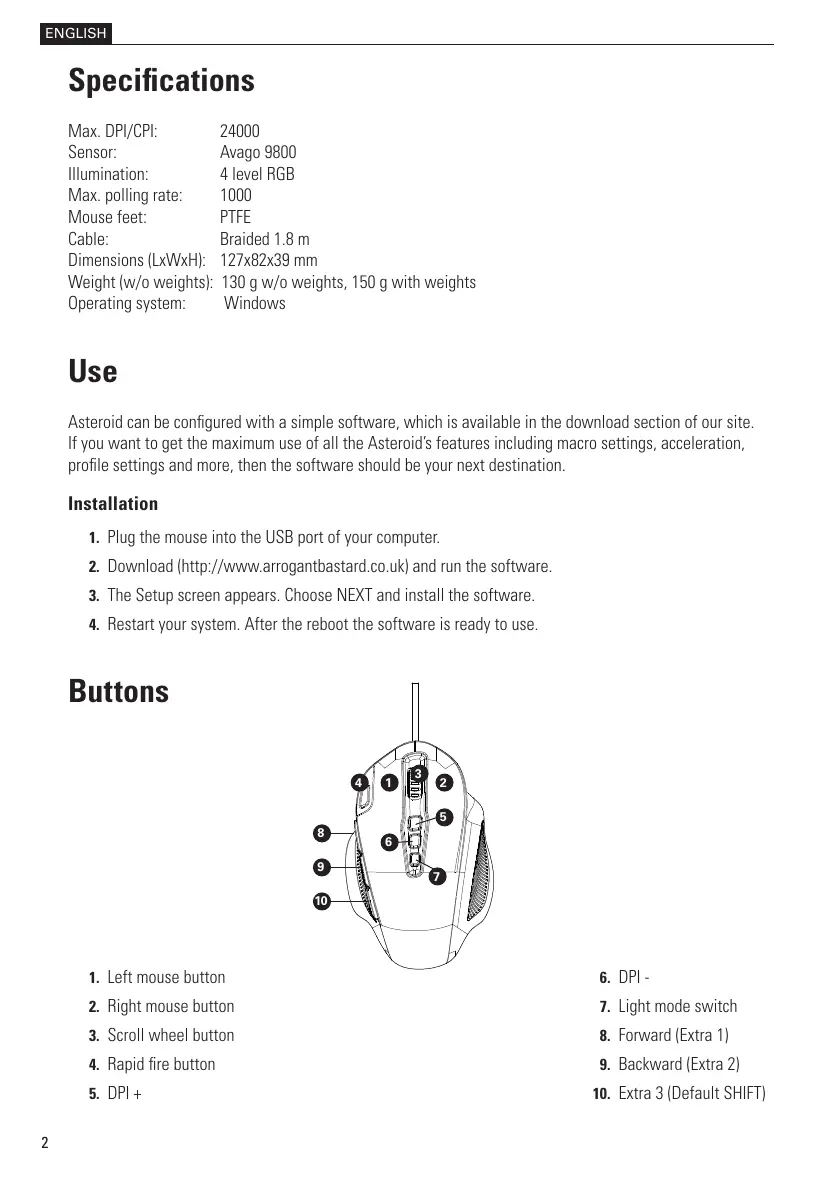
Buttons
1. Left mouse button
2. Right mouse button
3. Scroll wheel button
4. Rapid re button
5. DPI +
1 2
3
4
5
6
7
8
9
10
6. DPI -
7. Light mode switch
8. Forward (Extra 1)
9. Backward (Extra 2)
10. Extra 3 (Default SHIFT)



 To Next Page
 Loading...