3
ENGLISH
DPI settings
You have 5 different DPI options. You can activate dpi settings according to each prole (50-24000 dpi).
Quickly switch between DPI settings by clicking on the corresponding buttons, the scroll wheel led will
change color accordingly.
Light settings
The logo led can be managed by the software.The light can be turned on or off or pulsate or blink in
different colours and speeds.
Macro settings
In the software you can record macros for different key combinations. Click on the key you want to
customize and press on the macro button to access the macro manager. This allows you to setup common
commands and short cuts that enhance your actions and ensures that you don’t accidentally hit the wrong
key and miss out on important in-game sequences.
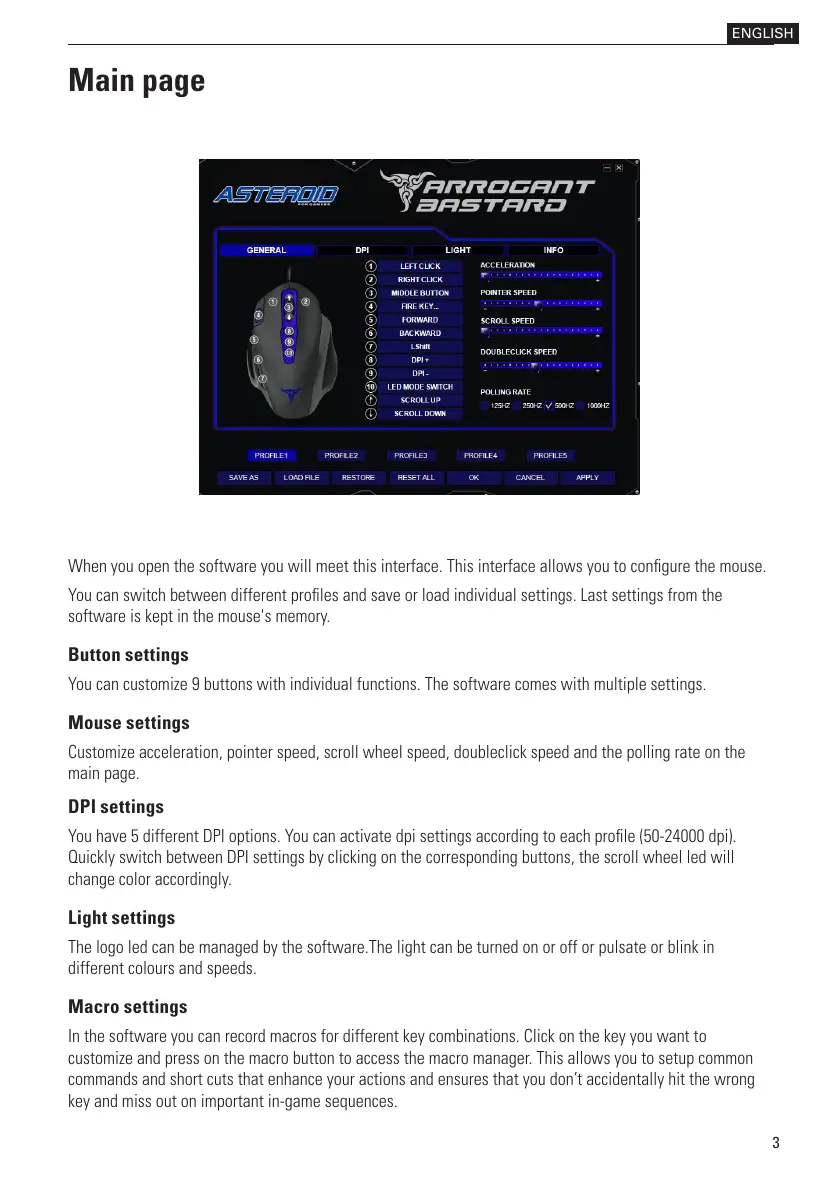
When you open the software you will meet this interface. This interface allows you to congure the mouse.
You can switch between different proles and save or load individual settings. Last settings from the
software is kept in the mouse's memory.
Button settings
You can customize 9 buttons with individual functions. The software comes with multiple settings.
Mouse settings
Customize acceleration, pointer speed, scroll wheel speed, doubleclick speed and the polling rate on the
main page.
Main page



 To Next Page
 Loading...