
EasyManua.ls Logo

Arthrex AR-8305 - User Manual

Arthrex AR-8305
56 pages
Print Icon
To Next Page IconTo Next Page
Loading...
Synergy Resection
User’s Guide
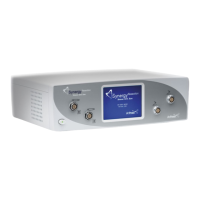
The Arthrex Synergy Resection User’s Guide provides safety
operation information for all components of the Arthrex Synergy
Resection console (Model AR-8305), including the accessories. All
operating personnel must read this User’s Guide thoroughly prior
to using this system and follow all safety warnings, cautions, and
notes.
0086
Arthrex, Inc.
Naples, FL 34108-1945 USA
Toll Free: 1-(800) 934-4404
www.arthrex.com
Arthrex GmbH
Erwin-Hielscher-Strasse 9
81249 München, Germany
Tel: +49 89 909005-0
www.arthrex.de
DFU-0213-7 Revision 0 08/2019
© 2019 Arthrex, Inc. All rights reserved.
AR-8305

Table of Contents

Questions and Answers

  • C
    Carrie MaddoxAug 2, 2025
    How to troubleshoot power issues with my Arthrex Music Mixer?
    • S
      Sabrina BuchananAug 3, 2025
      If your Arthrex Music Mixer isn't powering on, start by checking the main power plug and wall receptacle to ensure it's receiving power. Also, inspect the fuses, as blown fuses can prevent the unit from powering on. If these steps don't resolve the issue, the console may have an internal power failure, requiring repairs.
  • S
    stephen12Aug 7, 2025
    What to do if the handpiece of my Arthrex AR-8305 Music Mixer does not work?
    • J
      Jessica PadillaAug 7, 2025
      If the handpiece of your Arthrex Music Mixer isn't working, first ensure it's connected to the correct channel receptacle and that the connectors are properly plugged in. Check for any liquid in the receptacle or connector and dry thoroughly if needed. If the issue persists, try operating the device using the console unit to rule out a defective footswitch. Allow 30 seconds for the console to reset the affected channel in case of a handpiece over-current detection. If none of these steps work, the cable might be damaged and needs replacement, or the handpiece itself might be defective and require repairs.
  • C
    Collin LopezAug 13, 2025
    Why does my Arthrex AR-8305 Music Mixer work with the control unit but not the footswitch?
    • E
      Elizabeth JohnsonAug 13, 2025
      If your Arthrex Music Mixer runs with the control unit but not the footswitch, check the connector from the footswitch to the control unit to ensure it is fully and properly connected. Also, inspect the connector for any liquid and dry it thoroughly. If the problem persists, the footswitch may be defective and require repairs.
  • M
    Mark HammondAug 17, 2025
    How to restore suction in my Arthrex AR-8305 Music Mixer?
    • J
      John LawsonAug 17, 2025
      If you're experiencing no suction with your Arthrex Music Mixer, start by rinsing the suction connection with a syringe to clear any clogs. Also, clean the shaver blade or burr with a brush. Ensure that the Suction Control is open. If these steps don't resolve the issue, the Suction Control may be damaged and require repairs.
  • C
    Chelsey TateAug 22, 2025
    What to do if the connected handpiece is not showing on the Arthrex AR-8305 Music Mixer display?
    • S
      Sierra PrestonAug 22, 2025
      If the connected handpiece is not shown on the display of your Arthrex Music Mixer, verify that both connectors are properly plugged in. Try checking the connector with another handpiece to identify if the issue is with the handpiece or the connector. If the connector is damaged, replace it. If the issue persists, the handpiece may be defective and require repairs.
  • N
    Nicole JacksonAug 28, 2025
    Why is the motor running on my Arthrex Music Mixer but the shaver blades/burrs are not working?
    • R
      Ryan WilliamsonAug 28, 2025
      If the motor of your Arthrex Music Mixer runs but the shaver blades/burrs do not work, ensure the shaver blade/burr is correctly inserted and that the locking mechanism is fully closed. If the issue continues, the shaver blade/burr may be damaged and needs to be replaced.

Summary

General Warnings and Safety Notices

Important Symbols and Conventions

Explains critical, important, and useful information symbols and conventions.

Symbol Definitions

Provides a guide to various symbols used in the user manual and on the device.

Shipping, Unpacking, and Warranty Information

Details procedures for receiving, inspecting, and understanding the warranty terms.

Product Description

Product Description and Intended Use

Describes the AR-8305 Synergy Resection Shaver System and its intended medical applications.

Product Features

Details the various features and components of the AR-8305 console.

Applied Parts and Accessory Features

Lists and describes the applied parts and optional accessory features for the system.

Technical Specifications

Console

Provides detailed technical specifications for the AR-8305 console.

Standard Footswitch

Lists technical specifications for the standard footswitch accessory.

Ambient Conditions for Operation

Specifies the required ambient conditions for operating the AR-8305 console.

Ambient Conditions for Storage

Specifies the required ambient conditions for storing the AR-8305 console.

Safety, EMC, and Regulatory Requirements

Outlines safety, electromagnetic compatibility, and regulatory compliance standards for the device.

Setup

How to Set Up the Console

Provides guidance on the initial setup procedure for the AR-8305 console.

AC Power Safety Considerations

Details safety precautions related to AC power connection and usage.

Replacing the Fuses

Instructions on how to safely replace the fuses in the AR-8305 console.

Electromagnetic Compatibility

Discusses the device's EMC performance and potential for interference.

Basic Setup Procedure for the AR-8305 Console

Outlines the fundamental steps for setting up and connecting the AR-8305 console.

Setting up a Footswitch

Guides on how to connect and set up the footswitch for the console.

Setting up the Shaver Handpieces

Instructions for connecting and setting up shaver handpieces with the console.

Setting up Other Accessory Handpieces

Details on connecting and setting up other types of accessory handpieces.

Shutdown Procedure

Describes the safe procedure for shutting down the AR-8305 console.

Operation and Frequently Used Functions

Main Screen

Explains the layout and elements of the AR-8305 console's main operating screen.

Settings Menu Main Screen

Details the main screen of the settings menu and its available options.

Language Selection Screen

Describes how to select the operating language for the console interface.

Oscillation Mode Selection Screen

Explains how to select oscillation modes for each handpiece channel.

Footswitch Override Screen

Covers settings for controlling handpiece operation via footswitch or hand controls.

Reset Defaults Screen

Details the screen used to confirm resetting the console to factory default settings.

Information Screen

Displays model, software versions, and build information for the console.

Buttons

Describes the function of various buttons on the main screen and their operation.

Speed Test Mode

Explains how to enter and use the speed test mode for the console.

Speed Adjustment

Details how to adjust motor speed using the console's speed control buttons.

Oscillation Mode Adjustment

Describes how to adjust the oscillation mode for handpieces.

Accessory Handpiece Speed Limits and Deltas

Defines speed limits, defaults, and increments for supported accessory handpieces.

Attachment Motor Control

Explains the control of motor direction and modes for handpiece attachments.

Cruise Control

Details how to use the cruise control function with the gas pedal footswitch.

Toggle Function

Explains the toggle function for switching control between handpiece channels.

Footswitches

Covers the different types of footswitches and their operation.

Accessory Handpieces

Provides information on connecting and handling accessory handpieces.

Cleaning and Disinfecting

Console AR-8305

Instructions for cleaning and disinfecting the AR-8305 console.

Footswitches

Procedures for cleaning and disinfecting the console's footswitches.

Accessory Cable

Details on cleaning and disinfecting the accessory cables.

Accessory Handpieces

Instructions for cleaning and disinfecting various accessory handpieces.

Sterilization

Transmissible Spongiform Encephalopathy (TSE) Agents

Maintenance

Life Expectancy

Provides information on the expected lifespan of the AR-8305 console.

Periodic Maintenance

Outlines recommended periodic inspections and maintenance for the system.

Technical Support

How to Display the Software Version

Instructions on how to view the current software version of the AR-8305 console.

Additional Technical Information

Guidance on obtaining further technical information and support from Arthrex.

Troubleshooting

Troubleshooting Interference with Other Devices

Provides steps to resolve interference issues with other electronic devices.

Repair Policy

End of Life, Environmental Directives

Electromagnetic Emissions

Arthrex AR-8305 Specifications

General IconGeneral
BrandArthrex
ModelAR-8305
CategoryMusic Mixer
LanguageEnglish