The ArtisJet 3000U Pro is a B3 LED UV printer designed for small working environments, such as digital printing stores, making it a versatile desktop printer for on-demand workflows. This manual outlines the installation, operation, and maintenance procedures for the device.
Function Description:
The ArtisJet 3000U Pro is an innovative UV printer capable of printing on various materials. It features a control panel with different functions, a flatbed working table with height adjustment, ink cartridges, a power button, and a UV cooling system. The printer is designed for ease of use, with features like automatic height adjustment and a dedicated print software for managing print tasks and settings.
Important Technical Specifications:
- Printer Model: ArtisJet 3000U Pro B3 LED UV Printer
- Dimensions (depth x width x height): 84 cm (33.07") x 94 cm (37") x 54 cm (21.25")
- Working Table Dimensions: 59.5 cm (23.43") x 37 cm (14.57")
- Net Weight: 120kg
- Connectivity: USB connection port, electrical power connection port.
- Software: ArtisRIP V9.0 Software & Workstation, ArtisJet RIP V9.0 Installation.
- Ink System: Features multiple ink cartridges (likely CMYK plus white and varnish, given the UV printing capability).
- Print Head: Equipped with a print head for precise ink deposition.
- UV Lamp: Adjustable UV lamp power for normal UV and varnish UV levels.
- Motor Speed: Adjustable X-motor speed for carriage movement during printing, with a default value of 8.
- Print Power: Adjustable print power of the printhead.
- X Print Zone: Adjustable value for improved bidirectional printing results.
Usage Features:
- Control Panel: The printer is operated via a control panel with various buttons and a display screen.
- SPI: Pumps ink strongly.
- Clean: Initiates manual head cleaning.
- Auto Position: Automatically adjusts height and returns to print position.
- Cancel: Cancels the current printing task.
- Pause: Pauses the current printing task.
- Move Up/Down/Out/Back: Controls the movement of the working table.
- Move back the working table without auto height sensor: Allows manual table movement.
- Mini move down: Provides fine adjustment for downward movement.
- Menu: Accesses the printer's main settings menu.
- Back: Returns to the previous setting menu.
- Enter: Confirms a setting option.
- Moving to up/down setting option: Navigates through menu options.
- Software Integration: The printer uses dedicated software (ArtisRIP V9.0) for design and print management. This software allows users to import print files, manage print queues, and adjust various print settings.
- Automatic Height Adjustment: The printer features an "Auto Position" function that automatically detects the height of the product on the working table and adjusts the print head accordingly, ensuring optimal print quality for different product thicknesses.
- Custom Menus & Templates: ArtisJet provides custom menus and templates for various products, simplifying the printing process for different applications.
- Loading Templates: Users can load "XY Starting Point" templates to define the print area on the table and "Color Test Image" templates to verify color accuracy and print quality.
- Print Monitoring: The print software displays printing progress, job titles, sizes, and copies, allowing users to monitor ongoing tasks.
Maintenance Features:
- Ink System Initialization: The manual details the process of installing ink cartridges and initializing the ink system, including "Pumping Ink" and "New Machine Install" procedures.
- Nozzle Check: A critical maintenance step to ensure print quality. The printer software includes a "Nozzle Check" function to identify and address clogged nozzles.
- Print Head Cleaning: The "Clean" button on the control panel initiates manual print head cleaning.
- Holiday Mode: When the printer is turned on and in holiday mode, it automatically performs a cleaning cycle to maintain the print head.
- Waste Ink Bottle: The printer includes a waste ink bottle on the left side to collect excess ink, which needs to be monitored and emptied as part of routine maintenance.
- Carriage Unlock: The carriage is secured with tapes during shipment, which must be removed before operation.
- E-fixture Matt: An E-fixture matt is used on the working table to secure materials for printing and should be removed and placed correctly.
- Print Quality Check: After a nozzle check, users are instructed to evaluate the print quality. If lines are not full (indicating poor quality), the "CLEAN" button should be pressed until the nozzle check is full in all colors.

 Need help?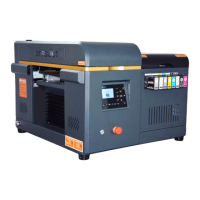

 To Next Page
 General