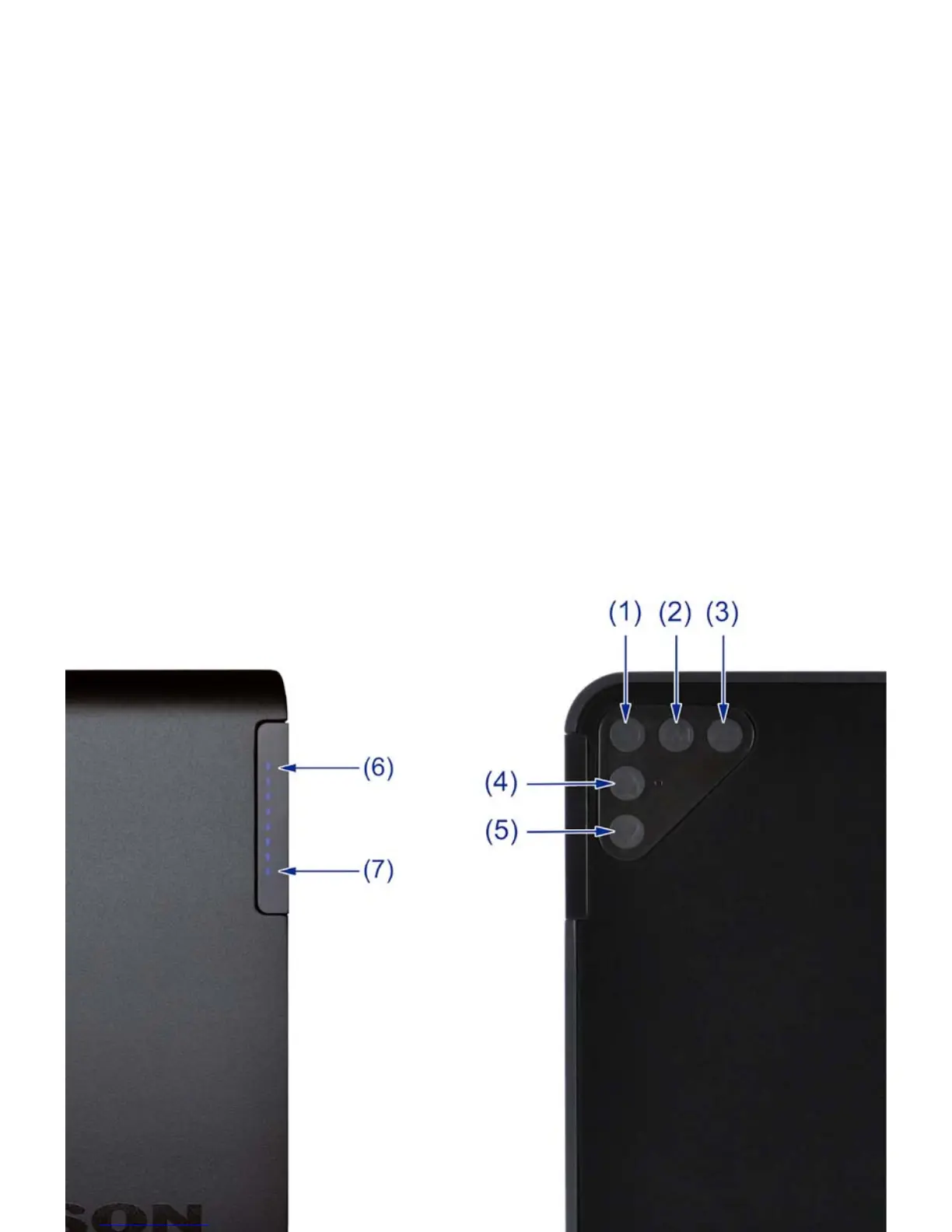
BUTTON BOARD & LED ARRAY
On the upper right side of the subwoofer there are 5 buttons to control the important functions
of the subwoofer. The functions are related to the adjacent LED array, they are detailed as
follows:
1. On / Standby – Toggle between STANDBY and ON. The adjacent LED array will
indicate the status:
i. STANDBY – Single Red LED, see item 6.
ii. ON - Blue or Fuchsia LEDs, indicating current volume level.
2. Music / Movie EQ – Toggle between Movie and Music EQ settings. The adjacent LED
array will indicate the status:
i. Music EQ – Blue LED. Extended low frequency at 0 dB playback level
ii. Movie EQ – Fuchsia LED. Increases system gain +6 dB, enhances up
per bass range
3. Input Source Toggle – Toggle between the 3 input sources with feedback on LED array
(see item 7):
i. Input 1 – LFE / Line Level – One ash of bottom LED
ii. Input 2 – Wireless – Two ashes of bottom LED
iii. Input 3 – High Level – Three ashes of bottom LED
4. Volume UP – Tap for single steps in volume adjustment, press and hold for
Multiple steps.
5. Volume DOWN – Tap for single steps in volume adjustment, press and hold for
multiple steps.
3


 To Next Page