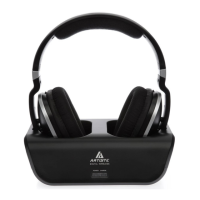
The ARTISTE ADH300 is a wireless headphone system designed for an immersive audio experience, particularly with televisions. It comprises a transmitter and a headphone receiver, offering a convenient and cable-free way to enjoy audio.
Function Description
The core function of the ARTISTE ADH300 is to transmit audio wirelessly from various sources to the headphone receiver. The transmitter acts as the central hub, connecting to your audio source (such as a TV, phone, or other devices) and broadcasting the audio signal. The headphone receiver then picks up this signal, allowing you to listen to the audio privately. This system is ideal for situations where you want to watch TV or listen to music without disturbing others, or when you need enhanced audio clarity.
The system supports multiple audio input options, including AUX/3.5mm, RCA (Red/White) AUDIO OUT, and Optical Output (with an optional adapter). This versatility ensures compatibility with a wide range of audio devices. The transmitter also features charging pins for the headphones, an audio signal charging indicator, and a DC IN socket for power.
The headphone receiver is equipped with controls for volume adjustment, an ON/OFF switch, and LED indicators for power and signal link. It also has charging contacts that align with the transmitter's pins for convenient recharging. The headphones are designed to be comfortable for extended use, with an adjustable band and soft earmuffs.
Usage Features
Setting up and using the ARTISTE ADH300 is designed to be straightforward. Before initial use, it is crucial to fully charge the headphones for approximately 7 hours. The headphones come with rechargeable AAA batteries already installed. To charge, the headset must be turned off, and the headphone band retracted to ensure proper contact with the charging pins on the cradle. A green LED on the charging cradle indicates correct charging, and it will turn off once fully charged.
The system offers different hookup options depending on your audio source.
- Hookup A (3.5mm/AUX audio out): This is suitable for devices with a 3.5mm audio output. You connect the transmitter to your TV or audio device using the RCA-3.5mm cable, then connect the AC/DC adapter to power the transmitter. After turning on the TV and playing sound, you turn on the headset. A green light on the left earmuff indicates a successful connection, and you should hear sound.
- Hookup B (RCA audio out): For devices with RCA (Red/White) audio outputs, you use the RCA-Female 3.5mm cable and RCA-3.5mm cable to connect the transmitter to your audio source. The power connection and subsequent steps are similar to Hookup A.
- Hookup C (Optical audio out): This option requires additional accessories (optical cable, optical adapter, and AC/DC charger for the adapter) which are not included in the standard package. This hookup is for TVs with an optical digital audio output. It's important to remove the plastic caps from the optical cable and ensure it's correctly and completely plugged into your TV and the optical adapter. For optical connections, the TV's audio output setting must be set to "PCM" (Pulse-Code Modulation) for the system to function correctly.
A "Phone Test" is recommended before connecting to a TV to ensure the headphones are working. This involves connecting the transmitter to a phone via a 3.5mm cable, powering the transmitter, playing music on the phone, and then turning on the headphones. A green LED on the left earmuff confirms a successful connection.
The headphones feature an "Auto Off" function: if there is no audio input or the signal is too weak for 3 minutes, the headset will automatically turn off to conserve battery. To resume listening, you need to restart the headset and play sound again.
The ARTISTE ADH300 also supports pairing two headsets with a single transmitter. This involves connecting the transmitter to the TV, disconnecting transmitter power, holding the power button on the new headset until the green light flashes, then turning on the original headphone. Reconnecting power to the transmitter initiates a search for surrounding headphones. Once paired, both headsets will show a green light, and the base will show a bright red light, indicating successful connection.
Maintenance Features
The ARTISTE ADH300 is designed with user convenience in mind for maintenance. The headphones use rechargeable NiMH AAA batteries, which are pre-installed. When replacement is needed, these batteries are located in the right earmuff. The design allows for easy access by gently pressing down a latch, without requiring excessive force. It is crucial to ensure that replacement batteries are inserted with the correct polarity. The manual explicitly warns against attempting to charge other types of batteries (non-rechargeable) with the system.
Troubleshooting guidance is provided to address common issues. If the system doesn't work with an optical connection, users are advised to first test with a phone using an aux cable to confirm headphone functionality. It's also important to ensure the optical adapter is charged and its power light is on. Correct and complete plugging of cables is emphasized, especially for optical connections, as improper insertion can lead to static or no sound. The optical cable should not be tied up or folded at sharp angles (90 degrees) due to its glass and plastic construction.
For TV settings, detailed flowcharts are provided for SONY, SAMSUNG, and LG TVs, guiding users on how to adjust audio output settings, particularly to "PCM" for optical connections. This helps resolve issues where no sound is heard or only static is present.
Other troubleshooting tips include:
- Sound dropouts or interference: Keeping the transmitter closer to the headphones, removing obstacles, and keeping the transmitter away from other wireless devices (like Wi-Fi routers) can mitigate these issues.
- No sound/low volume: Checking the headset volume, increasing the analog audio source volume, and ensuring the audio source is switched on are common solutions. For some TVs, the 3.5mm AUX port might not provide enough volume, suggesting a switch to RCA or optical connections.
- Headset turning off automatically: This is often due to the auto-off feature if no audio signal is detected or the signal is too weak. Playing TV sound again and restarting the headset, or performing a phone test, can help.
- Sound only on one ear: This typically indicates an issue with cable insertion or incorrect port usage (e.g., plugging RCA into an AV port instead of an audio out port).
- Pairing issues: Instructions are provided to re-pair the headset with the transmitter, involving specific button presses and observation of LED indicators.
- Netflix/Hulu audio issues: Users are advised to set the TV's audio output format to "PCM" and ensure Netflix is opened first. For Roku users, switching between cable and Netflix via the Roku remote is suggested.
- Battery or network-related issues: Testing with disposable batteries, playing downloaded music from a mobile phone to rule out network buffer issues, and turning off other 2.4G equipment for a close-up test are recommended.
The LED indicators on both the transmitter and headphones serve as crucial diagnostic tools, providing visual cues about the device's status, such as power on, pairing success, charging status, and shut down. Users are encouraged to refer to the LED indicator table in the manual for troubleshooting.
Overall, the ARTISTE ADH300 is designed to be a user-friendly wireless audio solution, with comprehensive instructions and troubleshooting tips to ensure a smooth and enjoyable listening experience.


 To Next Page
 General