Need help?
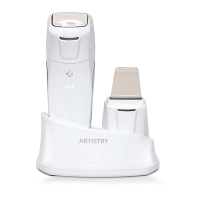
Do you have a question about the Artistry Intensive Hot & Cool Device and is the answer not in the manual?
Reduces pore size for smoother skin appearance.
Enhances skin absorption of skincare products.
Boosts skin firmness and resilience.
Refines and smooths skin surface.
Helps regulate oil production for balanced skin.
Utilizes heat, red LED, and micro-vibration for absorption enhancement.
Employs cooling, blue LED for pore tightening and elasticity.
Connect adapter to charge, separate body, and press button after charging.
Details sequential steps for operating Hot and Cool modes and standby.
Explains single/double press for mode selection and long press to turn off.
Addresses issues like machine not working, not charging, or flickering LED.
Instructions on connecting the charger and indicator lights during charging.
Covers general, safety, and specific warnings for device usage.
 General
| Brand | Artistry |
|---|---|
| Model | Intensive Hot & Cool Device |
| Category | Personal Care Products |
| Language | English |

 To Next Page