ARTURIA – PROPHET V - MANUAL
22
In order to understand the principal programming of the Prophet V, we will start with a
very simple sound. Select the preset “1_Osc” in the sub bank “Template/ Temp_Synth”.
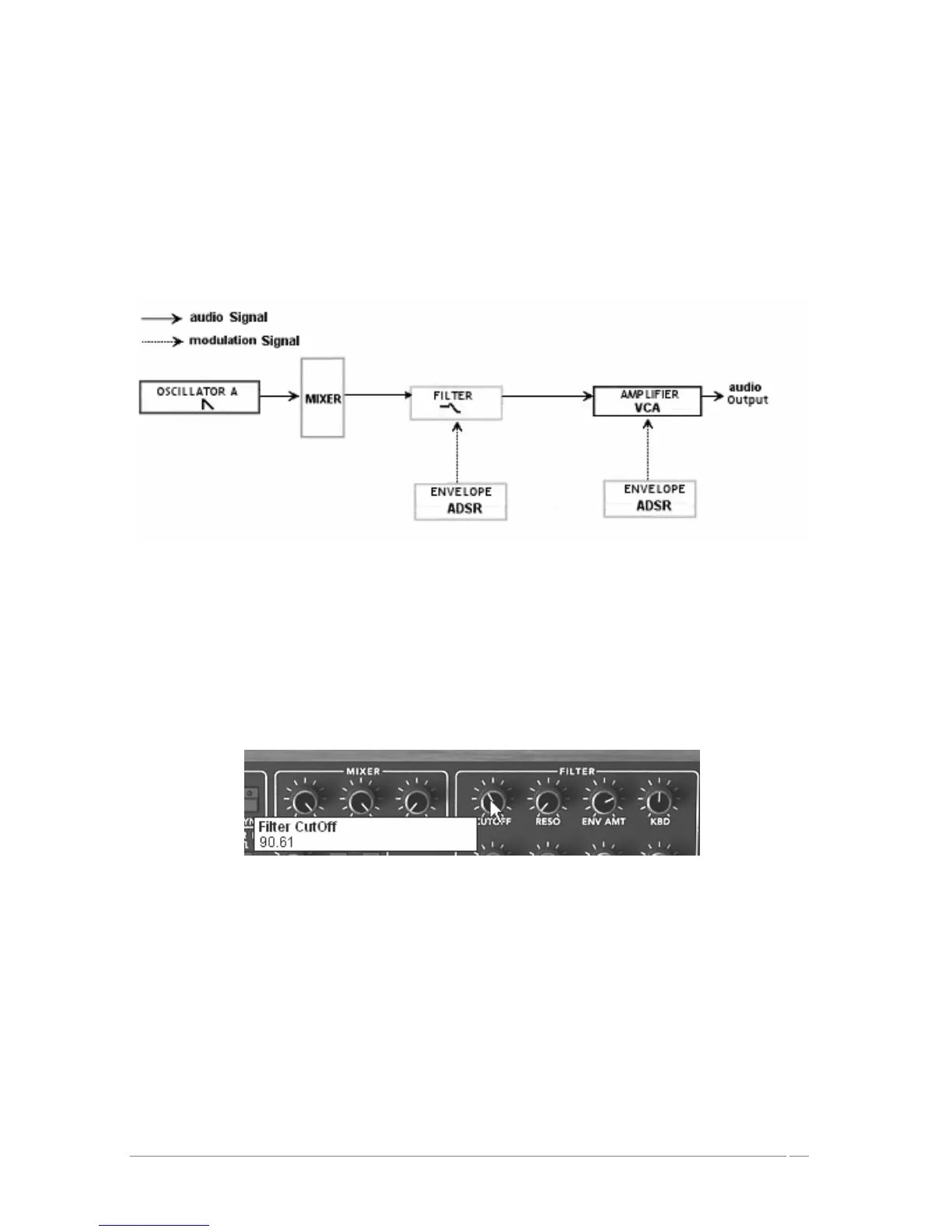
The synthesis structure of the sound is relatively simple: the square wave form of the
oscillator 1 is active and the signal is directed through the low pass filter while passing by
an intermediate mixer, then in the output of the amplifier. An ADSR envelope modulates
the cut-off frequency of the filter and a second ADSR envelope modulates the volume of
the amplifier.
Finally, the following synopsis resumes our example sound creation:
The sound path of a preset « 1_Osc »
Begin by lowering the cut frequency of the low pass filter. This will slowly lower the sound.
For this, set the “Cutoff” knob. (For an exact setting, right-click with the mouse in PC or
shift+click in Mac)
Note that the cut-off frequency is modulated by an ADSR envelope (attack, decay, sustain,
and release).
Lower the filter cut-off frequency
To better hear the effect that the ADSR envelope has on the cut frequency of the filter,
increase the resonance value. This will amplify the cut-off point of the filtering effect
and the sound will begin to whistle, also known as self-oscillation, and is an important
feature in analog filter emulation.














 To Next Page