Users can group multiple rooms and zones on the
application.
For example, you can group devices 1, 2 and 3 to play
the same music in sync, or group devices
1 and 2 as zone A and devices 3 and 4 as zone B,
and play dierent music in zones A and B.
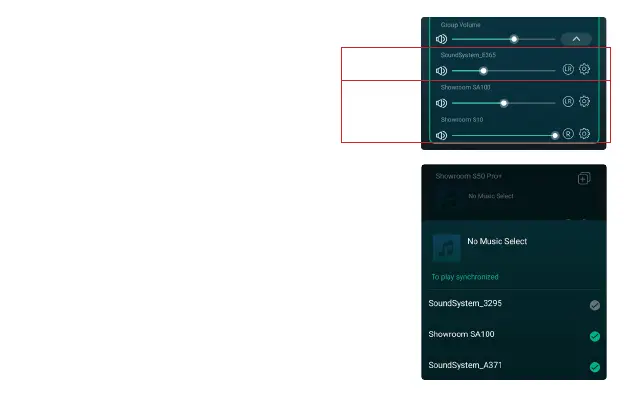
In order to add device to multiroom function, click on the “+” mark of the
device you want to be the master device.
A list of available devices will pop out and you can select the device you
want to add as slave device.
Click the Done button when nished.
The gray tick icon represents the master device and green tick icon
represent the slave device.
To remove device from multiroom function, click on the “+” mark again
to bring up the device list, and unselect any slave device you want to
remove. Then click on the Done button to conrm.
If all the slave device is removed, multiroom function will disable.
8.5 Multiroom and Multizone
8.5.1 Add / Remove Device to Multiroom
1
Master
Slave
2


 To Next Page