The ASA Marconi 50 PS is a radio tubular motor designed for rolling shutters. It features a plug-and-play setup with a manual adjustment option for the end limits. This motor is specifically designed for rolling shutters equipped with rigid links and stoppers, although these are not necessary when the motor is in manual setting mode.
Function Description:
The Marconi 50 PS motor allows for both automatic and manual programming of its limit switches, providing flexibility in installation and operation. It supports the addition and deletion of remote controls, enabling convenient control of the rolling shutters. The device also includes a reset function to clear existing programming and restart the setup process.
Important Technical Specifications:
- Motor Type: Radio Tubular Motor
- Control: Radio RTW (Radio Tailormade in Italy)
- Compatibility: Designed for rolling shutters with rigid links and stoppers.
- Programming Modes: Automatic and Manual Limit Switch Programming.
- Feedback Mechanism: Visual feedback (indicated by flashing lights on the remote control illustrations) confirms successful steps during programming.
Usage Features:
Limit Switch Automatic Programming:
This mode is suitable for rolling shutters equipped with rigid links and stoppers.
- Initiation: Simultaneously push the UP and DOWN buttons on the remote control and wait for feedback.
- Direction Check: Verify the rotating direction of the shutter.
- Correct Direction: If the rotation direction is correct, push the UP and DOWN buttons simultaneously again and wait for feedback. This completes the programming.
- Incorrect Direction: If the rotation direction is wrong, reverse it by holding down the STOP button for 2 seconds until feedback is received.
- Re-check and Confirm: Check the rotation direction again. Confirm the correct direction by pushing the UP and DOWN buttons simultaneously until feedback is received. This completes the programming.
Important Warning for Automatic Programming: If the rotation direction is not confirmed, subsequent programming steps cannot be carried out.
Limit Switch Manual Programming:
This mode allows for precise manual adjustment of the limit switches, starting from the up limit switch.
- Initiation: Press the UP and DOWN buttons simultaneously and wait for feedback.
- Direction Check: Verify the rotating direction.
- Correct Direction: If the rotation direction is correct, push the UP and DOWN buttons simultaneously and wait for feedback.
- Incorrect Direction: If the rotation direction is wrong, reverse it by holding down the STOP button for 2 seconds until feedback is received.
- Re-check and Confirm: Check the rotation direction again. Confirm the correct direction by pushing the UP and DOWN buttons simultaneously until feedback is received.
Important Warning for Manual Programming: If the rotation direction is not confirmed, subsequent programming steps cannot be carried out.
- Enter Manual Adjustment Mode: Keep pressing the UP and DOWN buttons simultaneously until feedback is received.
- Reach Up Limit: Manually move the shutter to the desired up limit switch position.
- Record Up Limit: Record the up limit switch position by keeping the UP button pressed until feedback is received.
- Reach Down Limit: Manually move the shutter to the desired down limit switch position.
- Record Down Limit: Record the down limit switch position by keeping the DOWN button pressed until feedback is received.
Programming End Options:
- End Programming (Standard): Keep pressing the UP and DOWN buttons simultaneously until two feedbacks are received.
- Limit Switch Intermediate: To set an intermediate stop position, press the UP button until the desired position is reached. Confirm by pressing the STOP button until two feedbacks are received.
- Slats Opening: To set the slats' opening limit switch position, press the DOWN button until the desired position is reached. Confirm by pressing the STOP button until two feedbacks are received.
Remote Control Management:
- Adding a Remote Control:
- From an already programmed remote control (A): Press for 2 seconds to initiate the pairing mode.
- To the new remote control (B): Press for 0.5 seconds to pair it.
- Deleting a Remote Control:
- From an already programmed remote control (A) (the one to be kept): Press for 2 seconds.
- From the remote control to be erased (B): Press for 0.5 seconds.
Maintenance Features:
Reset Procedure:
The reset function is crucial for clearing all existing programming, allowing for a fresh setup or troubleshooting.
- Power Cycle: Switch off the power supply to the motor, wait for 5 seconds, and then restore it.
- Motor Feedback Check:
- Motor Feedback (Not Programmed): If the motor provides feedback (e.g., a short movement), it indicates that the motor is not programmed. Proceed with the programming procedure.
- No Motor Feedback (Already Programmed): If there is no motor feedback, it indicates that the motor is already programmed.
- Cancel Programming (if already programmed):
- Switch off the power supply for 5 seconds.
- Switch on the power supply.
- Push all three buttons (UP, DOWN, STOP) simultaneously on the remote control and wait for feedback.
- Hold down the STOP button for 7 seconds until two feedbacks are achieved. This will clear the programming.
- Proceed with Programming: After a successful reset, the motor will be unprogrammed, and you can carry out the desired programming procedure (automatic or manual).
Modifying the Limit Switches:
To adjust existing limit switch settings, follow these steps:
- Carry out the full reset procedure as described above.
- Repeat the desired programming (automatic or manual) to set the new limit switches.
The ASA Marconi 50 PS is designed for ease of use and reliable operation, offering comprehensive programming and reset capabilities to manage rolling shutters effectively.

 Need help?
 General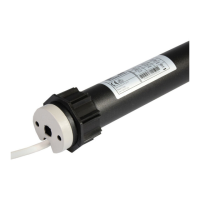

 To Next Page