EasyManua.ls Logo

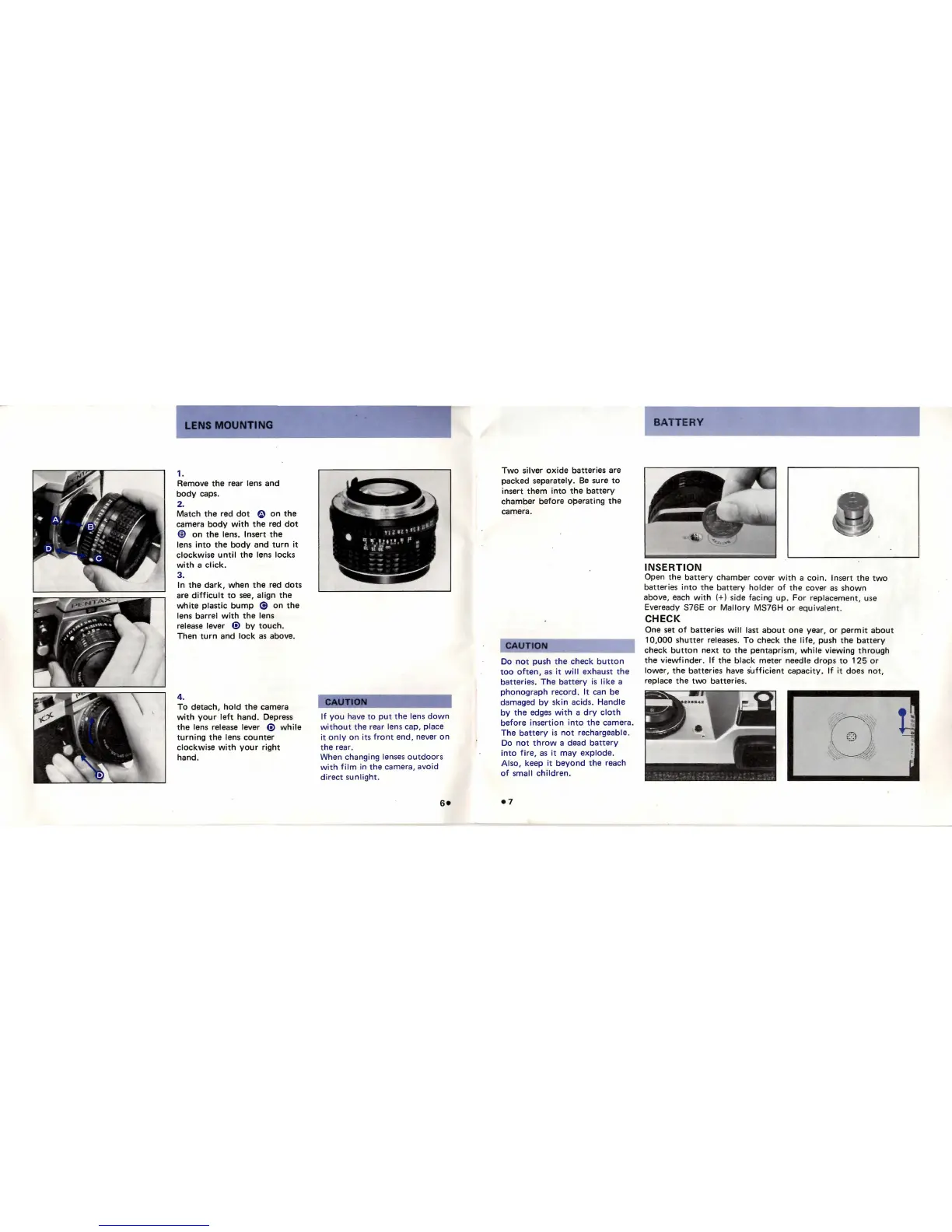
ASAHI Pentax KX - Lens Mounting; Attaching a Lens; Detaching a Lens; Battery Installation and Check

ASAHI Pentax KX
20 pages
Print Icon
To Next Page IconTo Next Page
To Previous Page IconTo Previous Page
Loading...
MOUNTING
1.
Remove
the
rear lens and
body
caps.
2.
Match
the
red
dot
e
on
the
camera
body
with
the
red
dot
€I
on
the
lens. Insert
the
lens
into
the
body
and
turn
it
clockwise
until
the
lens locks
with
a
click.
3.
In
the
dark,
when
the
red
dots
are
diff
i
cult
to
see,
align
the
white
plastic
bump
@
on
the
lens barrel
with
the
lens
release lever
G>
by
touch.
Then
turn
and
lock
as
above.
4.
To
detach,
hold
the
camera
with
your
left
hand. Depress
the
lens release lever
G>
while
turning
the
lens
counter
clockwise
with
your
right
hand.
If
you
have
to
put
the
l
ens
dow
n
with
o
ut
the
rear lens cap, place
it
only
on
its
front
end, never
on
the
rear.
When changing lenses ou
tdoors
wit h
fi
lm
in
the
camera, avoid
direct
sunlight
.
Two
silver
oxide
batteries are
packed separately.
Be
su
re
to
insert t hem i
nto
the
batte
ry
chamber
before
o~erating
the
camera.
CAUTION
Do
not
push
the
check
button
too
often,
as
it
wi
11
exhaust
the
batteries. The
battery
is
like
a
phonograph
record.
It
can be
damaged
by
skin acids. Handle
by
the
edges
with
a
dry
cloth
before
insertion
into
the
camera.
The
battery
is
not
rechargeable.
Do
not
throw
a dead
battery
into
fire
,
as
it
may
explode
.
Also, keep
it
beyond
the
reach
of
small
children
.
e7
BATTERY
INSERTION
Open
the
battery
chamber cover
wi
th
a
coin
. Ins
ert
the
two
batterie
s
into
the
b
att
ery
holder
of
the
cover as shown
above, each
with
(+ ) side facing
up
.
For
replacemen
t,
use
Eveready S76E
or
Mallo
ry MS76H
or
equivalent
.
CHECK
One set
of
batter
i
es
will
las
t about
one
year,
or
permi
t
about
10,000
shutter
releases.
To
check
the
life,
push
the
battery
check
button
next
to
t he
pentapr
ism,
while
viewing
through
the
viewfinder.
If
the
black
meter
needle
drops
to
125
or
lower,
the
batter
i
es
have s'
ufficient
capacity.
If
it
does
not
,
replace
the
two
batteries.
~
'
( ® ).
;~
.~
/

Related product manuals