EasyManua.ls Logo

ASAHI Pentax KX - Compose and Focus; Cross-microprism System; Split-image System; Shutter Operation

ASAHI Pentax KX
20 pages
Print Icon
To Next Page IconTo Next Page
To Previous Page IconTo Previous Page
Loading...
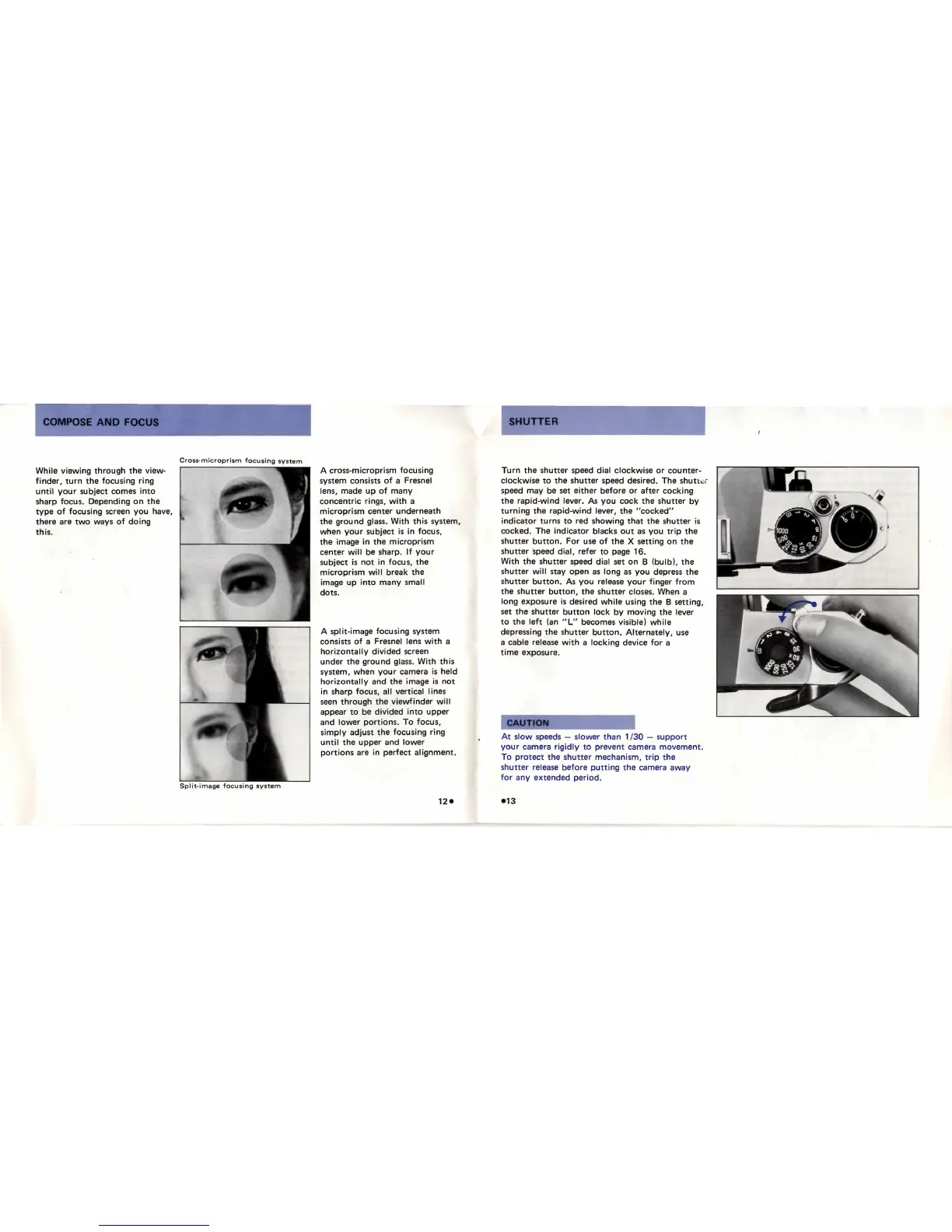
While
viewing
through
the
view-
finder,
turn
the
focusing ring
until
your
subject comes
into
sharp focus. Depending
on
the
type
of
focusing screen
you
have,
there are
two
ways
of
doing
this
:
Cross-microprism
focusing
syst
em
A cross-microprism focusing
system consists
of
a Fresnel
lens,
made
up
of
many
concentric
rings,
with
a
microprism
center
underneath
the
ground
glass.
With
this
system,
when
your
subject
is
in focus,
the
image in
the
microprism
center
will
be sharp.
If
your
subject
is
not
in focus,
the
microprism
will
break
the
image
up
into
many
small
dots.
A
split-image focusing system
consists
of
a Fresnel lens
with
a
horizontally
divided
screen
under
the
ground
glass.
With
this
system, when
your
camera
is
held
horizontally
and
the
image
is
not
in sharp focus, all vertical lines
seen
through
the
viewfinder
will
appear
to
be
divided
into
upper
and
lower
portions.
To
focus,
simply
adjust
the
focusing ring
until
the
upper
and
lower
portions
are in
perfect
al
ignment.
UTTER
Turn
the
shutter
speed dial
clockwise
or
counter-
clockwise
to
the
shutter
speed desired. The
shutl
.!,
speed
may
be set
either
before
or
after
cocking
the
rapid-wind
lever.
As
you
cock
the
shutter
by
turning
the
rapid-wind
lever,
the
"cocked"
indicator
turns
to
red showing
that
the
shutter
is
cocked. The
indicator
blacks
out
as
you
trip
the
shutter
button
.
For
use
of
the
X setting
on
the
shutter
speed
dial,
refer
to
page 16.
With
the
shutter
speed dial set
on
B
(bulb),
the
shutter
will
stay
open
as
long
as
you
depress
the
shutter
button.
As
you
release
your
finger
from
the
shutter
button,
the
shutter
closes. When a
long exposure
is
desired
while
using
the
B setting,
set
the
shutter
button
lock
by
moving
the
lever
to
the
left
(an
"L"
becomes visible)
while
depressing
the
shutter
button.
Alternately
, use
a
cable release
with
a
locking
device
for
a
time
exposure.
At
slow
speeds - sl
ower
than
1 /
30
-
support
your
camera
rigidly
to
prevent camera
movement.
To
protect
the
shutter
mechanism,
trip
the
shutter
release
before
putting
the
camera away
for
any
extended
period
.

Related product manuals