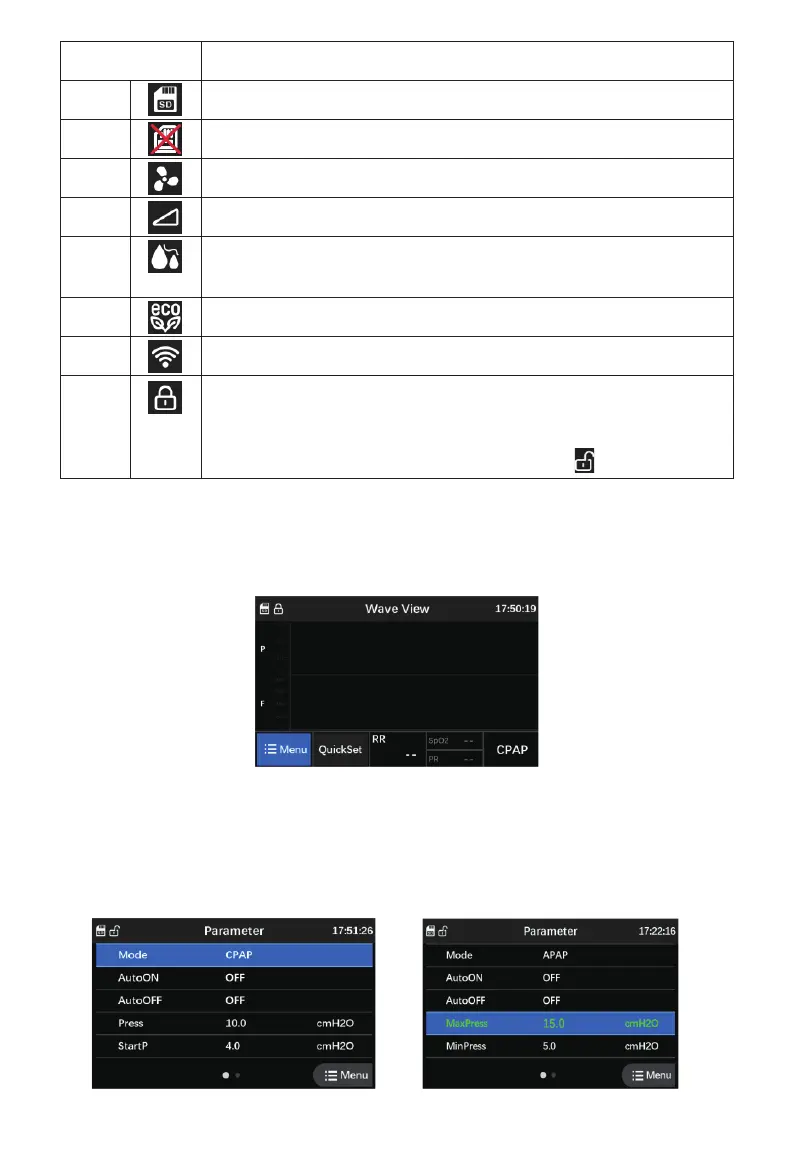
Icon Meaning
1
2
3
4
5
6
7
8
The SD card is inserted.
SD card not connected status display
The device is working.
The Ramp function has been set.
The humidifier function and preheat function are enabled and humidifier
level has been set.
The ECO function has been set.
The WIFI is connected.
Indicates that the parameter setting interface is locked. After turning on
the device, it is locked by default. (Unlock method: in the menu interface,
rotate the Knob to make the cursor focus on the parameter, press the
Knob key for 3 seconds to unlock. After unlocking, will be shown.)
7.3 Wave Interface
Under the menu interface, rotate the “Knob” button, move the cursor to “Wave” and press it, the
Wave interface will be shown as Fig. 7-3. At this interface, select “Quick Set” and press “Knob”
button for 3 seconds to adjust parameters of current working mode.
7.4 Parameter Setting Interface
Under the menu interface, rotate the "Knob" button to move the cursor onto the “Parameter
Setting” icon, and then press the “Knob” button and hold on for 3 seconds to enter the following
interface Fig. 7-4 (Di-Di-Di-Di sound can be heard if interface is unlocked successfully).
Fig. 7-3 Wave Interface
Fig. 7-4 Parameter Setting Interface 1 Fig. 7-5 Selected Status Screen
39


 To Next Page
 Loading...