EasyManua.ls Logo

ASCHER RACING F64-USB - User Manual

ASCHER RACING F64-USB
15 pages
Print Icon
To Next Page IconTo Next Page
Loading...
F64-USB
product manual
V1.0
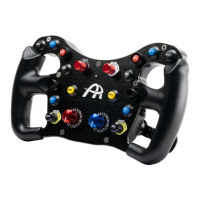
steering wheel for racing simulators
Ascher Racing GmbH
1
Question and Answer IconNeed help?

Do you have a question about the ASCHER RACING F64-USB and is the answer not in the manual?

Summary

General Information

Mounting and Connection

SQR Wheel Side via Standard SC2 Adapters

Details mounting the SQR wheel side using standard SC2 adapters, showing the connection.

SQR Wheel Side via Ascher Racing SQR 70 mm Adapter

Illustrates mounting the SQR wheel side using the Ascher Racing SQR 70mm adapter.

Q1 R 70 mm Wheel Side Mounting

Explains the process of mounting the Q1R 70mm wheel side.

M5 Threaded Quick Release Installation

Details the procedure for mounting M5 threaded Quick Releases, including specific steps.

Operation and Clutch Bite Point

Clutch Bite Point Adjustment

How to adjust clutch bite point directly on the wheel without using the configuration tool.

Configuration Tool Functions

Input Modes and Master Clutch Settings

Configure Analog Input Mode for clutches and set the Master Clutch.

Clutch Bite Point and Calibration

Set slave clutch value and calibrate clutch axes and settings.

Rotary Switch and Encoder Configuration

Configure rotary switch modes, encoder pulse width, and LED intensity.

Input Status and Axis Settings

View input status and configure axis linearity and dead zones.

Bite Point Setting Procedures

Finding Suitable Bite Point Setting

Recommended procedure for finding the correct bite point setting for driving.

Quick Race Starts Procedure

Recommended procedure for performing quick race starts using clutch control.

Label Application Guide

Paddle Shifter Force Adjustment

Paddle Shifter Force Setting

Explains how paddle shifter snap action force is set by magnets and spacers.

Actuation Force Examples

Lists approximate actuation forces based on magnet height and spacer combinations.

Product Dimensions

Overview

This document outlines the features, setup, and maintenance of the Ascher Racing F64-USB steering wheel, designed for racing simulators.

Function Description

The Ascher Racing F64-USB is a steering wheel primarily intended for use with racing simulators. It connects to a computer via a coiled USB cable, functioning as a standard HID-Gamecontroller, meaning it does not require specific driver installations. The wheel provides a comprehensive set of inputs for various in-game controls, including buttons, encoders, and dual clutches. Its design focuses on providing a realistic and configurable interface for sim racing enthusiasts.

Usage Features

The steering wheel offers a wide array of features to enhance the sim racing experience, with extensive customization options accessible through a dedicated configuration tool or directly on the wheel for certain functions.

General Operation: Upon connection, the F64-USB is recognized by Windows as a standard Human Interface Device (HID) Gamecontroller, ensuring broad compatibility with racing simulator software. No additional drivers are needed, simplifying the setup process.

Input Capabilities: The wheel boasts a total of 64 inputs, allowing for a rich and detailed control scheme. These inputs include various buttons and encoders, which can be mapped to different in-game actions.

Clutch System: A key feature of the F64-USB is its dual clutch system, which can be configured in two primary modes:

  • Throttle and Brake: In this mode, the two clutches operate as separate axes, allowing for independent control of throttle and brake inputs, which can be beneficial for specific driving techniques.
  • Dual Clutch: This mode combines both clutch signals into a single axis. The configuration tool compares the signals from both clutches, and the greater signal is registered as the output. This setup is particularly useful for achieving precise race starts.

Bite Point Adjustment: The clutch bite point is a critical setting for optimal race starts, and the F64-USB provides two methods for adjustment:

  • On-Wheel Adjustment: Users can adjust the clutch bite point directly on the steering wheel without needing the configuration tool. This is achieved by simultaneously pushing both joystick buttons for one second to enter bite point mode. The left joystick allows for 1% increments in adjustment, while the right joystick offers finer 0.1% increments. Exiting the mode is done by pushing both joystick buttons again for one second.
  • Configuration Tool Adjustment: The configuration tool also provides a dedicated section for setting the clutch bite point, offering a visual interface for precise calibration.

Recommended Procedure for Bite Point Setting: For finding an optimal bite point, a structured approach is recommended:

  1. Enter calibration mode and set the bite point to a high initial value, such as 80%.
  2. Engage only the slave clutch.
  3. Apply throttle.
  4. Gradually reduce the bite point in 1.0% increments using the left joystick until the simulated vehicle begins to move.
  5. Perform several test starts to fine-tune the bite point to personal preference.
  6. Exit the bite point calibration mode.

Recommended Procedure for Quick Race Starts: To execute quick and effective race starts using the dual clutch system:

  1. Pull both the master and slave clutches fully.
  2. Apply throttle.
  3. For the race start, quickly release the master clutch. The system is designed to reach the desired bite point in less than 20 milliseconds, facilitating a rapid launch.
  4. Slowly release the slave clutch to manage traction and accelerate smoothly.

Rotary Switch Modes: The steering wheel's rotary switches offer versatile functionality, with several configurable modes:

  • 12 Way Rotary: This mode provides a constant button press output when the rotary switch is engaged.
  • 12 Way Rotary Pulsed: Similar to the above, but outputs a pulsed button press.
  • Encoder: Each clockwise or anti-clockwise rotation of the encoder generates a pulsed button press, ideal for incremental adjustments.
  • Shift Encoder: In this advanced mode, one rotary switch acts as a selector, while the other functions as an encoder. This allows for the use of up to 12 encoders for various settings, significantly expanding the control possibilities.

Encoder Pulse Width: The duration of button presses generated by the encoders can be adjusted, allowing users to fine-tune the responsiveness of these inputs.

LED Intensity: The intensity of the signal LED used during bite point calibration mode can be adjusted, providing visual feedback that suits different environments and preferences.

Analog Input Mode: The configuration tool allows users to select between "Throttle and Brake" and "Dual Clutch" modes for the analog inputs, as described above.

Master Clutch Selection: Users can designate one of the clutches as the "master clutch." The master clutch's behavior will not be affected by the clutch bite point setting. The slave clutch, conversely, will be scaled down such that 100% mechanical throw corresponds to the set clutch bite point, enabling precise control over the initial engagement.

X-Axis/Y-Axis Output: The output behavior of the left and right clutches (X-Axis and Y-Axis) can be customized:

  • Linearity Modes: Users can choose between linear, progressive, degressive, or S-Curve linearity modes to tailor the clutch response to their driving style.
  • Dead Zones: Adjustable dead zones allow users to set a buffer between the electrical and mechanical throw of the clutches, defining the start and end points of the active range.

Calibration: A calibration process is available to ensure accurate clutch input:

  1. Set the Analog Input Mode to "Throttle and Brake."
  2. Release the clutch and click "Set Low."
  3. Pull the clutch fully and click "Set High."

Maintenance Features

The manual also provides guidance on certain maintenance and customization aspects of the steering wheel.

Mounting and Connection: Proper mounting is crucial for the steering wheel's functionality and longevity. Users should ensure sufficient clearance between the steering wheel and the motor for the coiled cable connector, which has an approximate length of 64mm. For certain mounting solutions, additional spacers may be required. It is recommended to securely mount a USB extension cable to the sim rig to prevent strain on the wheel's connector.

The F64-USB supports various quick release (QR) systems:

  • SQR Wheel Side via Standard SC2 Adapters: This involves using standard Simucube 2 (SC2) adapters, which typically include a 30mm spacer and a 70mm adapter.
  • SQR Wheel Side via Ascher Racing SQR 70mm Adapter: This option utilizes a specific Ascher Racing SQR 70mm adapter (not included) in conjunction with an SQR wheel side (not included). Mounting involves 3mm and 4mm Allen keys.
  • Q1R 70mm Wheel Side: This method uses a Q1R 70mm wheel side, with bolts and washers included, and requires a 3mm Allen key for installation.
  • M5 Threaded QRs: Mounting M5 threaded QRs (such as HRS Xero Play QR or NRG/Fanatec Podium Hub) requires a more involved process due to both parts being M5 threaded.
    • For through-hole M5 threaded QRs, the QR part needs to be bypassed.
    • For blind-hole M5 threaded QRs, captive screws are used from inside the wheel casing. This involves:
      1. Removing the Binder connector nut from the rear side using the included tool.
      2. Opening the wheel rim by removing seven front plate bolts with a 2.5mm Allen key.
      3. Screwing in five captive screws completely until their threads no longer intersect.
      4. Attaching the QR by turning each bolt a quarter turn in a circular pattern.
      5. Reattaching the front plate, taking care not to pinch the shifter or clutch cables.

Paddle Shifter Force Setting: The snap action force of the paddle shifters can be adjusted by changing the combination of magnets and spacers.

  • Magnet Handling: Magnets are brittle and should be handled with care to prevent breakage. Avoid letting them smash into each other.
  • Removing Magnets: To remove installed magnets, carefully place additional magnets on top, then press the paddle shifter to separate the installed magnets. The top and bottom magnets can then be pulled out. Magnets are best separated by shearing them off.
  • Included Magnets: The packaging foam insert includes four 3mm magnets and spacers for adjustment.
  • Actuation Force Examples: The manual provides examples of approximate actuation forces based on magnet height and spacers:
    • 800g = 5mm + 5mm (factory default)
    • 570g = 5mm + 5mm + 1 spacer
    • 480g = 3mm + 3mm
    • 440g = 5mm + 5mm + 2 spacers
    • 340g = 3mm + 3mm + 1 spacer
    • 260g = 3mm + 3mm + 2 spacers

Label Application: To apply labels to the buttons and encoders:

  1. Remove the encoder knobs using a hex wrench.
  2. For ease of application, use a tool such as a knife.
  3. Place the label on the very tip of the knife.
  4. Position the label centered and horizontally on the desired surface.
  5. Press the label onto the surface.

ASCHER RACING F64-USB Specifications

General IconGeneral
TypeSteering Wheel
ConnectivityUSB
Buttons12
Encoders2
CompatibilityPC
MaterialAluminum
ShiftersMagnetic
BacklightRGB