
 Need help?
Do you have a question about the ASEM BM1 Series and is the answer not in the manual?
Provides guidance on how to properly dispose of the product and its packaging, emphasizing environmental responsibility.
Explains the meaning of various safety symbols used throughout the manual to ensure user and hardware safety.
Specifies that only qualified personnel should operate the BM1xx, highlighting their required knowledge and experience.
Outlines the correct applications for the product and the importance of adhering to environmental conditions.
Details critical safety guidelines for installation, operation in hazardous areas, and working with control cabinets.
Introduces the BM1xx as a compact embedded IPC based on the Intel® Apollo Lake™ platform.
Presents a comparative overview of the BM1xx family models, highlighting key features and differences.
Lists the main features and benefits of the BM1xx series, including its compact design and Intel® Apollo Lake™ platform.
Details the standard items included in the BM1xx package and optional accessories available.
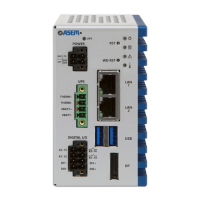
Describes the power supply area, including UPS status LED and DC input connector details.
Explains the function of the front panel buttons (Reset, Watchdog) and status LEDs (Power, Storage, Error).
Covers essential steps before installation, such as selecting the mounting location and checking conditions.
Instructs users to verify all components are present and undamaged after unpacking.
Advises on verifying ambient conditions and technical specifications for proper device operation.
Specifies the recommended vertical mounting position and guidelines to prevent overheating.
Provides detailed dimension templates for various BM1xx models for book and DIN rail mounting.
Step-by-step instructions for installing the BM1xx system using a wall mount.
Step-by-step instructions for installing the BM1xx system on a DIN rail.
Guides on connecting the system to the ground wire and the power cable.
Details the assembly process for the power connector, including wiring and pin functions.
Explains the procedure for powering on the system and safely shutting it down.
Details the supported operating systems, specifically Windows 10 IoT Enterprise.
Information regarding the preloaded and preconfigured Ubiquity Runtime software.
Guides users on entering and navigating the BIOS setup utility for system configuration.
Details common BIOS settings found in the 'Main' configuration menu.
Covers various advanced BIOS settings related to CPU, Uncore, LPSS, and PCI Express configurations.
Explains BIOS settings related to security, including passwords, secure boot, and TPM.
Details BIOS options for configuring the boot order and boot devices.
Describes options for saving changes, discarding changes, and loading default settings within the BIOS.
Provides instructions and diagrams for safely removing the rear cover of the BM1xx.
Details the procedure for replacing the CR2032X backup battery, including warnings.
Explains the process for replacing the M.2 SSD, emphasizing the use of industrial-grade SSDs.
Covers accessing, installing, and removing the SIM card for cellular connectivity.
Offers guidelines for cleaning the BM1xx unit and general maintenance recommendations.
Provides contact information for ASEM's technical support and after-sales services.
Recommends contacting certified disposal services for environmentally sound recycling of the device.
Illustrates the internal architecture and component connections of the BM1xx system.
Presents detailed technical specifications for the BM1xx family, including hardware and environmental data.
Explains how to calculate and define the power consumption of the BM1xx system and its components.
Provides guidance and criteria for selecting an appropriate 24V DC power supply for the BM1xx.
Details the technical specifications and performance characteristics of the CR2032X backup battery.
Lists the certifications and compliance standards met by the BM1xx product.
Details the ASEM MB963 motherboard used in the BM1xx series, including top and bottom views.
Provides views and connector summaries for the Wired A board.
Provides views and connector summaries for the Wired B board.
Provides views and connector summaries for the Wireless board.
Provides views and connector summaries for the Power board.
Describes the available WiFi and 4G global modules, including their technical specifications and bands.
Details the technical specifications for WiFi+BT and 4G-Global modules.
Presents dimensional drawings for the WiFi+BT and 4G-Global modules.
Provides drawing details for internal WiFi and 2G/3G/4G coaxial cables.
Details the electrical and mechanical specifications for various WiFi and 2G/3G/4G antennas.
Presents drawing details for external WiFi and 2G/3G/4G coaxial cables.
Provides step-by-step instructions for installing different types of antennas, including torque specifications.
Guides on installing a Linux distribution, covering BIOS setup, drivers, and storage.
Details obtaining, installing, and customizing the touchscreen driver for Linux.
Provides recommendations for optimizing the SSD M.2 lifespan in Linux, including TRIM and swappiness.

 To Next Page
 General