EN 9
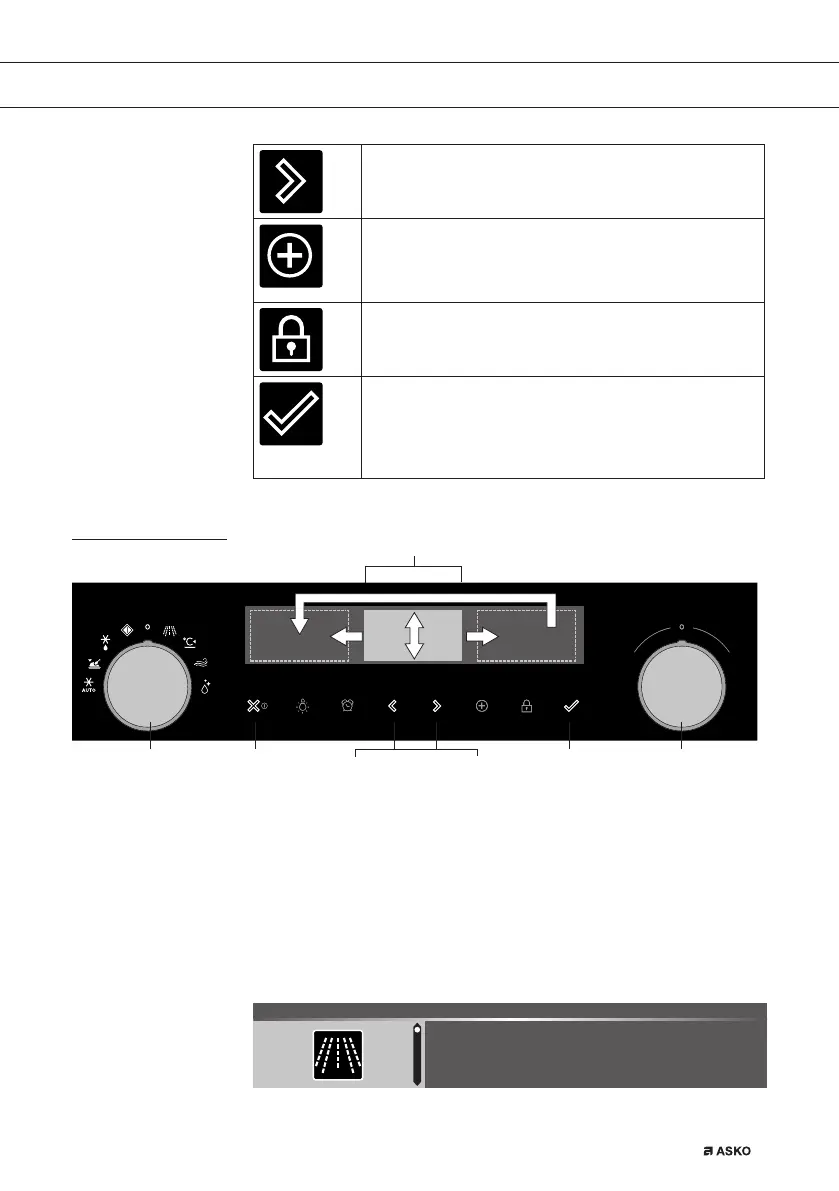
Navigation key right
- To move the active area to the right.
Plus key
- To open or exit the settings menu (in standby-mode).
- To open or exit the plus menu with the extra options
possible at that moment (in on-mode).
Child lock key
- Press and hold the left navigation key and right
navigation key simultaniously to lock the appliance.
Confirm key
- To confirm all the white settings/elements in the
screen.
- Add 30 seconds microwave time (microwave
function).
Navigation
active area
stop key confirm keyfunction knob selection knobnavigation keys
By turning the function knob away from the 0-position, the icon of the
chosen main function is lit. The display will show the icon and name
of the activated function for about 1,5 seconds. Next you will see the
chosen main function and sub-function at the top of the display in the
feedback bar. Also the function settings mode will become active (grey
background). In this activated area you can select your settings using
the selection knob.
750 W 1:00
MICROWAVE 14:30
YOUR MICROWAVE


 To Next Page