WARNING!
This function is not suitable for food requiring fast preheating.
Perishable food should not be kept in the oven for a long time.
Before using this mode, check whether the clock on the
appliance is accurately set.
Minute minder setting
The minute minder can be used independently of oven operation. The
longest possible setting is 24 hours. During the last minute, the minute
minder is displayed in seconds.
Rotate the KNOB to select the symbol and confirm your setting.
Rotate the KNOB and set the minute minder duration. Confirm the setting
by pressing on the KNOB.
INFORMATION!
The select timer function can be reset to 00:00 by long-pressing the KNOB.
INFORMATION!
The most recently used timer function values can be stored and offered as preset values the next
time you use the timer. As a factory setting, this function is off, but it can be activated (see chapter
Selecting extra functions, Adaptive function).
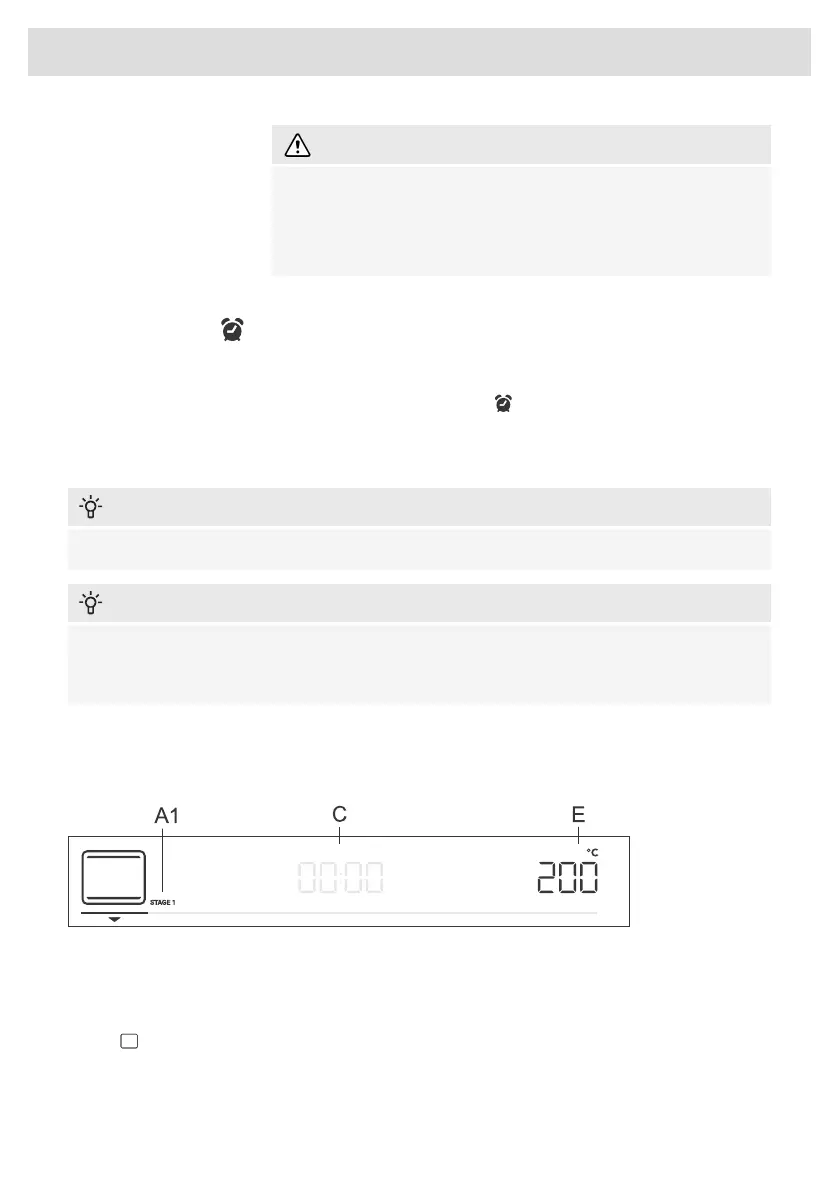
STEP PROGRAM
This function allows baking in two steps or stages (two consecutive baking steps are combined in
a single cooking process).
A1 first cooking step STAGE1, (STAGE2)
C program duration/end of program (see chapter "Timer Functions")
E temperature/power
Step:STAGE1
In the mode, set the baking system and temperature. You can also choose the fast preheating
function. Then, set the baking duration for STAGE1 (see chapter Timer Functions). Confirm the
setting by pressing on the KNOB.
19
Choosing the settings



 To Next Page