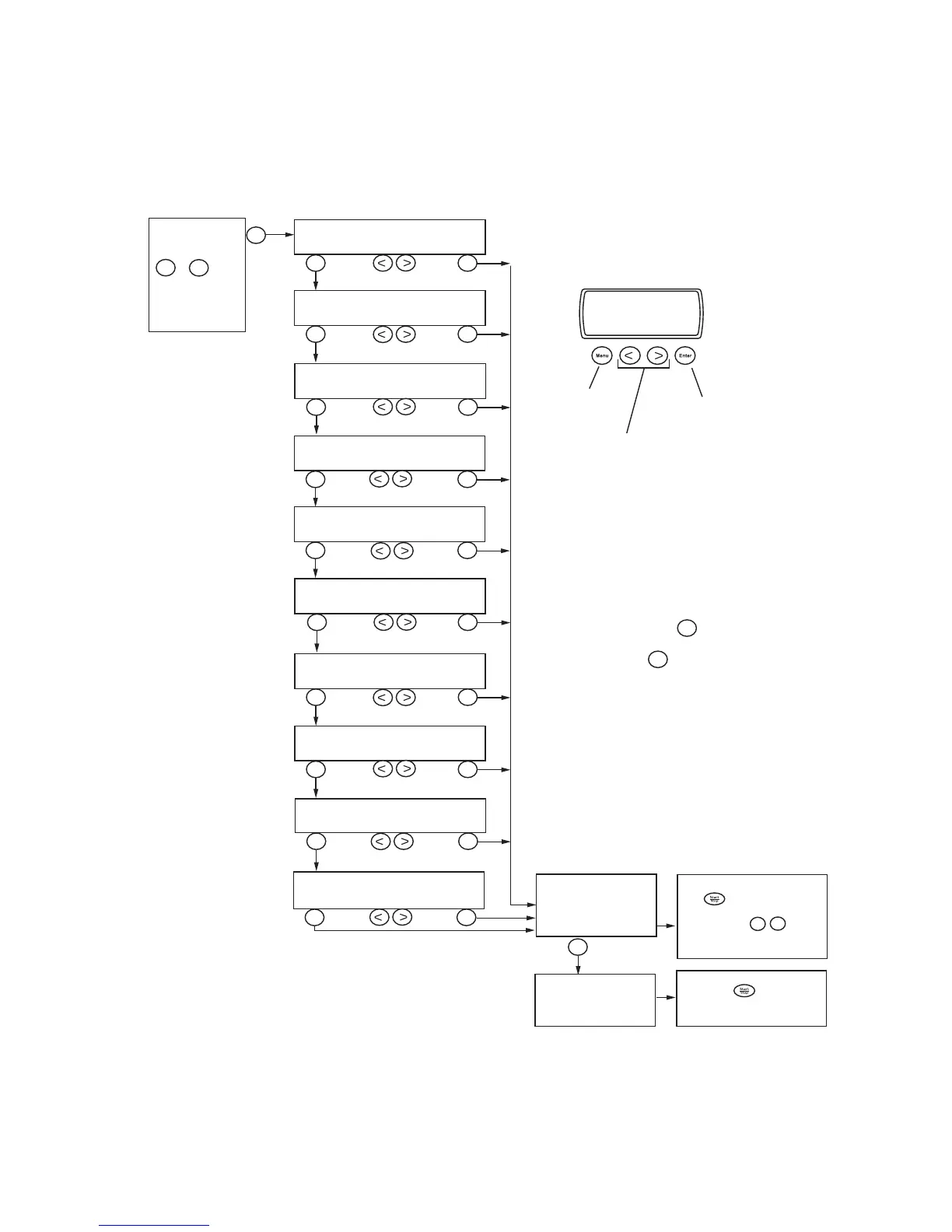
The menu system for changing a preset program
Menu
Menu
Enter
Menu
Enter
Menu
Enter
Menu
Enter
Menu
Enter
Menu
Enter
Menu
Enter
Menu
Enter
Menu
Enter
Enter
P1
P4
Change with:
Select Program
Select Temperature
Select Spin speed
Select Delayed start
Select Super rinse
Select E2 Economy/Effect
Select Pre-soak
Select Anti-crease
Select High water level
Select
program
to be changed
(For a temporary
change, select any
button).
The new program is
stored in the memory.
The program can now be started
with .
The program will disappear
then next time -
is pressed or when the machine
is switched off.
Program changed and
shown in the display,
but not stored in the
memory.
P1
P4
The program can now be
started with .
The program can be used each
time you want to wash.
Menu
Enter
Select Sensor
-
Change with:
Change with:
Change with:
Change with:
Change with:
Change with:
Change with:
Change with:
Change with:
NOTE
Not all steps are shown for all program types. Only
permitted settings are shown in the display.
You can change several settings/options consecutively.
Simply index forwards with .
Then finish by continuing until the program is shown in
the display, or press .
Index to next
Select setting
Exit from menu/
Save program
Enter
Menu



 To Next Page