Changing the Pad Key
8FMMEFTDSJCFUIJTöSTUCFGPSFHFUUJOHJOUPUIF1BE.PEFT*OBEEJUJPOUPTFMFDUJOHTDBMFTBOE
1BE.PEFTJUTBMTPQPTTJCMFUPEFöOFUIFSPPULFZGPSUIFQBET5IFEFGBVMULFZJT$CVUZPVDBO
DIPPTFBOZOPUFJOUIFDISPNBUJDTDBMF5IFQSPDFTTJTTJNQMF
1. Hold [SHIFT] through the nal step.
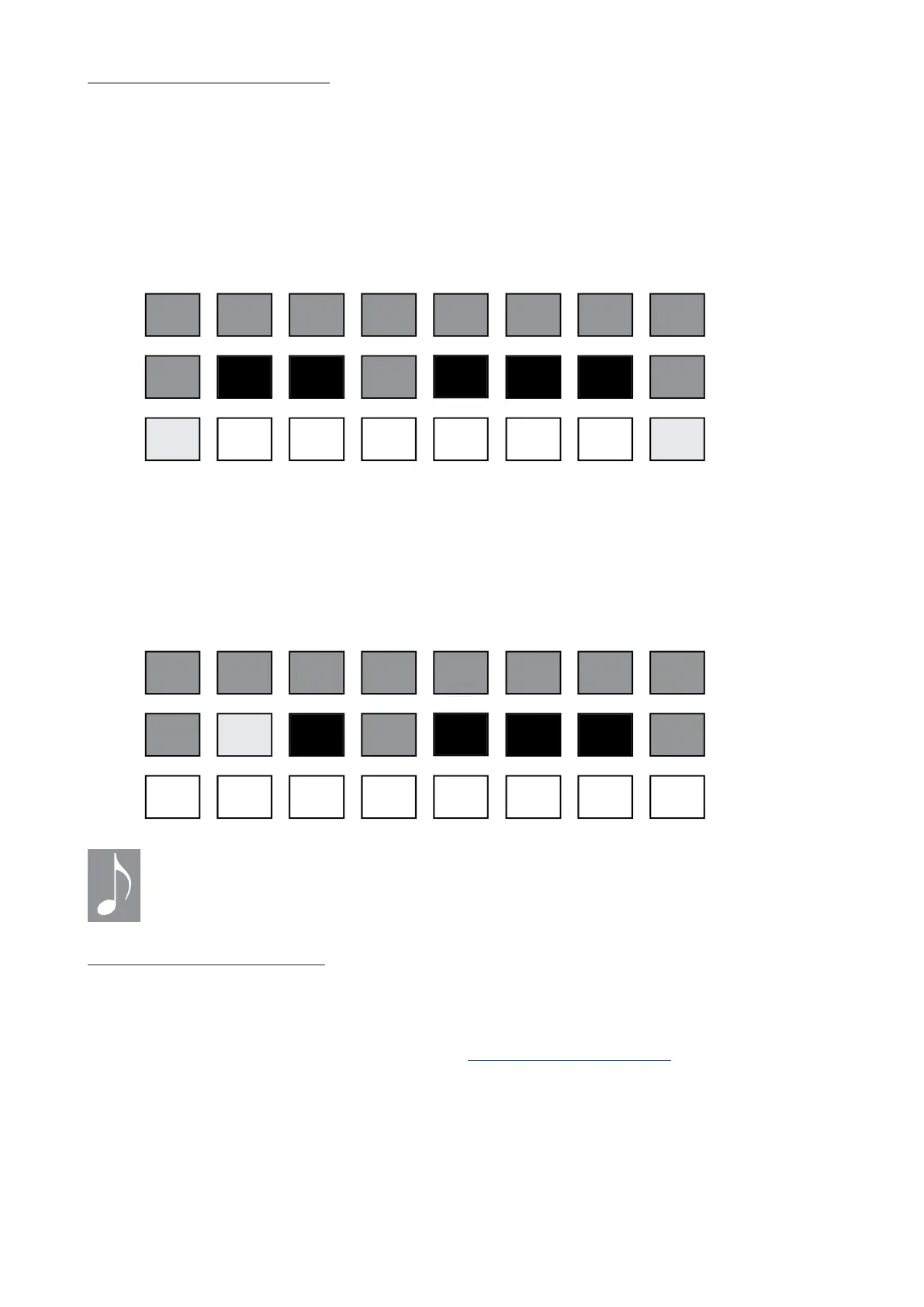
2. Press the top-row pad labeled [KEY]. The Left display shows the current Pad Key. The bottom
two rows of pads show colors representing a single chromatic octave: yellow = the current root
note (C), blue = white keys, green = black keys, grey = inactive.
C# D# F# G# A#
C D E F G A B C
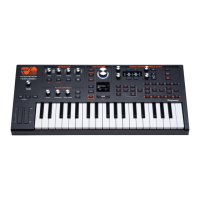
3. Select pad 10 to change the Pad Key. The Left display shows Pad Key = C#.
4. Release [SHIFT]. Pads 1-24 now begin on a C# in the lower left corner and work their way
upward according to the scale and Pad Mode settings. This is a global setting for all presets.
/PUFUIBUUIFOFYUUJNFZPVSFQFBUUIJTQSPDFTTQBEXJMMCFZFMMPXJOTUFQBCPWFTJODFUIF
1BE,FZIBTCFFODIBOHFEUP$
C# D# F# G# A#
C D E F G A B C
5IF1BE,FZTFUUJOHEPFTOPUUSBOTQPTF
JODPNJOH.*%*OPUFEBUB
Pad response options
Velocity and pressure
5IFWFMPDJUZBOEQSFTTVSFTFOTJUJWJUZPGUIFQBETDBOCFUPHHMFEPOBOEPòJOEFQFOEFOUMZ
5IFTFQBSBNFUFSTBSFGPVOEPOQBHFPGUIFKeys / Pads: Page 3 (p. 91)
Latch or Sustain notes
1SFTTJOH<-"5$)>TVTUBJOTPOFPSNPSFOPUFTVOUJMBOPUIFSJTQMBZFE6TF<4)*'5><-"5$)>UP
UPHHMFUIF4VTUBJOGVODUJPOPOBOEPòJGZPVEPOUIBWFBTVTUBJOQFEBMDPOOFDUFE


 To Next Page