
 Need help?
Do you have a question about the ASM Polytouch HYDRASYNTH EXPLORER and is the answer not in the manual?
Lists essential safety measures to prevent hearing damage and ensure proper device operation, including reading instructions and avoiding water.
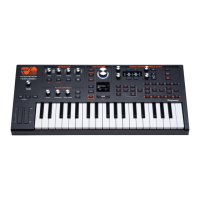
Details the intuitive workflow, front-panel controls, OLED displays, Macro controls, and Arpeggiator features of the Hydrasynth Explorer.
Explains the 8-voice polyphony, analog modeling, WaveScan synthesis, hundreds of waveforms, and dual filter system.
Provides initial setup steps, including unboxing, connecting power and audio, using the mixer, headphones, and master volume.
Lists the items included with the Hydrasynth Explorer, such as the unit itself, manual, and power supply.
Covers power options (DC adapter, batteries), audio connections to mixers or headphones, and master volume control.
Illustrates the Hydrasynth Explorer's top panel, labeling the main sections: Arpeggiator, Main Systems, Filter Controls, and Master Control.
Explains Access buttons, Function buttons, Control knobs, Control buttons, Module Select buttons, knob types, and the OLED displays.
Details how to select, browse, and manage patches using the Patch knob, Browse button, and Favorites banks for quick access.
Covers saving patches, system setup pages for global settings, and initializing parameters or modules using INIT and RANDOM buttons.
Explains how to initialize and randomize parameters, modules, or entire patches using the INIT and RANDOM buttons.
Explains the Macro Assign button for performance controls and the Mod Matrix for creating modulation routes.
Describes how to select modules for editing and outlines performance features like Pitch/Mod strips, Octave/Chord buttons, and CV outputs.
Introduces module groups: Oscillator, Mixer, Filter, Envelope, LFO, and Amp, explaining their basic functions and signal flow.
Covers Oscillators 1 and 2, their Single and WaveScan modes, and parameters like Mode, Semi, Wave, Cents, and Keytrack.
Explains mixer parameters for setting levels of Oscillators, Ring, and Noise, and details the Solo function for isolating sources.
Details Filter 1 types, compensated vs. uncompensated filters, and parameters like Type, Cutoff, Control, and Resonance.
Explains how LFO 2 Amount, Velocity Envelope, and Amp Level interact to control the amplitude of the patch.
Introduces envelopes, their DAHDSR form factor, adjustable curves, time-based segments, triggers, and parameters like Attack, Decay, Sustain, Release.
Explains LFOs, their features, and parameters including Wave, Rate, Phase, and Level, covering LFOs 1 and 2.
Covers Pre- and Post-FX modules, Bypass, and the Chorus and Flanger effect types with their parameters.
Details voice parameters for Polyphony, Analog Feel, Density & Detune, Stereo Mode, Random Phase, and Warm Mode.
Explains Arpeggiator modes like Up, Down, Alt, and Octave modes, plus parameters for Tempo, Division, Swing, and Gate.
Guides users through creating, assigning, and editing Macros, covering the Home page, Macro Assign, and Destination settings.
Details how to create mod routes using the Mod Matrix, covering the whole process, shortcuts, direct assignment, and modulation sources.
Explains Control Voltage (CV) and Gate concepts, CV/Gate Polyphony, Compatibility, Clocks and Sync, and the Mod Matrix routing for CV outputs.
Covers patch browsing, sorting methods (Patch #, Name, Category), comparing patches, and assigning favorites.
Explains system setup navigation, saving settings, Master page parameters (Transpose, Tuning, Knob Modes), and battery type.
Details combinations for initializing modules with [INIT] and randomizing with [RANDOM], including [INIT] + Control Button X.
Lists physical dimensions, weight, and details of rear panel connections including MIDI, USB, Headphone, Outputs, and CV/Gate.
 General
| Type | Synthesizer |
|---|---|
| Sound Engine | Digital |
| Polyphony | 8 voices |
| Oscillators | 3 per voice |
| Wavemorphing | Yes |
| Arpeggiator | Yes |
| Filters | 2 per voice |
| LFOs | 5 per voice |
| Modulation | Modulation Matrix with 32 slots |
| Effects | Reverb, Delay |
| Display | OLED |
| CV/Gate | Yes |
| MIDI | MIDI In, MIDI Out, MIDI Thru |
| USB | USB MIDI |
| Connectivity | Stereo Headphone Output, L/R Stereo Output, Sustain Pedal Input |
| Power | USB or external power supply |
| Keyboard | 37-note, semi-weighted, velocity and polyphonic aftertouch |

 To Next Page