50
Reverb Types
Hydrasynth Explorer provides 4 reverb types, each with distinct characteristics:
• Hall
• Room
• Plate
• Cloud
Reverb Parameters
All of the reverbs have identical parameters, so we’ll describe them once.
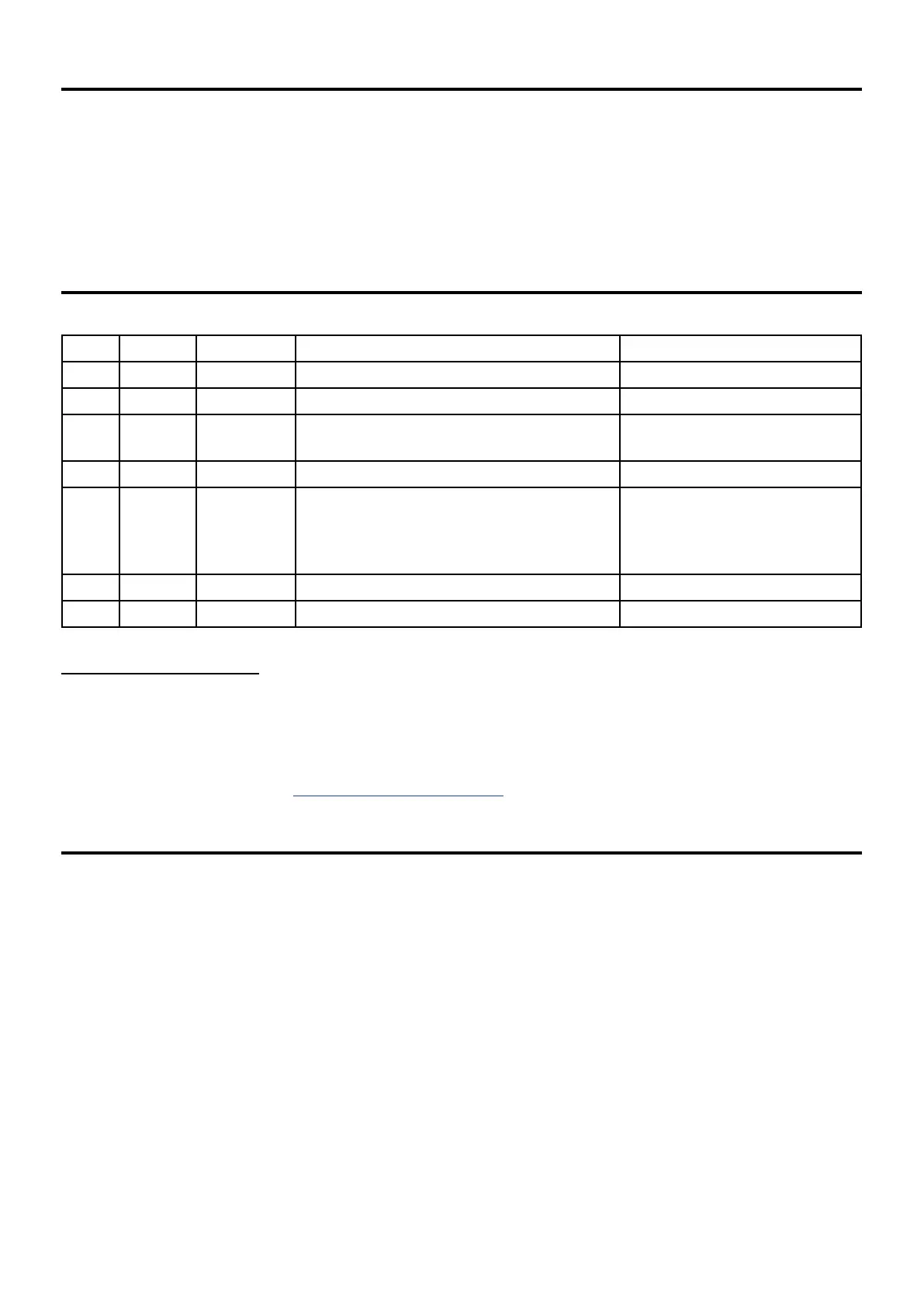
Page Control Parameter Range Description
1 1 Type 5 types (see list above) Select reverb
1 2 PreDelay 0.5-250 ms Length of time before reverb
1 3 [Time] 120 ms - 90 seconds, Freeze
No damping = indenite Freeze
Decay time of reverb
1 4 [Dry/Wet] 0-100.0% Blends dry signal with eect
2 1 [Tone] -/+ 64.0 Wet signal lter control:
-64.0 to -0.1: Low pass
0.0: No ltering
0.1 to 64.0: High pass
2 2 [Hi Damp] 0.0-128.0 High-frequency decay
2 4 [Lo Damp] 0.0-128.0 Low-frequency decay
Freeze the Reverb
While on Reverb module page 1, hold [SHIFT] and press Control button 3 and the reverb time will jump
to Freeze. If the Hi / Lo Damp parameters are set to zero, the Freeze setting will hold the reverb inde-
nitely. Any notes that are played will be added to the eect.
A Macro button can toggle the Freeze value on and o; just set the BTN VALUE to 128.0. To learn more
about setting up a Macro, see Mastering the Macros (p. 58).
Mod Route Shortcut
Here’s how to set up mod routes quickly from an Envelope or LFO to an eect:
• Hold the module button for the desired source
• Press the module button for the destination. This will create a mod route in the Mod Matrix at the
rst available slot with the rst parameter of the eect selected.
• Change the selected parameter if needed
• Set the mod amount with the appropriate Control knob.
Remember: not all FX parameters are available as mod destinations.


 To Next Page