1. Turn on
Rapidly press fire button 5 times.
2. Mode selection
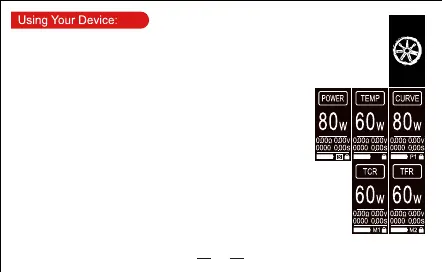
When the screen is unlocked, sliding the screen to left or right will select working modes
(POWER, TEMP, CURVE, TCR, TFR) cyclically.
3. Working parameter setting
POWER mode:
Power setting: When screen is unlocked, long press power display position to
enter the power setting interface; press “+” and “-” icons directly on power
setting interface to set power; press “Fire” key to confirm and quit.
TEMP mode:
Selection of coil material: When screen is unlocked, long press “TEMP” mode
display position to enter the coil material selection interface; press “+” and “-”
icons to select coil material; press “Fire” key to confirm and quit.Temperature
control power, temperature display switching: single click the power display
position to switch to temperature display; single click the temperature display position to
switch to power display.
Temperature control power setting: under the unlocked state of touch screen, long
press the power display position to enter power setting interface; press “+” and “-” icons
directly on power setting interface to set power; press “Fire” key to confirm and quit.
Temperature setting: under the unlocked state of touch screen, long press the
temperature display position to enter temperature setting interface; press “+” and “-”
icons directly on temperature setting interface to set power; press “Fire” key to confirm
and quit.
CURVE mode:
02


 To Next Page