
 Need help?
Do you have a question about the ASROCK A55M-HVS and is the answer not in the manual?
Details the technical specifications of the ASRock A55M-HVS motherboard.
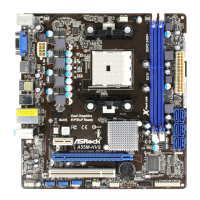
Illustrates and labels the physical components and connectors on the motherboard.
Describes the input/output ports on the rear panel of the motherboard.
Important safety and handling precautions before installing motherboard components.
Step-by-step guide for installing the CPU onto the motherboard socket.
Instructions for installing the CPU cooling fan and heatsink.
Guide for installing DDR3 memory modules into the DIMM slots.
Details the PCI and PCI Express slots and their uses.
Details the configuration and use of jumpers on the motherboard, specifically Clear CMOS.
Identifies and explains various onboard headers and connectors on the motherboard.
Guide on how to install SATA/SATAII hard disks into the motherboard.
Detailed guide on using the SATA/SATAII HDD Hot Plug feature.
Instructions on how to install drivers from the support CD.
Guide for installing operating systems on RAID configurations.
 General
| Non-ECC | Yes |
|---|---|
| Memory channels | Dual-channel |
| Memory slots type | DIMM |
| Number of memory slots | 2 |
| Supported memory types | DDR3-SDRAM |
| Maximum internal memory | 16 GB |
| Supported memory clock speeds | 800, 1066, 1333, 1600, 1866, 2400 MHz |
| Processor socket | Socket FM1 |
| Processor manufacturer | AMD |
| Compatible processor series | AMD Sempron |
| Processor thermal power (max) | 100 W |
| USB 2.0 connectors | 3 |
| Number of COM connectors | 1 |
| Number of SATA II connectors | 6 |
| USB 3.2 Gen 1 (3.1 Gen 1) connectors | 0 |
| HDMI version | 1.4a |
| USB 2.0 ports quantity | USB 2.0 ports have a data transmission speed of 480 Mbps, and are backwards compatible with USB 1.1 ports. You can connect all kinds of peripheral devices to them. |
| Audio chip | VIA VT1705 |
| Cooling type | Passive |
| Certification | FCC, CE, WHQL, ErP/EuP |
| Component for | PC |
| Power source type | ATX |
| Motherboard chipset | AMD A55 FCH |
| Audio output channels | 5.1 channels |
| Motherboard form factor | micro ATX |
| Compatible operating systems | Windows 7\\r Windows Vista\\r Windows XP |
| RAID levels | 0, 1, 10 |
| Supported storage drive interfaces | SATA II |
| On-board graphics card | No |
| Parallel processing technology support | Not supported |
| PCI Express slots version | 2.0 |
| Cables included | SATA |
| LAN controller | Realtek RTL8111E |
| Networking features | Gigabit Ethernet |
| Ethernet interface type | Fast Ethernet, Gigabit Ethernet |
| BIOS type | AMI |
| ACPI version | 1.1 |
| BIOS memory size | 32 Mbit |
 Weight and Dimensions
| Depth | 216 mm |
|---|---|
| Width | 226 mm |





 To Next Page
