English
58
4.3 OC Tweaker Screen
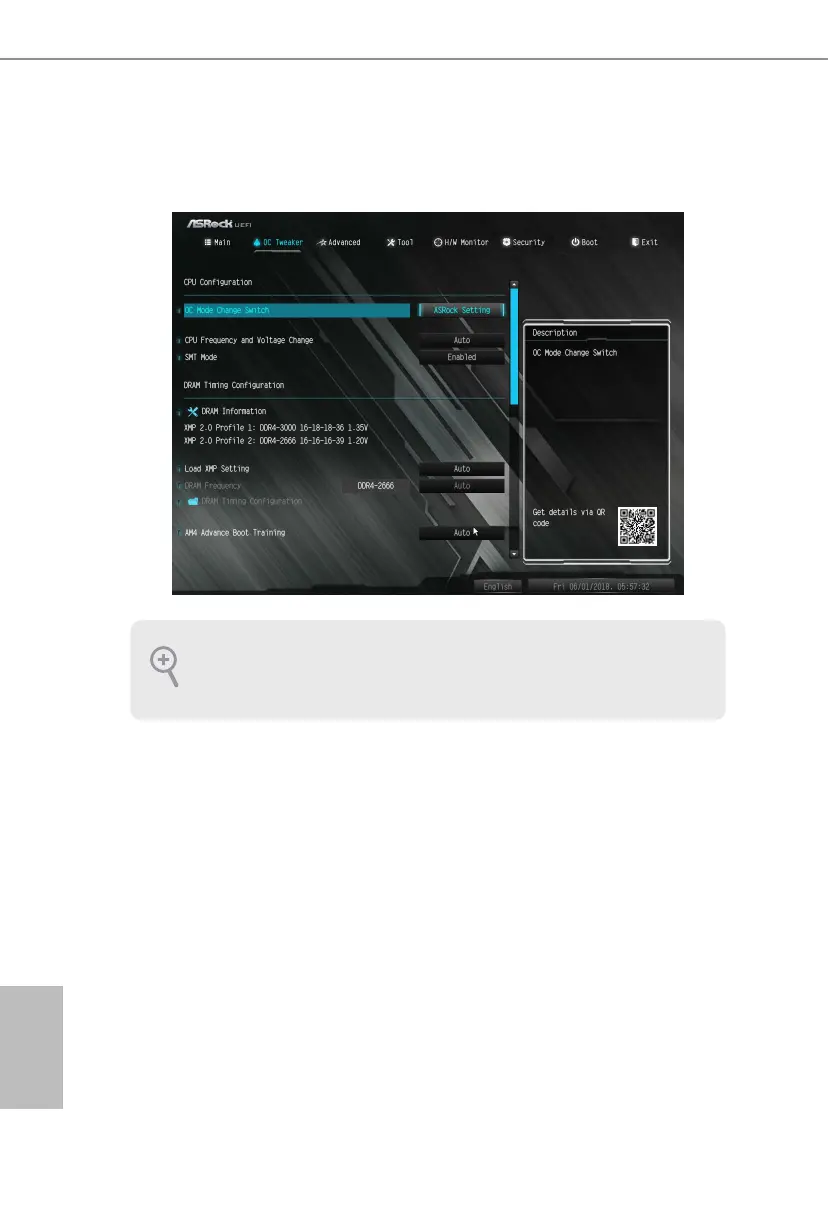
In the OC Tweaker screen, you can set up overclocking features.
CPU Conguration
OC Mode Change Switch
Select a setting for OC Mode.
Overclock Mode
Select the overclock mode.
CPU Frequency and Voltage Change
If this item is set to [Manual], the multiplier and voltage will be set based on user selection.
Final result is depending on the CPU's capability.
SMT Mode
is item can be used to disable symmetric multithreading. To re-enable SMT, a
power cycle is needed aer selecting [Auto].
Warning: S3 is not supported on systems where SMT is disabled.
Because the UEFI soware is constantly being updated, the following UEFI setup
screens and descriptions are for reference purpose only, and they may not exactly
match what you see on your screen.


 To Next Page
 Loading...