This document is the user manual for the ASRock H510M-H2/M.2 SE motherboard. It provides comprehensive information on the motherboard's features, installation procedures, and technical specifications.
Function Description
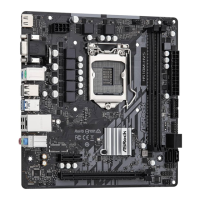
The ASRock H510M-H2/M.2 SE is a Micro ATX form factor motherboard designed to support Intel's 10th and 11th Generation Core™ Processors (LGA1200). It serves as the central hub for a computer system, connecting and coordinating various components such as the CPU, memory, storage, and peripheral devices. This motherboard is built with a focus on stability and performance, ensuring a reliable computing experience.
Important Technical Specifications
Platform:
CPU:
- Supports 10th Gen & 11th Gen Intel® Core™ Processors (LGA1200)
- Supports Intel® Turbo Boost Max 3.0 Technology
Chipset:
Memory:
- Dual Channel DDR4 Memory Technology
- 2 x DDR4 DIMM Slots
- Supports DDR4 3200/2933/2800/2666/2400/2133 non-ECC, un-buffered memory*
- Supports ECC UDIMM memory modules (operate in non-ECC mode)
- Max. capacity of system memory: 64GB
- Supports Intel® Extreme Memory Profile (XMP) 2.0
- 15μ Gold Contact in DIMM Slots
- 11th Gen Intel® Core™ (i9/i7/i5) support DDR4 3200 natively; Core™ (i3), Pentium® and Celeron® support DDR4 2666 natively.
- 10th Gen Intel® Core™ (i9/i7) support DDR4 2933 natively; Core™ (i5/i3), Pentium® and Celeron® support DDR4 2666 natively.
- Please refer to Memory Support List on ASRock's website for more information.
Expansion Slots:
- Intel® 11th Gen & 10th Gen Processors:
- 1 x PCIe 4.0 x16 Slot (PCIE1)*
- Intel® 11th Gen Processors support PCIe 4.0 x16
- Intel® 10th Gen Processors support PCIe 3.0 x16
- Intel® H470 Chipset:
- 1 x PCIe 3.0 x1 Slot (PCIE2)*
- Supports NVMe SSD as boot disks
Graphics:
- Intel® UHD Graphics Built-in Visuals and the VGA outputs can be supported only with processors which are GPU integrated.
- Graphics specifications may vary between CPU types.
- 2 x HDMI
- Intel® 11th Gen Processors support HDMI 2.0, HDCP 2.3 and max. resolution up to 4K 60Hz
- Intel® 10th Gen Processors support HDMI 1.4, HDCP 2.3 and max. resolution up to 4K 30Hz
Audio:
- 7.1 CH HD Audio (Realtek ALC897 Audio Codec)
LAN:
- Gigabit LAN 10/100/1000 Mb/s
- Realtek 8111H
USB:
- 6 x USB 3.2 Gen1 (4 Rear, 2 Front)
- 6 x USB 2.0 (2 Rear, 4 Front)
- All USB ports support ESD Protection
Rear Panel I/O:
- 1 x PS/2 Mouse/Keyboard Port
- 2 x HDMI Ports
- 2 x USB 2.0 Ports
- 4 x USB 3.2 Gen1 Ports
- 1 x RJ-45 LAN Port
- HD Audio Jacks: Line in / Front Speaker / Microphone
Storage:
- Chipset:
- 1 x Ultra M.2 Socket (M2_1, Key M), supports type 2260/2280 SATA3 6.0 Gb/s & PCIe Gen3x4 (32 Gb/s) modes*
- 4 x SATA3 6.0 Gb/s Connectors
- Supports Intel® Optane™ Technology
- Supports NVMe SSD as boot disks
RAID:
- Supports RAID 0, RAID 1, RAID 5 and RAID 10 for SATA storage devices
Connector:
- 1 x SPI TPM Header
- 1 x Chassis Intrusion and Speaker Header
- 1 x CPU Fan Connector (4-pin)*
- 2 x Chassis/Water Pump Fan Connectors (4-pin) (Smart Fan Speed Control)**
- 1 x 24 pin ATX Power Connector
- 1 x 8 pin 12V Power Connector
- 1 x Front Panel Audio Connector
- 2 x USB 2.0 Headers (Support 4 USB 2.0 ports)
- 1 x USB 3.2 Gen1 Header (Supports 2 USB 3.2 Gen1 ports)
- CPU_FAN1 supports the fan power up to 1A (12W).
- CHA_FAN1~2/WP supports the fan power up to 2A (24W).
- CHA_FAN1~2/WP can auto detect if 3-pin or 4-pin fan is in use.
BIOS Feature:
- AMI UEFI Legal BIOS with GUI support
OS:
- Microsoft® Windows® 10 64-bit / 11 64-bit
Certifications:
- FCC, CE
- ErP/EuP ready (ErP/EuP ready power supply is required)
Usage Features
The ASRock H510M-H2/M.2 SE motherboard is designed for ease of installation and use, catering to both new builders and experienced users.
Installation Guidance:
The manual provides detailed, step-by-step instructions with illustrations for installing all major components:
- CPU Installation: Clear instructions for correctly inserting the 1200-Pin CPU into the socket, emphasizing the importance of aligning the CPU and avoiding bent pins. It also advises saving the CPU socket cover for future service needs.
- CPU Fan and Heatsink Installation: Visual guides for mounting the CPU fan and heatsink, ensuring proper cooling for the processor.
- Memory Module (DIMM) Installation: Instructions for installing DDR4 DIMM modules, including warnings about dual channel configuration and potential damage if modules are installed incorrectly. It highlights that the DIMM only fits in one correct orientation.
- Front Panel Header Connection: Detailed diagrams for connecting the front panel wires (Power SW, Reset SW, Power LED, HDD LED) to the system panel header, crucial for system power and status indicators.
- I/O Panel Shield Installation: Simple steps for installing the I/O panel shield into the chassis.
- Motherboard Installation: Guidance on securing the motherboard within the chassis, indicating screw locations.
- SATA Drive Installation: Instructions for installing optical drives and SATA drives, along with connecting SATA data and power cables.
- Graphics Card Installation: Steps for installing a graphics card into the PCIe slot, including a "CLICK!" indicator for proper seating. It also provides a warning about ensuring the power supply is switched off and unplugged before installation.
- Peripheral Device Connection: Illustrations showing how to connect common peripheral devices such as monitors, keyboards, mice, and speakers to the rear I/O ports.
- Power Connector Connection: Clear diagrams for connecting the ATX 12V power connector and the 24-pin ATX power connector, with a warning about using the correct power cable for the CPU and not the graphics card.
- Power On Procedure: Simple steps to power on the system after all components are installed and connected.
- Jumper Setup: Explanations for setting up jumpers, specifically the Clear CMOS Jumper (CLRMOS1), to reset BIOS settings.
- Onboard Headers and Connectors: Detailed diagrams and descriptions for connecting various onboard headers, including the System Panel Header, Chassis Intrusion and Speaker Header, Serial SATA3 Connectors, USB 2.0 Headers, USB 3.2 Gen1 Header, Front Panel Audio Header, Chassis/Water Pump Fan Connectors, CPU Fan Connector, ATX Power Connector, and SPI TPM Header.
- M.2 SSD Module Installation: A comprehensive guide for installing an M.2 SSD module, including steps for preparing the screw, adjusting the standoff based on module length, peeling off the protective film, aligning and inserting the SSD, and tightening the screw. It emphasizes correct orientation and avoiding overtightening.
BIOS Features:
The motherboard features an AMI UEFI Legal BIOS with a graphical user interface (GUI), making it user-friendly for configuring system settings.
Operating System Support:
It supports Microsoft® Windows® 10 64-bit and Windows® 11 64-bit, ensuring compatibility with modern operating systems.
Maintenance Features
The manual provides important information regarding the maintenance and care of the motherboard and system.
Pre-installation Precautions:
- ESD Protection: Advises users to take precautions against static electricity by wearing a grounded wrist strap or touching a safety grounded object before handling components.
- Component Handling: Recommends holding components by the edges and avoiding touching ICs.
- Proper Installation: Emphasizes securing the motherboard to the chassis with screws to prevent damage.
Overclocking Warning:
A critical warning is provided regarding overclocking, stating that it may affect system stability and potentially cause damage to components. It clarifies that ASRock is not responsible for damage caused by overclocking.
BIOS Updates:
The manual mentions that BIOS software might be updated, and the latest version is available on ASRock's website. It encourages users to visit the website for support information and the latest VGA cards and CPU support list.
Contact Information:
ASRock provides various contact channels for technical questions and support requests, including email addresses for ASRock Incorporation, ASRock EUROPE B.V., and ASRock America, Inc. A QR code is also provided for quick access to manuals and documents.
Compliance and Safety:
- FCC and CE Certifications: Indicates compliance with regulatory standards.
- ErP/EuP Ready: Highlights energy efficiency compliance, requiring an ErP/EuP ready power supply.
- RoHS Compliance: The motherboard is compliant with RoHS directives, as indicated by the RoHS symbol on the motherboard layout.
- Battery Warning: A warning about the presence of a button battery, advising to keep batteries out of sight and reach of children.
- California, USA Only: Information regarding the presence of perchlorate in the lithium battery and disposal regulations.
- Australia Only: Consumer law information regarding goods and services.
- UKCA and CE Markings: Declarations of conformity for devices sold in the UK and EU.
- WEEE Directive: Instructions for proper disposal of electronic products, indicating that the motherboard should not be thrown into municipal waste.
Intel End User Software License Agreement:
The manual includes a detailed software license agreement for Intel's copyrights, outlining terms of use, distribution, ownership, and limitations of liability.
Disclaimer:
ASRock disclaims responsibility for errors or omissions in the documentation and for any damage arising from the use or inability to use the product.
In summary, the ASRock H510M-H2/M.2 SE user manual is a comprehensive guide for installing, configuring, and maintaining the motherboard, providing essential technical details, clear installation instructions, and important safety and compliance information.

 Need help?
 General




 To Next Page