40 41
English
3.4.2 Conguring and Using Splashtop
Splashtop is a remote desktop access soware that lets you remotely access your
home computer from your mobile device.
Before conguring this feature, verify the following.
•MeshCentralhasbeenproperlycongured.
*Follow the instructions on "3.5.1 Conguring and Using MeshCentral " to create
a mesh and install mesh agent.
•RemoteWakehasbeenenabledin"Intel®SmartConnectTechnologyManager".
Setup Guide
Step 1
Download and install the Streamer on your home computer, which is located in
the folder at the following path of the Support CD: \ ASRock Utility > Splashtop
Streamer. en enter your Splashtop Account. If you have not created a Splashtop
acount, create one.
Step 2
Download and install “Splashtop 2” on your mobile device and log into the app.
Using Remote Wakeup
Step 1
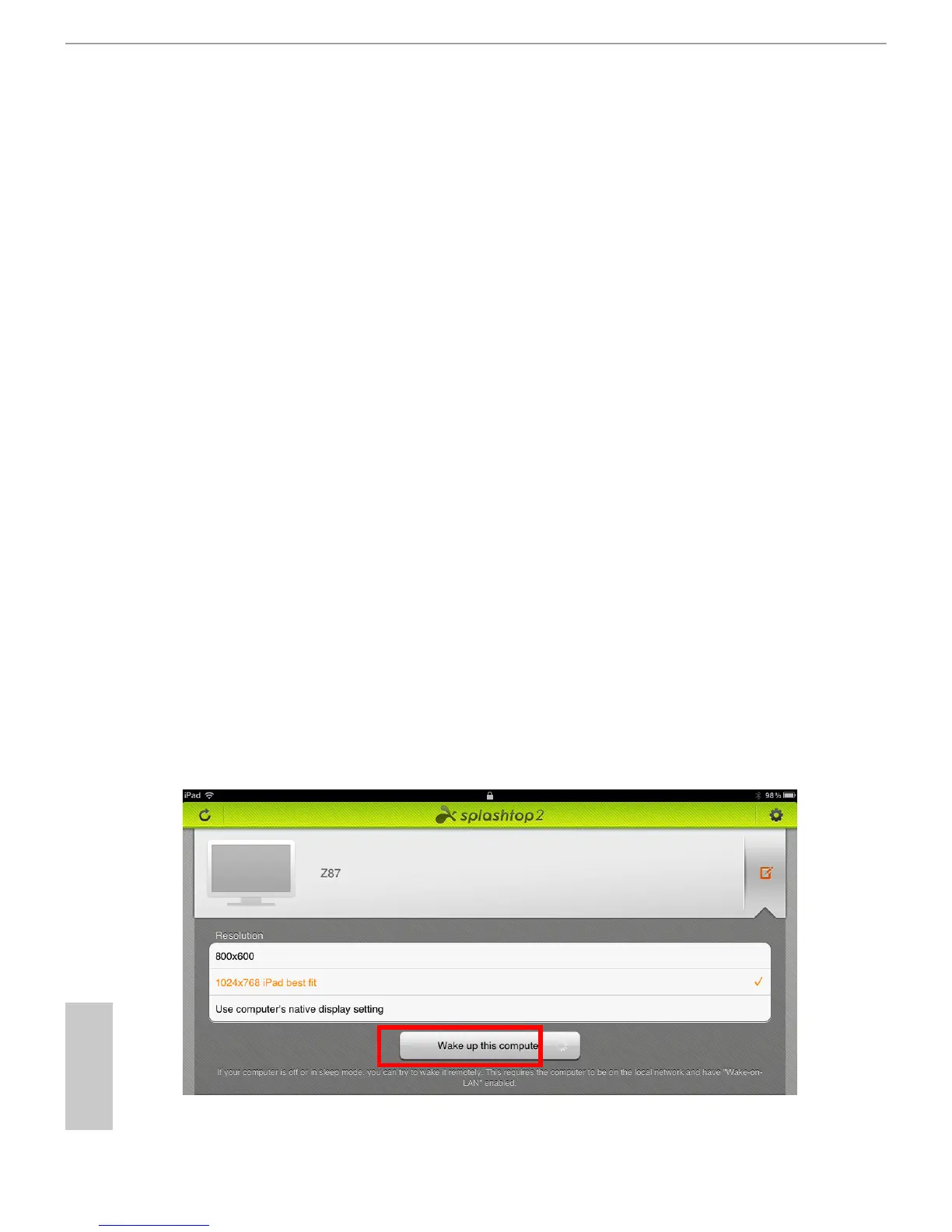
In "Splashtop 2”, tap the edit button next to an oine machine from the list.
Step 2
Tap "Wake up this computer".



 To Next Page