English
5
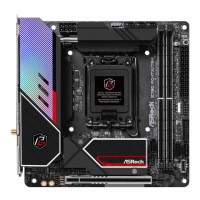
Z790 PG-ITX/TB4
Connector
•
1 x RGB LED Header*
•
1 x Addressable LED Header**
•
1 x CPU Fan Connector (4-pin)***
•
1 x CPU/Water Pump Fan Connector (4-pin) (Smart Fan
Speed Control)****
•
1 x Chassis Fan Connector (4-pin)*****
•
1 x 24 pin ATX Power Connector (Hi-Density Power Con-
nector)
•
1 x 8 pin 12V Power Connector (Hi-Density Power Connec-
tor)
•
1 x Front Panel Audio Connector (15μ Gold Audio Connec-
tor)
•
1 x USB 2.0 Header (Supports 2 USB 2.0 ports)
•
1 x USB 3.2 Gen1 Header (Supports 2 USB 3.2 Gen1 ports)
•
1 x Front Panel Type C USB 3.2 Gen2x2 Header (20 Gb/s)
•
1 x Clear CMOS Button
* Supports in total up to 12V/3A, 36W LED Strip
** Supports in total up to 5V/3A, 15W LED Strip
*** CPU_FAN1 supports the fan power up to 1A (12W).
**** CPU_FAN2/WP supports the fan power up to 2A (24W).
**** CPU_FAN2/WP can auto detect if 3-pin or 4-pin fan is in
use.
***** CHA_FAN1 supports the fan power up to 1A (12W).
BIOS
Feature
•
AMI UEFI Legal BIOS with GUI support
OS
•
Microso® Windows® 11 64-bit
Certica-
tions
•
FCC, CE
•
ErP/EuP ready (ErP/EuP ready power supply is required)
Please realize that there is a certain risk involved with overclocking, including
adjusting the setting in the BIOS, applying Untied Overclocking Technology, or using
third-party overclocking tools. Overclocking may aect your system’s stability, or
even cause damage to the components and devices of your system. It should be done
at your own risk and expense. We are not responsible for possible damage caused by
overclocking.
* For detailed product information, please visit our website:
http://www.asrock.com


 To Next Page
 Loading...