The Aastra Model 6731i IP Phone is a sophisticated communication device designed for use in various IP-PBX environments. It leverages advanced XML capabilities to support custom applications and is fully interoperable with leading IP-PBX platforms. The phone operates using the SIP IP telephony protocol, facilitating communication over an IP Network. It features a 3-line LCD display and supports up to 6 lines with call appearances, enabling users to manage multiple calls efficiently. The 6731i is available in two hardware platforms: one with text keys and another with symbol keys, offering flexibility in user preference.
Function Description
The primary function of the Aastra 6731i IP Phone is to provide reliable voice communication over an IP network. It allows users to make and receive calls, transfer calls, and conduct conference calls. The phone integrates with SIP-based IP PBX systems and networks, requiring a SIP account for operation. It supports various network protocols, including Trivial File Transfer Protocol (TFTP), File Transfer Protocol (FTP), Hypertext Transfer Protocol (HTTP), and HyperText Transfer Protocol over Secure Sockets Layer (SSL) (HTTPS) for configuration and updates. The phone is designed to connect to Ethernet/Fast Ethernet LAN (10/100 Mb) or Gigabit Ethernet LAN (1000 Mbps) using Category 5/5e or Category 6 cabling, respectively. Power can be supplied via in-line power (IEEE 802.3af) through the Ethernet cable or an optional 48V AC Power Adapter. Alternatively, a Power over Ethernet (PoE) power injector or switch can be used.
Usage Features
The Aastra 6731i offers a comprehensive set of features for daily communication needs.
- Call Handling: Users can easily dial numbers, answer incoming calls, and send incoming calls to voicemail. The phone supports placing calls on hold, transferring active calls to another number, and initiating conference calls with multiple participants. The Goodbye key allows users to end active calls or exit open lists without saving changes. The Redial key provides quick access to up to 100 previously dialed numbers, with a double press redialing the last number.
- Programmable Keys: The phone features 8 programmable top keys, which can be configured for various functions. By default, these keys can be set to "None" or assigned functions like "SAVE" for storing numbers and names in the Directory, "DELETE" for removing entries from the Directory and Callers List, "DIRECTORY" for displaying up to 200 stored contacts, and "SERVICES" for accessing enhanced features. The System Administrator can customize these keys to perform specific functions such as Speed Dial, Do Not Disturb (DND), BLF List, Flash, Automatic Call Distribution (ACD), Directed Call Pickup/Group Call Pickup, XML, Sprecode, Park/Pickup, Last Call Return (lcr), Call Forward, BLF/Xfer, Speed Dial/Xfer, Speed Dial/Conf, Intercom, Services, Phone Lock, Paging, and None.
- Audio Control: A volume control key allows users to adjust the volume for the handset, ringer, and hands-free speaker. The Speaker key transfers an active call to the speaker, enabling hands-free use, and can switch between headset and speaker modes based on audio settings. The phone also features a full-duplex speakerphone for high-quality hands-free calls and supports headset mode via the handset jack.
- User Interface and Navigation: The 3-line LCD screen displays call information, status messages, and menu options. Navigation keys (UP, DOWN, LEFT, RIGHT arrows) allow users to scroll through status messages, menu selections, and line/call appearances. When editing entries, the LEFT arrow key erases characters, and the RIGHT arrow key sets options. The Options key provides access to services and options for phone customization.
- Customization Options: Users can customize their phone settings through the IP Phone UI or the Aastra Web UI.
- IP Phone UI: Accessible via the Options key, this interface allows users to configure Call Forward settings (All, Busy, No Answer, All Off, All On), preferences (Ring Tone, Tone Set, Contrast Level, Speed Dial Edit, Live Dialpad, Set Audio, Time and Date, Language), and view Phone Status (IP&MAC Addresses, LAN Port, PC Port, Firmware Info, Error Messages). Users can also set a User Password, restart the phone, and activate Phone Lock.
- Aastra Web UI: By entering the phone's IP address into a web browser, users can access a more advanced interface. After logging in with a username and password (default "user" with a blank password field), users can view System Information, Network Status, Hardware Information, Firmware Information, and SIP Status. This interface provides additional customization options beyond those available on the phone's display.
- Call Management Features: The phone includes a Callers List key to access a record of the last 200 received calls. It also supports Account Configuration for DND and Call Forwarding, and Voicemail access.
- Additional Features: The 6731i supports Star Codes for various functions, suppression of DTMF playback, display of DTMF digits, play of Call Waiting Tone, Stuttered Dial Tone, XML Beep Support, Call Hold Reminder during active and single hold calls, Status Scroll Delay, Incoming Call Interrupts Dialing, Switch UI Focus to Ringing Line, Preferred Line and Preferred Line Timeout, Goodbye Key Cancels Incoming Calls, Message Waiting Indicator, Incoming Intercom Call Features, using the Redial Key for "Last Number Redial," and Group RTP Paging (receives RTP streams).
- Administrator-Enabled Features: Administrators can enable additional features such as Outgoing Intercom Calls, Missed Call Summary Subscription, Customizable Callers List Key, Autodial (Hotline and Warmline), Centralized Conferencing, Answer and Ignore Keys for XML Applications, Playing a WAV File On Your Phone, Using the Keypad During Active XML Applications, Key Redirection, XML Applications and Off-Hook Interaction, XML Override for a Locked Phone, RTP Recording and Simultaneous Playing, "Hold" Feature Enhancement (for Broadsoft Servers), Configurable Save and Delete Keys, Authentication Support for HTTP/HTTPS Download Methods Used with Broadsoft Client Management System (CMS), Diverting Calls from Your Phone, Display of Call Destination Information, and Indication of Terminated Calls.
Maintenance Features
While the manual primarily focuses on user operation, some aspects touch upon maintenance and configuration that contribute to the device's upkeep.
- Firmware and Configuration Updates: The phone automatically checks for and downloads new configuration and firmware updates from a server during startup. This process ensures the device runs on the latest software, potentially improving performance and security. Users are cautioned not to unplug or remove power during these updates to prevent data corruption.
- Troubleshooting: The manual provides guidance for common issues, such as "Incomplete Config" messages, which indicate a problem with the downloaded configuration, and "No Service" or "Network Disconnected" prompts, which suggest network connectivity issues. Users are advised to check cable connections and, if necessary, restart the phone.
- System Administrator Support: For advanced settings, configurations, and troubleshooting, users are directed to contact their System Administrator. The Administrator has access to more detailed guides and tools to manage the phone, including setting up administrator-only options and resolving complex network or configuration problems.
- Password Management: The ability to set and reset a user password helps maintain the security of personalized settings and prevents unauthorized access to phone options.
- Phone Lock: The phone lock feature allows users to secure their device, preventing unauthorized use or changes to settings when away from their desk.
- Restarting the Phone: Users can restart their phone through the IP Phone UI, which can help resolve minor software glitches or apply new settings.
The Aastra 6731i IP Phone is a robust and versatile communication tool, offering a rich set of features for both individual users and managed enterprise environments. Its customizable options and integration capabilities make it adaptable to various communication needs.

 Need help?
 General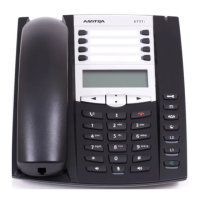

 To Next Page