20
Manual configuration
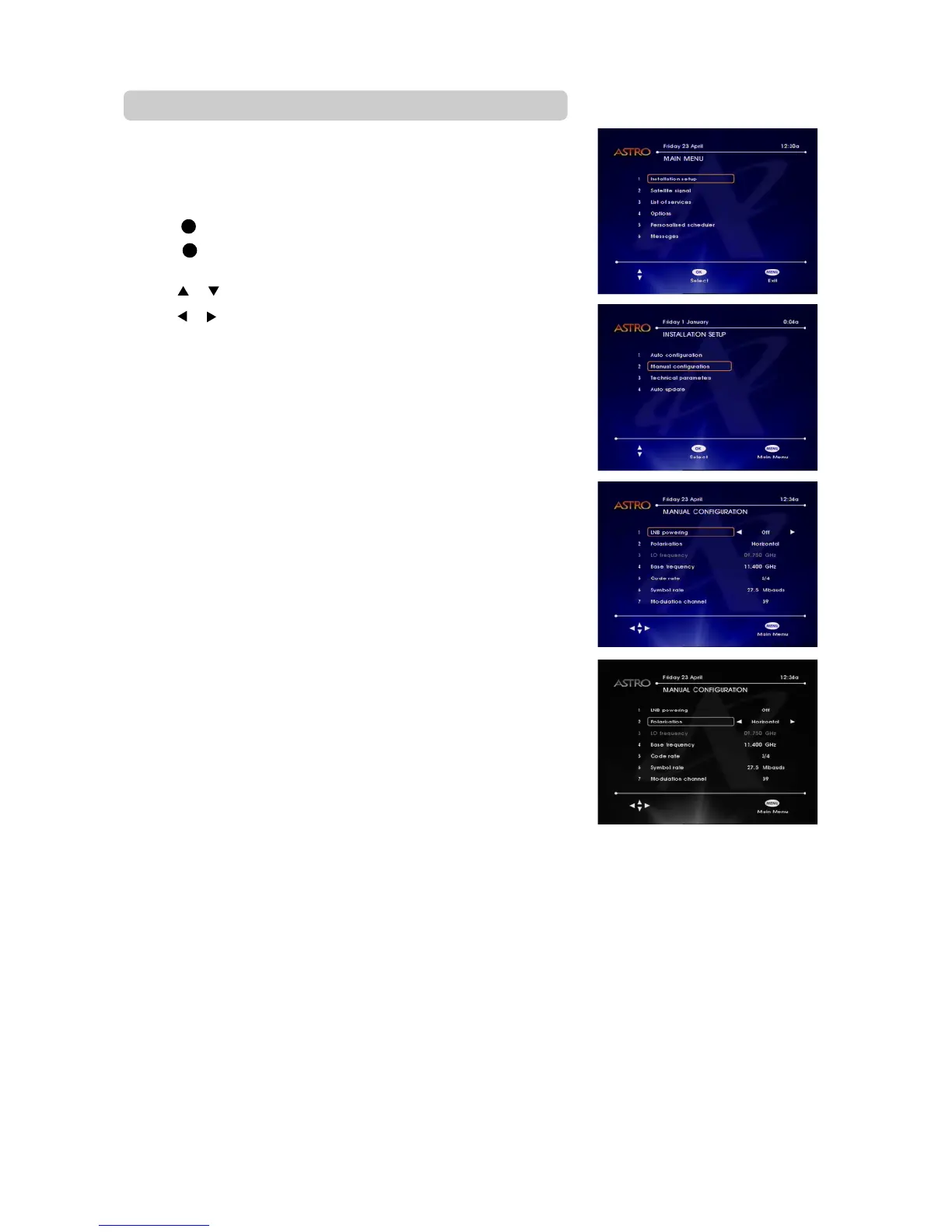
This option allows you to manually edit your DMT’s technical parameters,
and is PIN code protected.
• While watching ASTRO programmes, press MENU. The main menu screen
will appear.
• Press 1 to select the “Installation Setup” option
• Press 2 to select the “Manual configuration” option Enter your 4-digit
PIN code and press OK
• Press or to select the required options
• Press
or to make the required adjustment for each option.
• Press MENU twice to return to normal TV viewing.
LNB Powering
Your ASTRO satellite antenna contains a device known as Low Noise Block
(LNB). Your DMT needs to supply power to this device in order for it to
receive ASTRO signals. This option allows you to switch ON or OFF the
power supply sent to the LNB. This setting should normally be ON, but you
will need to switch it OFF (on all but one of the DMTs) if you have two (or
more) DMTs connected to the same LNB and antenna.
Polarization
Polarization is an ASTRO transmission parameter. This setting should
normally be set to Vertical unless otherwise advised by ASTRO.



 To Next Page