The Astro Pi MP3 Music Player is a versatile and robust device designed for playing music, featuring multiple control interfaces and a durable flight case. It integrates a Raspberry Pi with a suite of sensors and input methods, making it suitable for various environments, including educational and space-related applications.
Function Description
The primary function of the Astro Pi MP3 Music Player is to play audio files, specifically MP3s, from a designated music folder. It offers a range of controls for managing playback, volume, and track selection, utilizing both physical buttons and a joystick, as well as an innovative gyroscope-based tilt control system. The device is housed in an Astro Pi Flight Case, which provides protection and integrates the various input components.
Important Technical Specifications
While specific internal hardware details like processor speed or RAM are not provided, the manual highlights several key components and their functionalities:
-
Input Methods:
- 6 General Purpose Buttons: These buttons are strategically placed on the flight case for various controls. Four of these are arranged in a diamond shape, primarily for volume and track navigation. The remaining two are located below these four, dedicated to fast forward and rewind functions.
- Joystick: A central joystick provides four-directional input (Up, Down, Left, Right) and a pressable center. This offers an alternative and intuitive way to control the player.
- LED Matrix: An LED matrix is present on the device, likely for displaying information such as track status, volume levels, or visual feedback.
- Gyroscope: The device incorporates a gyroscope, enabling gesture-based control through tilting. This allows for hands-free or alternative control of volume and track skipping.
-
Software Configuration:
- Music Folder: The default music folder is specified as
/home/pi/Music on line 209 of the code, indicating a Linux-based operating system (likely Raspberry Pi OS) and a customizable software environment.
-
Physical Design:
- Astro Pi Flight Case: The device is enclosed within a robust flight case, suggesting durability and protection against physical impacts, making it suitable for demanding environments. The case integrates all the control elements seamlessly.
Usage Features
The Astro Pi MP3 Music Player offers a rich set of usage features through its multiple control interfaces:
Joystick Controls:
The joystick provides a highly interactive way to manage music playback:
- Up: Increases the volume by 3 decibels. This allows for quick and precise volume adjustments.
- Down: Decreases the volume by 3 decibels. Similar to the 'Up' function, this enables fine-tuned volume reduction.
- Left: Skips to the previous track. This is useful for replaying a song or going back in the playlist.
- Right: Skips to the next track. This allows for easy progression through the music library.
- Centre Pushed: Pauses or plays the current track. This acts as a toggle for playback, providing a convenient way to stop and resume music.
The 6 general-purpose buttons offer dedicated functions:
- Top Button (Diamond Shape): Controls volume increase. A single press increases the volume by 3 decibels.
- Bottom Button (Diamond Shape): Controls volume decrease. A single press decreases the volume by 3 decibels.
- Right Button (Diamond Shape): When pressed, this button pauses the playing track and skips to the next one. This combines two actions into one, which can be efficient for moving past a song while pausing.
- Left Button (Diamond Shape): When pressed, this button pauses the playing track and skips back to the previous one. Similar to the right button, it offers a combined action for navigation and playback control.
- Rewind Button (Below Diamond Shape, Left): Skips back 30 seconds within the current track. This is useful for replaying a specific part of a song or podcast.
- Fast Forward Button (Below Diamond Shape, Right): Skips forward 30 seconds within the current track. This allows users to quickly move past sections they don't wish to hear.
Gyroscope Controls:
The gyroscope introduces an innovative, gesture-based control method:
- Back Tilt (90-degree angle, screen facing user, tilted backwards): Skips to the next track. This provides a hands-free way to advance through songs.
- Forward Tilt (Screen tilted forwards): Skips to the previous track. This allows for easy navigation back to earlier tracks without touching the device.
- Left Tilt (Screen tilted to the left): Increases the volume. This offers an alternative, physical gesture for volume adjustment.
- Right Tilt (Screen tilted to the right): Decreases the volume. Similar to the left tilt, this provides a gesture for reducing volume.
The arrows in the manual's diagram symbolize the direction of tilt required to achieve the desired result, making the gyroscope controls intuitive to understand.
Maintenance Features
The manual does not explicitly detail maintenance features such as cleaning instructions, battery replacement, or software updates. However, the mention of the music folder being set at a specific line in the code (/home/pi/Music on line 209 of the code) implies that the device is programmable and likely runs on a Raspberry Pi. This suggests that:
- Software Updates: Users with programming knowledge or access to the device's operating system could potentially update the software, modify the code, or change configurations (like the music folder path).
- Troubleshooting: The open-source nature implied by the Raspberry Pi platform means that troubleshooting and customization might be possible at a deeper level than with a closed-source commercial device.
- Hardware Accessibility: While not explicitly stated, the "Flight Case" design might allow for access to internal components for maintenance or upgrades, typical of Raspberry Pi-based projects.
In summary, the Astro Pi MP3 Music Player is a feature-rich device designed for robust music playback, offering multiple intuitive control methods through a joystick, physical buttons, and gyroscope-based gestures, all housed within a protective flight case. Its underlying Raspberry Pi architecture suggests a degree of customizability and potential for advanced users to manage its software and configurations.

 Need help?
 General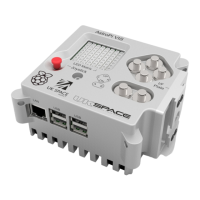

 To Next Page