
 Need help?
Do you have a question about the AstroAI LS40791 and is the answer not in the manual?
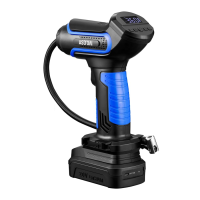
Provides a general description of the product, its power sources, and its primary inflation functions.
Covers essential safety warnings for product usage, including electrical safety, flammables, and keeping out of reach of children.
Details safety for power sources, cleaning, battery care, charging, and avoiding damage during operation.
Illustrates the main body of the tire inflator with numbered parts like the LED light, trigger, screen, and buttons.
Depicts and lists all accessories included in the package, such as power cords, adapters, and the storage bag.
Instructions on how to charge the battery pack using a USB cable and indicator meanings for charging status.
Guidance on how to correctly install and remove the rechargeable battery pack from the tire inflator.
Steps to install the battery or connect the 12V DC power cord and turn on the device.
How to switch between pressure units (PSI, Bar, kPa, kg/cm²) and select inflation modes (Bicycle, Motorcycle, Car, Basketball).
Instructions for using '+' and '-' buttons to set desired pressure and connecting the quick connector to the valve stem.
Details on pressing the trigger to start inflation and how to turn off the tire inflator after use.
Lists technical details including model, voltage, power rating, inflating speed, hose length, and dimensions.
Addresses problems like slow inflation and provides solutions for them.
Solutions for the inflator not inflating, including fuse checks, connections, battery status, and preset pressure.
A comprehensive list of all items provided in the product package, including the inflator and accessories.
Guidance on how to properly dispose of and recycle the product at the end of its service life.
Explains the terms of the limited warranty, what it covers, and exclusions for defects in material and workmanship.
Provides contact information for customer support and inquiries regarding the product.
 General
| Type | Digital Multimeter |
|---|---|
| Continuity | Yes |
| Diode Test | Yes |
| Backlight | Yes |
| AC Voltage | 6V/60V/600V |
| AC Current | 60mA/600mA |
| Display | LCD |
| Voltage | 600V |

 To Next Page