the prompt for the first setting. Click the button as many times as required for that setting, or leave
the setting alone and simply wait for the next double flash, this time followed by two blinks, indicating
that we are now at setting #2, etc.
The FT03 confirms each click with a blink. A press & hold skips to the next setting. A continuous press
exits the setup menu completely. Four blinks indicate that the setup is completed.
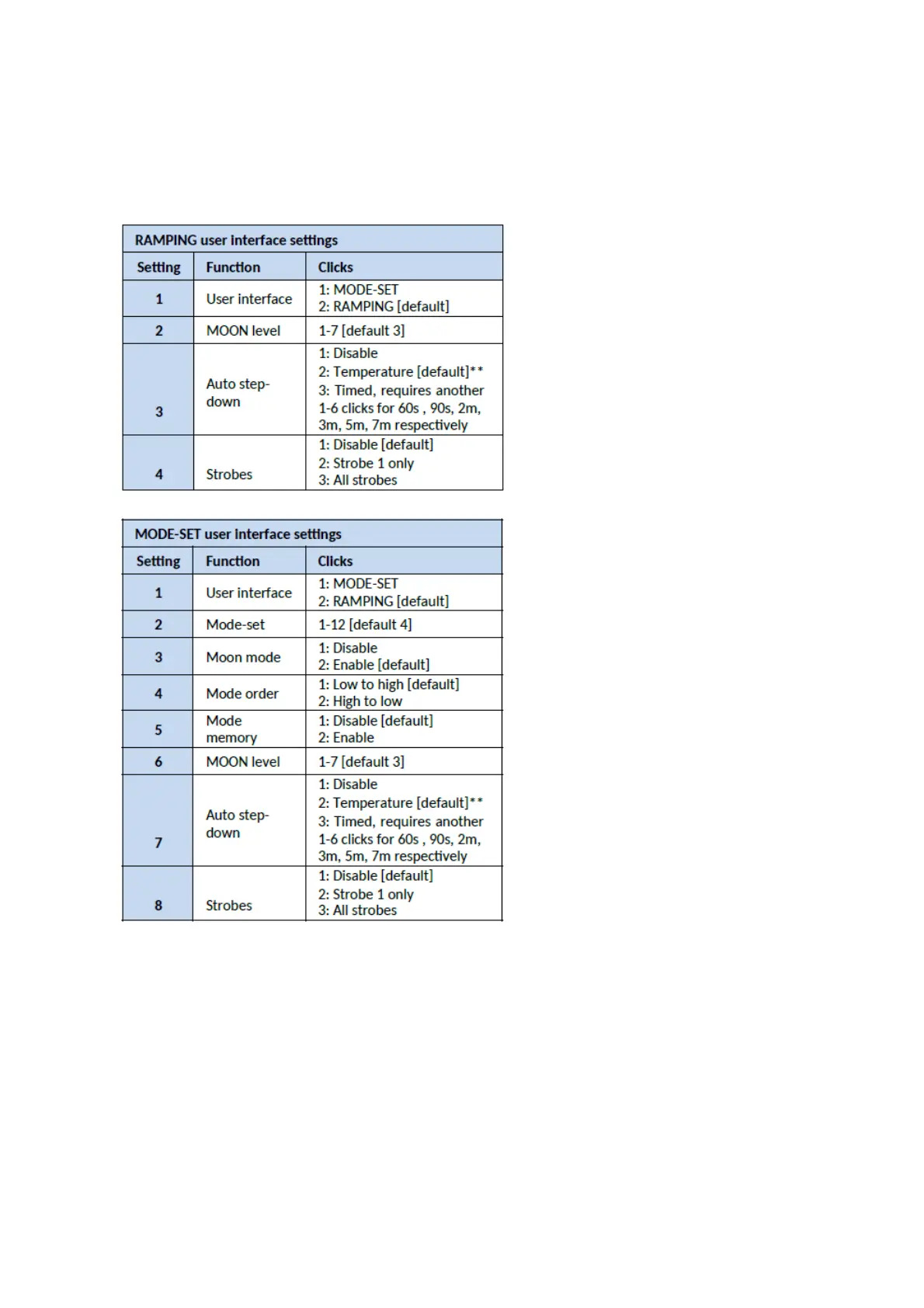
The available settings differ, depending if the FT03 is currently set to the RAMPING UI or the MODE-
SET UI. Note that changing setting 1 flips to the other UI and immediately kicks you into the table for
that UI:
** If [temperature] is selected for auto step-down, the FT03 goes to 100% output. Leave the lamp to
heat to the desired limit, and then click to set that temperature as the trip point (this can take a
minute, use fresh cells for this). Or click within 5 s to keep previous setting.
The mode-sets have been selected to suit a high-power thrower like the FT03:



 To Next Page