
 Need help?
Do you have a question about the AstroNova TrojanLabel T3-OPX and is the answer not in the manual?
Describes the origin and authenticity of the manual's instructions.
States the primary goal of the user guide for correct operation.
Details requirements for keeping the manual accessible to staff.
Outlines the employer's duty to ensure personnel read instructions.
Identifies AstroNova, Inc. as the manufacturer of the machine.
States the official designation of the machine as Digital Over-Printer T3-OPX.
Details information found on the machine's identification plate.
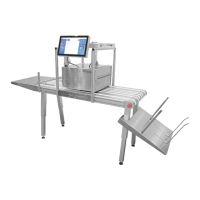
Provides a high-level overview of the machine's components.
Explains the machine's designated application and restrictions.
Warns against improper use, such as using unapproved inks.
Describes crush warning stickers and their meaning.
Details warnings related to the touchscreen, including heat and servicing.
Illustrates and labels the front components of the T3-OPX.
Illustrates and labels the rear components of the T3-OPX.
Illustrates and labels the bottom components of the T3-OPX.
Illustrates and labels the media entry side components.
Illustrates and labels the media exit side components.
Illustrates and labels the various connection ports on the unit.
Provides an overview of the T3-OPX installation process on conveyor tables.
Lists crucial safety and handling precautions before installation.
Lists necessary tools and components for installation.
Details the steps for setting up the mail table for installation.
Describes the process of installing the bracket system onto the conveyor table.
Explains how to connect encoder and table control cables.
Guides on connecting power supply and network cables.
Covers safety checks and the process of powering on the unit.
Guides on calibrating table position and leveling the unit.
Explains the procedure for installing ink cartridges.
Describes the process of purging the print engine fluids.
Outlines the steps for optional printhead calibration.
Details the procedure for aligning the nozzles.
Explains how to calibrate color density.
Guides on aligning nozzle health for optimal printing.
Describes the process of installing the media cleaner.
Explains the information displayed in the overview menu.
Introduces the main settings menu and its options.
Explains network configuration settings.
Covers user preference settings like language and job library.
Explains how to enable and manage user accounts.
Details settings for print queue and job speed.
Introduces the statistics menu and job history.
Describes the procedure for safely shutting down the unit.
Guides on exporting and viewing statistical data.
Explains how to start the Xitron RIP server.
Guides on transferring jobs using the web interface.
Describes how to adjust media size for jobs.
Explains how to rotate artwork for jobs.
Details how to move artwork using offset controls.
Guides on creating custom media profiles.
Provides an overview of printing jobs from the library.
Explains the function and reset of the general page counter.
Describes the functions of the handling menu.
Explains how to initialize height control for the print unit.
Explains how to control conveyor belt speed.
Explains the function and placement of the emergency stop button.
Introduces the maintenance menu and its functions.
Details the process for removing the service tray.
Guides on installing a new service tray.
Explains how to uncap and cap the printhead.
Explains where jobs are stored and managed.
Explains how print jobs are queued and managed.
Introduces the media settings for printing.
Guides on creating new media profiles.
Details typical settings managed in the basic tab.
Guides on automatic height adjustment of media.
Details settings managed in the advanced tab.
Guides on creating media profiles.
Guides through the automated height adjustment process.
Explains the die-to-die overlap feature for uneven surfaces.
Details the steps to adjust die-to-die overlap.
Guides on performing individual die-to-die alignment.
Explains how to reset die-to-die alignment values.
Details the components of the edge sensor.
Guides on adjusting the edge sensor's sensitivity.
Lists part numbers for ink cartridges.
Explains when and how to replace the service tray.
Details the step-by-step process for service tray replacement.
Explains how to manually move the service tray.
Guides on replacing the fuse in the power inlet.
Explains the function and replacement of the aerosol filter.
Details the steps for replacing the aerosol filter.
Lists minimum software and hardware requirements.
Step-by-step guide for installing the Xitron RIP.
Explains how to link TrojanControl with the RIP server.
Introduces the PostFlight tool for debugging RIP settings.
Covers connecting external PCs for debugging.
Lists commands for the T1030 webpath board.
Provides top view dimensions for MT1.
Shows front view dimensions for MT1.
Displays an isometric view of the T3-OPX with accessories.
Provides top view dimensions for MT2.
Shows front view dimensions for MT2.
Details operational and environmental specifications for T3-OPX.
Explains the printhead resolution and modes.
Lists specifications for MailTable 1.
Lists specifications for MailTable 2.
 General
| Operating Temperature | 41°F to 104°F (5°C to 40°C) |
|---|---|
| Print Technology | Thermal Transfer / Direct Thermal |
| Max Print Speed | 12 inches per second (305 mm/s) |
| Resolution | 300 dpi |
| Connectivity | Ethernet, USB, Serial (RS-232) |
| Operating System Compatibility | Windows |
| Ink Cartridges | Thermal transfer ribbons (wax, wax-resin, resin) |
| Label Roll Diameter | 8 inches (203 mm) outer diameter |
| Power Requirements | 100-240V AC, 50/60 Hz |
| Media Width Range | 1" (25.4 mm) to 4.5" (114.3 mm) |

 To Next Page
