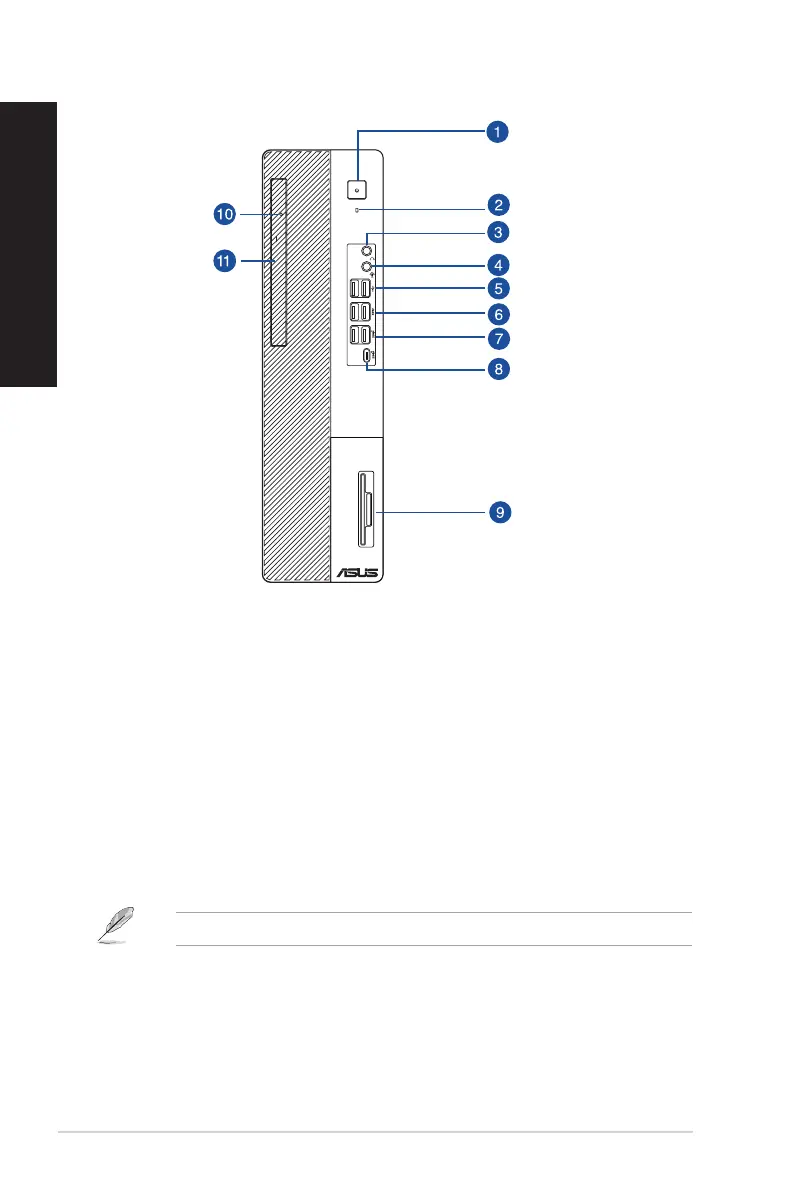
D700SC/M700SC/S700SC/D700SCES Front panel
1. Power button. Press this button to turn on your computer.
2. HDD indicator. The LED lights up or blinks to indicate the status of the HDD.
3. Headphone port. This port connects to a headphone or speaker.
4. Audio combo port. This port connects to a microphone or a headphone.
5. USB 2.0 ports. These Universal Serial Bus 2.0 (USB 2.0) ports connect to USB 2.0 devices such
as a mouse, printer, scanner, camera, PDA, and others.
6. USB 3.2 Gen 1 ports. The Universal Serial Bus 3.2 Gen 1 (USB 3.2 Gen 1) ports connect to USB
3.2 Gen 1 devices such as a mouse, printer, scanner, camera, PDA, and others.
7. USB 3.2 Gen 2 ports. The Universal Serial Bus 3.2 Gen 2 (USB 3.2 Gen 2) ports connect to USB
3.2 Gen 2 devices such as a mouse, printer, scanner, camera, PDA, and others.
8. USB 3.2 Gen 2 Type-C® port. The Universal Serial Bus 3.2 Gen 2 (USB 3.2 Gen 2) Type-C® port
connects to USB 3.2 Gen 2 Type-C® devices.
The output voltage of the USB 3.2 Gen 2 Type-C® ports is 5V, 1.5A.
9. IC smart card & SD card reader (optional). Insert a smart card or SD card into the
appropriate slot.
10. Optical disk drive indicator. The LED lights up or blinks to indicate the status of the ODD.
11. 5.25 inch optical disk drive bay. There is an optical disk drive in this bay.
14 Chapter 1: Getting started
ENGLISH
ENGLISH



 To Next Page