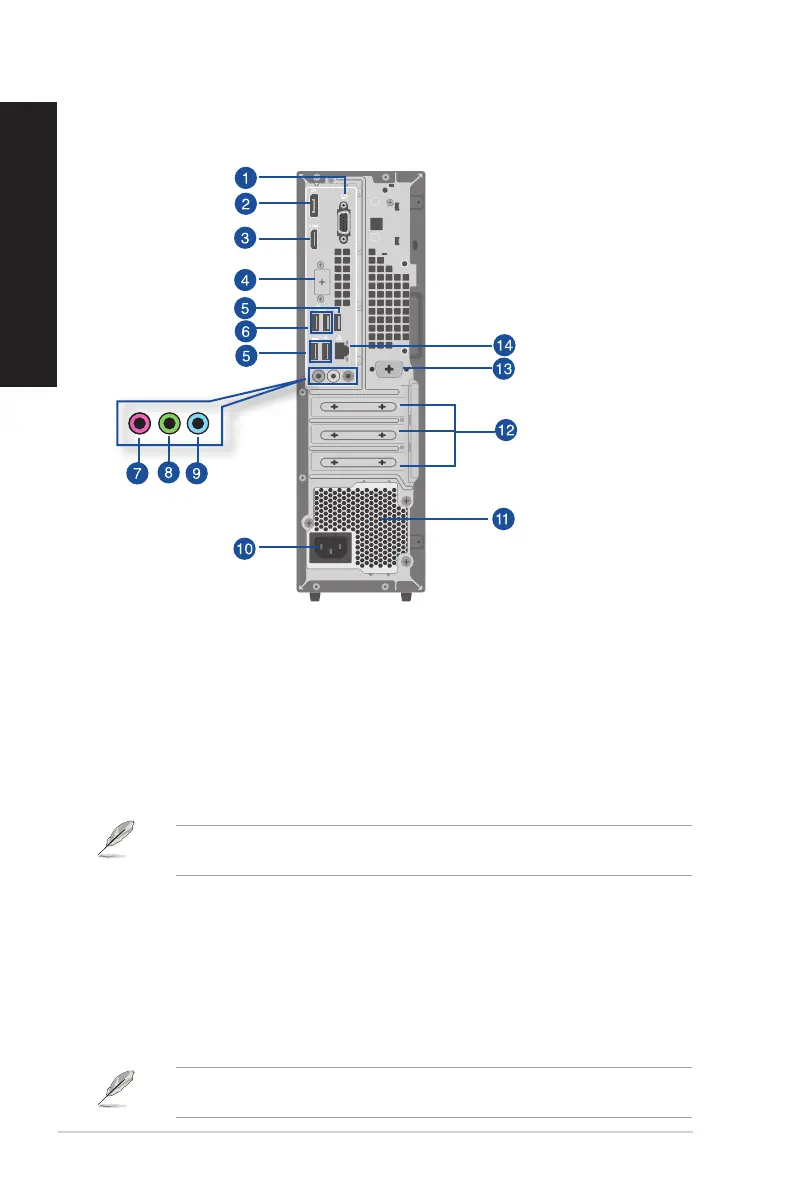
1. VGA port. This port is for VGA-compatible devices such as a VGA monitor.
2. DisplayPort. This port is for DisplayPort-compatible devices.
3. HDMI™ port. This port is for a High-Denition Multimedia Interface (HDMI™) connector, and
is HDCP compliant allowing playback of HD DVD, Blu-ray, and other protected content.
4. Flex I/O port (optional). This is an HDMI 2.1 TMDS port, DP 1.4 port, or VGA port.
5. USB 2.0 ports. These Universal Serial Bus 2.0 (USB 2.0) ports connect to USB 2.0 devices such
as a mouse, printer, scanner, camera, PDA, and others.
When USB Wake is enabled in the BIOS, the system will turn on or wake from hibernation when a
USB mouse or keyboard connected to this port is used. (This option is disabled by default.)
6. USB 3.2 Gen 1 ports. The Universal Serial Bus 3.2 Gen 1 (USB 3.2 Gen 1) ports connect to USB
3.2 Gen 1 devices such as a mouse, printer, scanner, camera, PDA, and others.
7. Microphone port (pink). This port connects to a microphone.
8. Line Out port (lime). This port connects to a headphone or speaker. In a 4, 5.1, or
7.1-channel conguration, the function of this port becomes Front Speaker Out.
9. Line In port (light blue). This port connects to a tape, CD, DVD player, or other audio
sources.
Refer to the audio conguration table below for the function of the audio ports in the 2, 4, 5.1, or
7.1-channel conguration.
D701SER / D701SERES / D701SERC / M701SER / D701SERT Rear panel
22 Chapter 1: Getting started
ENGLISH
ENGLISH



 To Next Page