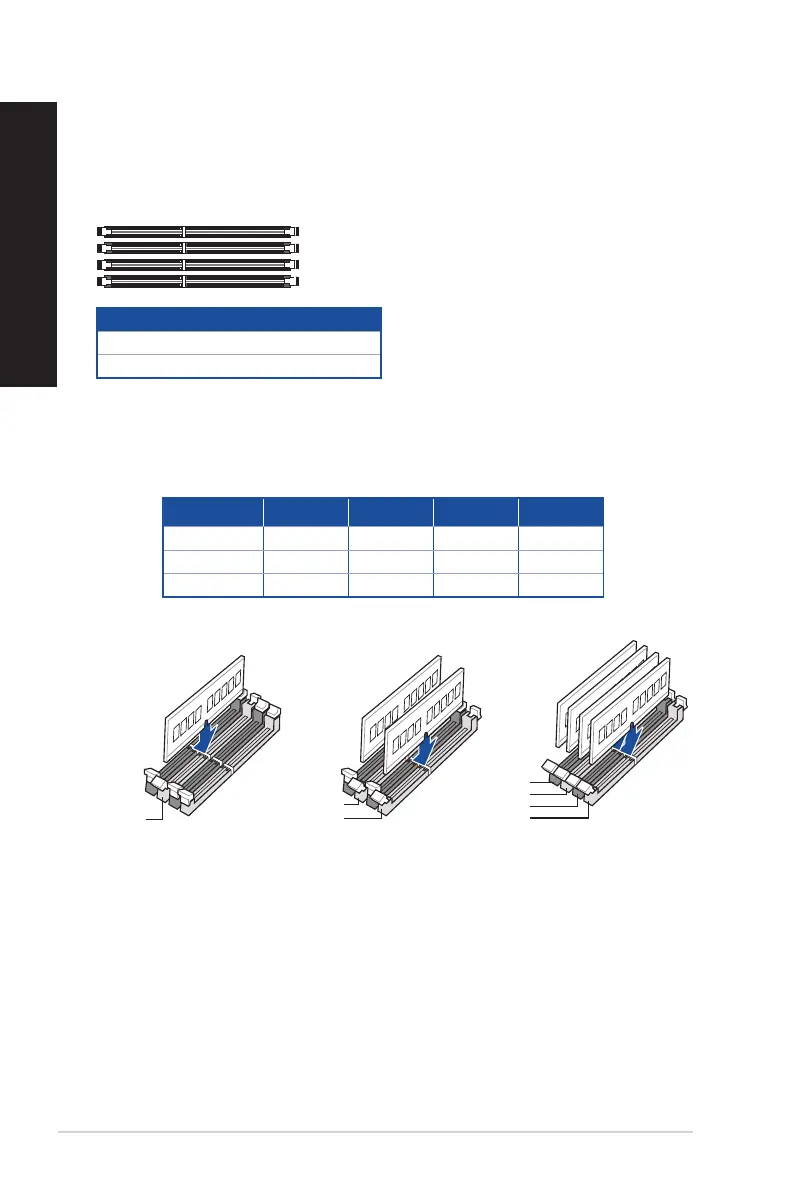
Installing memory in your computer
This desktop PC comes with four Double Data Rate 5 (DDR5) Dual Inline Memory Module (DIMM)
sockets. The gure illustrates the location of the DDR5 DIMM sockets.
Recommended memory congurations
•
Follow the installation sequence below to ensure system stability and avoid possible booting
up failure.
DIMM_B2
DIMM_B1
DIMM_A2
DIMM_A1
Channel Sockets
Channel A DIMM_A1 & DIMM_A2
Channel B DIMM_B1 & DIMM_B2
DIMM_B2
DIMM_A2
DIMM_A2
DIMM_A1
DIMM_A2
DIMM_B1
DIMM_B2
DIMM_A1 DIMM_A2 DIMM_B1 DIMM_B2
1 x DIMM x √ x x
2 x DIMM x √ x √
4 x DIMM √ √ √ √
D701SER / D701SERES / D701SERC / M701SER / D701SERT
28 Chapter 1: Getting started
ENGLISH
ENGLISH



 To Next Page