
 Need help?
Do you have a question about the Asus DSL-AC56U and is the answer not in the manual?
Introduction to the ASUS DSL-AC56U Modem Router and its key features.
Lists all the items included in the product package.
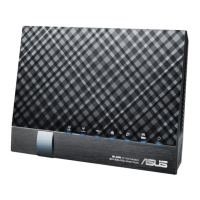
Identifies and describes the modem router's hardware components and LEDs.
Provides guidelines for optimal placement of the modem router for best wireless performance.
Lists the necessary system requirements to set up the wireless network.
Details initial setup procedures, including wired and wireless connections.
How to access and log into the router's web interface.
Guided setup for internet connection using QIS wizard.
Steps to connect devices to the configured wireless network.
Overview and configuration of the network map interface.
Secures the wireless network with SSID and encryption.
View and manage connected devices on the network.
Check status and manage USB devices connected to the router.
Set up a separate network for guests.
Manage network traffic, bandwidth, and Quality of Service.
Restrict internet access for specific devices.
Access USB device features like AiDisk, Servers Center.
Cloud service for saving, syncing, and sharing files.
Configure advanced wireless network parameters.
Configure Local Area Network IP and DHCP settings.
Set up and manage Wide Area Network connections.
Configure IPv6 addressing for the network.
Establish a VPN server for secure remote access.
Configure firewall and access control for network protection.
Manage router system settings, firmware, and backups.
Review network activity logs.
Utility to detect and configure ASUS routers on the network.
Utility to recover routers from failed firmware upgrades.
Set up a USB printer as a network print server.
Utility for downloading files even when devices are off.
Common troubleshooting steps for router issues.
Answers to common user questions.
 General
| Ethernet LAN | Yes |
|---|---|
| Cabling technology | 10/100/1000Base-T(X) |
| Networking standards | IEEE 802.11a, IEEE 802.11ac, IEEE 802.11b, IEEE 802.11g, IEEE 802.11n |
| Ethernet LAN data rates | 10, 100, 1000 Mbit/s |
| Ethernet LAN interface type | Gigabit Ethernet |
| Wi-Fi band | Dual-band (2.4 GHz / 5 GHz) |
| Wi-Fi standards | 802.11a, Wi-Fi 5 (802.11ac), 802.11b, 802.11g, Wi-Fi 4 (802.11n) |
| Top Wi-Fi standard | Wi-Fi 5 (802.11ac) |
| WLAN data transfer rate (max) | 867 Mbit/s |
| USB version | 2.0 |
| Rack mounting | - |
| Frequency range | 2.4 - 5 GHz |
| Bandwidth (first) | 2.4 GHz |
| Bandwidth (second) | 5 GHz |
| USB ports quantity | 2 |
| WLAN data transfer rates supported | 300, 867 Mbit/s |
| Product type | Tabletop router |
| Product color | Black |
| LED indicators | DSL, LAN, Power, USB |
| RJ-11 ports quantity | 1 |
| USB 2.0 ports quantity | USB 2.0 ports have a data transmission speed of 480 Mbps, and are backwards compatible with USB 1.1 ports. You can connect all kinds of peripheral devices to them. |
| Ethernet LAN (RJ-45) ports | 5 |
| Antennas quantity | 4 |
| Antenna gain level (max) | 4 dBi |
| Security algorithms | 64-bit WEP, 128-bit WEP, WPA-PSK, WPA2-PSK |
| Cables included | LAN (RJ-45) |
| Certification | CE, C-Tick, Telepermit |
| Power supply | 24 W |
| AC input voltage | 110 - 240 V |
| Power source type | AC |
| AC input frequency | 50 - 60 Hz |
 Weight and Dimensions
| Depth | 205 mm |
|---|---|
| Width | 147 mm |
| Height | 66 mm |
| Weight | 400 g |

 To Next Page
