ASUS Eee PC
1-9
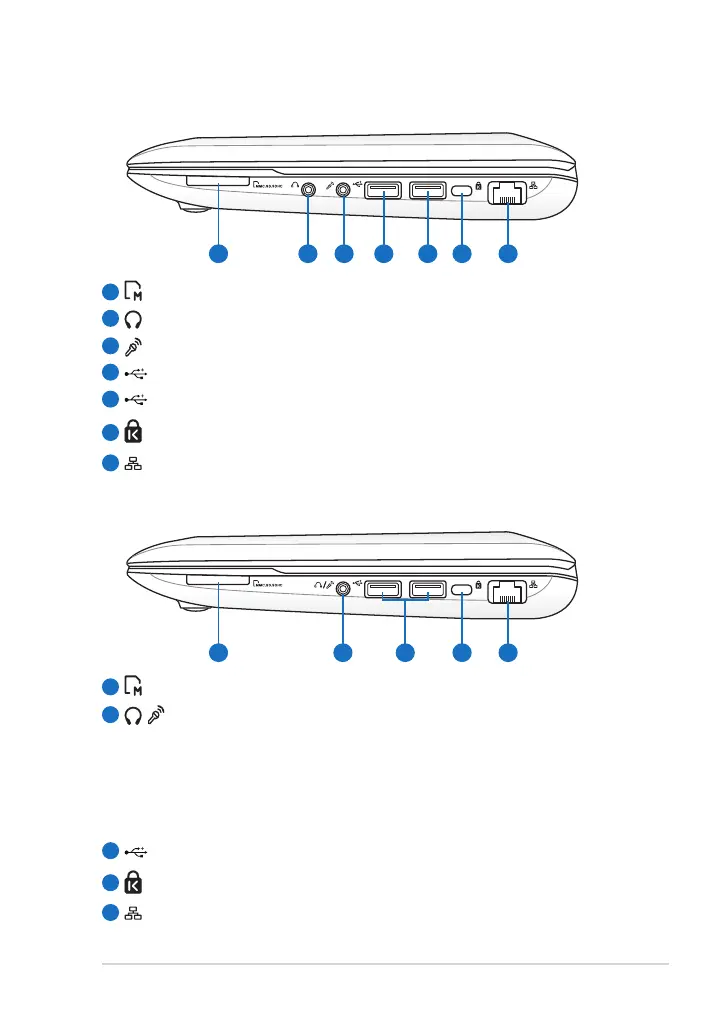
Eee PC 1015B
Eee PC 1015PX / 1011PX / R011PX / R051PX
2
1
5
4
3
Memory Card Slot
Headphone Output Jack
Microphone Jack
USB Port (2.0/1.1)
USB Port (3.0, on selected models/2.0/1.1)
Kensington® Lock port
LAN Port
6
7
2
1
5
4
3
Memory Card Slot
/ Headphone Output / Microphone Input Combo Jack
This combo jack can be used to connect the Eee PC’s audio out
signal to amplified speakers or headphones, or can be used to
connect an external microphone or output signals from audio
devices. This jack automatically detects the connecting device
and switches functions.
USB Port (2.0/1.1)
Kensington® Lock port
LAN Port













 To Next Page