3. Intel
®
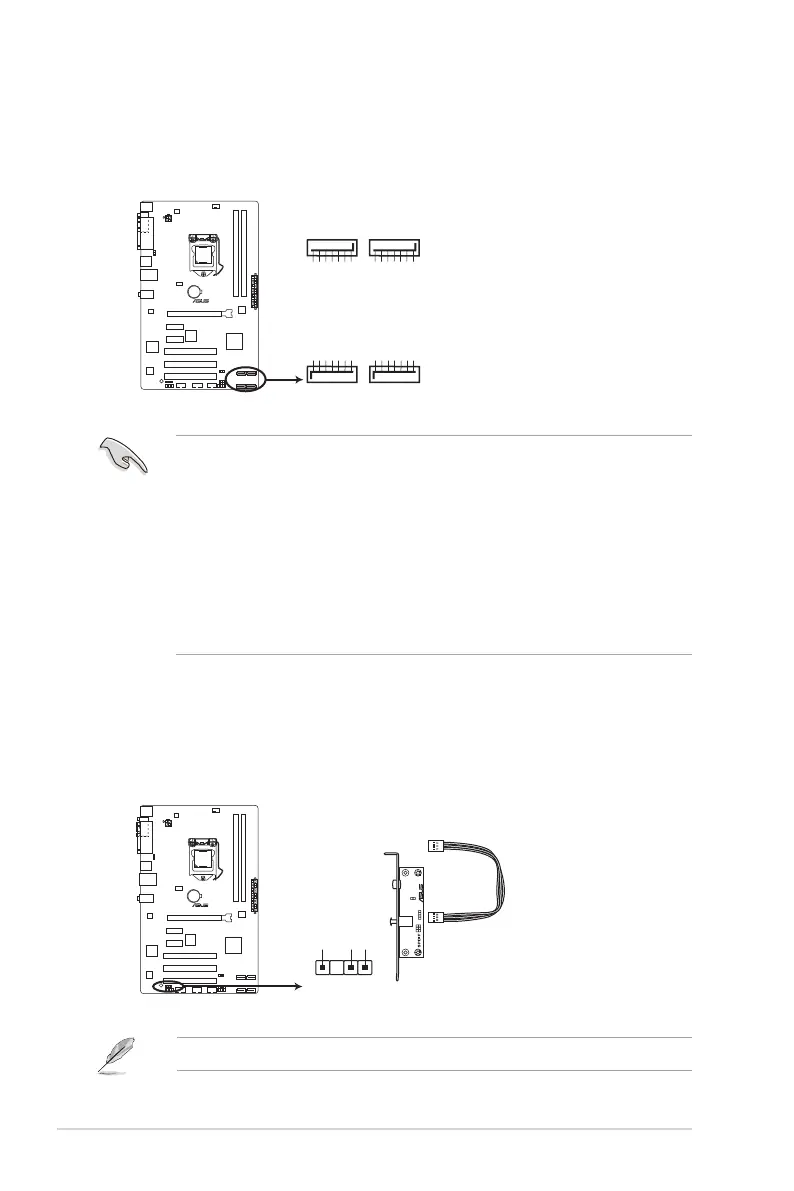
H61 Serial ATA 3.0Gb/s connectors (7-pin SATA3G_1~4)
These connectors connect to Serial ATA 3.0 Gb/s hard disk drives and optical drives via
Serial ATA 3.0 Gb/s signal cables.
• You must install Windows
®
XP Service Pack 3 or later version before using Serial ATA
hard disk drives.
• Due to H61 Chipset limitation, AHCI Mode only works on Windows
®
Vista / Windows
®
7. Please use IDE Mode on Windows
®
XP.
• To congure the SATA type in BIOS, click Advanced Mode > Advanced tab > SATA
Conguration > SATA Mode Selection. See section 2.5.3 SATA Conguration for
details.
• When using hot-plug and NCQ on Windows
®
Vista / Windows
®
7, set the SATA Mode
Selection item in the BIOS to [AHCI]. See section 2.5.3 SATA Conguration for
details.
SATA3G_4
GND
RSATA_RXP4
RSATA_RXN4
GND
RSATA_TXN4
RSATA_TXP4
GND
SATA3G_3
GND
RSATA_RXP3
RSATA_RXN3
GND
RSATA_TXN3
RSATA_TXP3
GND
SATA3G_2
GND
RSATA_TXP2
RSATA_TXN2
GND
RSATA_RXN2
RSATA_RXP2
GND
SATA3G_1
GND
RSATA_TXP1
RSATA_TXN1
GND
RSATA_RXN1
RSATA_RXP1
GND
H61-PLUS
H61-PLUS Intel
®
SATA 3.0Gb/s connectors
4. Digital audio connector (4-1 pin SPDIF_OUT)
This connector is for an additional Sony/Philips Digital Interface (S/PDIF) port. Connect
the S/PDIF Out module cable to this connector, then install the module to a slot
opening at the back of the system chassis.
The S/PDIF module is purchased separately.
H61-PLUS
H61-PLUS Digital audio connector
SPDIF_OUT
+5V
SPDIFOUT
GND
Chapter 1: Product introduction
1-28


 To Next Page