EasyManua.ls Logo

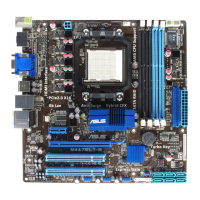
Asus M4A78LT-M - User Manual

Asus M4A78LT-M
64 pages
Print Icon
To Next Page IconTo Next Page
Loading...
Motherboard
M4A78LT-M

Table of Contents

Other manuals for Asus M4A78LT-M

Questions and Answers

  • J
    John AguilarJul 26, 2025
    What to do if my Asus Motherboard computer is on but the monitor is black?
    • W
      washleyJul 26, 2025
      If your Asus Motherboard computer turns on but the monitor remains black, first ensure that the monitor is powered on and the VGA cable is properly connected. If the issue persists, adjust the brightness and contrast settings on your monitor. As a final step, shut down the computer, disconnect the power cord, and verify that the VGA card is securely installed.
  • T
    terrymichaelAug 2, 2025
    Why is my Asus M4A78LT-M Motherboard not detecting memory?
    • A
      avilajosephAug 2, 2025
      If your Asus Motherboard isn't detecting memory, ensure that the memory module is the correct type for your motherboard. Also, verify that the DIMMs are firmly seated in the DIMM socket. Finally, make sure that the memory module is from the qualified vendor list (QVL).
  • J
    Jill StarkAug 10, 2025
    What to do if Asus M4A78LT-M has hard/optical disk drive error?
    • D
      Dale WalkerAug 10, 2025
      If you're encountering a hard/optical disk drive error with your Asus Motherboard (drive not recognized or detected), make sure the jumper setting is correct (Master/Slave). Check the BIOS configuration for the hard/optical disk drive. Ensure the device cables are firmly attached and verify that the device drivers are installed.
  • M
    Matthew BrewerAug 17, 2025
    How to fix floppy error on Asus M4A78LT-M Motherboard?
    • E
      Erin ConnerAug 17, 2025
      If you're experiencing a floppy error with your Asus Motherboard (indicator always lit or a warning message appears), check the BIOS configuration settings related to the floppy disk drive. Additionally, ensure that the cables for the floppy disk drive are correctly plugged in.

Summary

Chapter 1: Product introduction

Before you proceed

Important precautions to take before installing or configuring the motherboard.

Central Processing Unit (CPU)

Information and procedures for installing the CPU.

Installing the heatsink and fan

Instructions for installing the CPU heatsink and fan assembly.

System memory

Details regarding system memory installation and configuration.

Installing a DIMM

Step-by-step instructions for installing a memory module.

Removing a DIMM

Step-by-step instructions for removing a memory module.

ATX power connectors

Instructions for connecting ATX power supply connectors to the motherboard.

Notices

Safety information

Crucial safety precautions for installation and operation.

Chapter 2: BIOS information

Managing and updating your BIOS

Procedures for managing and updating the motherboard BIOS.

BIOS setup program

Guide to entering and navigating the BIOS setup utility.

BIOS menu screen

Overview of the BIOS setup screen layout and elements.

Main menu

Overview of the Main BIOS menu and basic system information.

SATA Configuration

Menu for configuring SATA storage devices and RAID modes.

Advanced menu

Menu for configuring advanced system settings like CPU and Chipset.

JumperFree Configuration

Settings for CPU overclocking and frequency adjustments.

CPU Configuration

Settings related to CPU features and performance.

Chipset

Advanced chipset configuration settings.

Power menu

Settings for Advanced Configuration and Power Interface (ACPI).

HW Monitor Configuration

Displays and configures hardware monitoring settings like temperature and fan speed.

Boot menu

Options for configuring system boot sequence and behavior.

Boot Device Priority

Sets the order of devices for system startup.

Security

Security settings for user and supervisor passwords.

Tools menu

Access to special function utilities like BIOS update and Express Gate.

Exit menu

Options for saving, discarding, or loading BIOS default settings.

Asus M4A78LT-M Specifications

General IconGeneral
Form FactorMicro ATX
ChipsetAMD 760G
SocketAM3
Memory Slots4 x DIMM
Memory TypeDDR3
Maximum Memory16 GB
PCIe x16 Slots1
PCIe x1 Slots1
PCI Slots2
SATA Ports6 x SATA 3Gb/s
Integrated GraphicsATI Radeon HD 3000
Audio8-Channel High Definition Audio
Video OutputsD-Sub, DVI
USB Ports12 (6 on back panel, 6 via headers)

Related product manuals