ASUS P5AD2-EASUS P5AD2-E
ASUS P5AD2-EASUS P5AD2-E
ASUS P5AD2-E
2-52-5
2-52-5
2-5
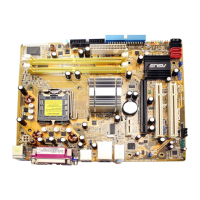
Internal connectorsInternal connectors
Internal connectorsInternal connectors
Internal connectors
PagePage
PagePage
Page
1. Floppy disk drive connector (34-1 pin FLOPPY) 2-24
2. Primary IDE connector (40-1 pin PRI_IDE1) 2-24
3. Serial ATA connectors (7-pin SATA1 [red], SATA2 [red], 2-25
SATA3 [black], SATA4 [black)
4. Optical drive audio connector (4-pin CD) 2-26
5. Front panel audio connector (10-1 pin AAFP) 2-26
6. USB connectors (10-1 pin USB56, USB78) 2-27
7. Serial port connector (10-1 pin COM1) 2-27
8. GAME/MIDI port connector (16-1 pin GAME1) 2-28
9. Chassis intrusion connector (4-1 pin CHASSIS1) 2-28
10. CPU, Chassis, and Power Fan connectors (3-pin CPU_FAN1,
PWR_FAN1, CHA_FAN1, CHA_FAN2) 2-29
11. ATX power connectors (24-pin EATXPWR1, 4-pin ATX12V1) 2-30
12. System panel connector (20-pin PANEL1) 2-31
System power LED (Green 3-pin PLED)
Hard disk drive activity LED (Red 2-pin IDE_LED)
System warnsing speaker (Orange 4-pin SPEAKER)
ATX power button/soft-off button (Yellow 2-pin PWRSW)
Reset button (Blue 2-pin RESET)



 To Next Page