ASUS PRIME A320M-E
1-9
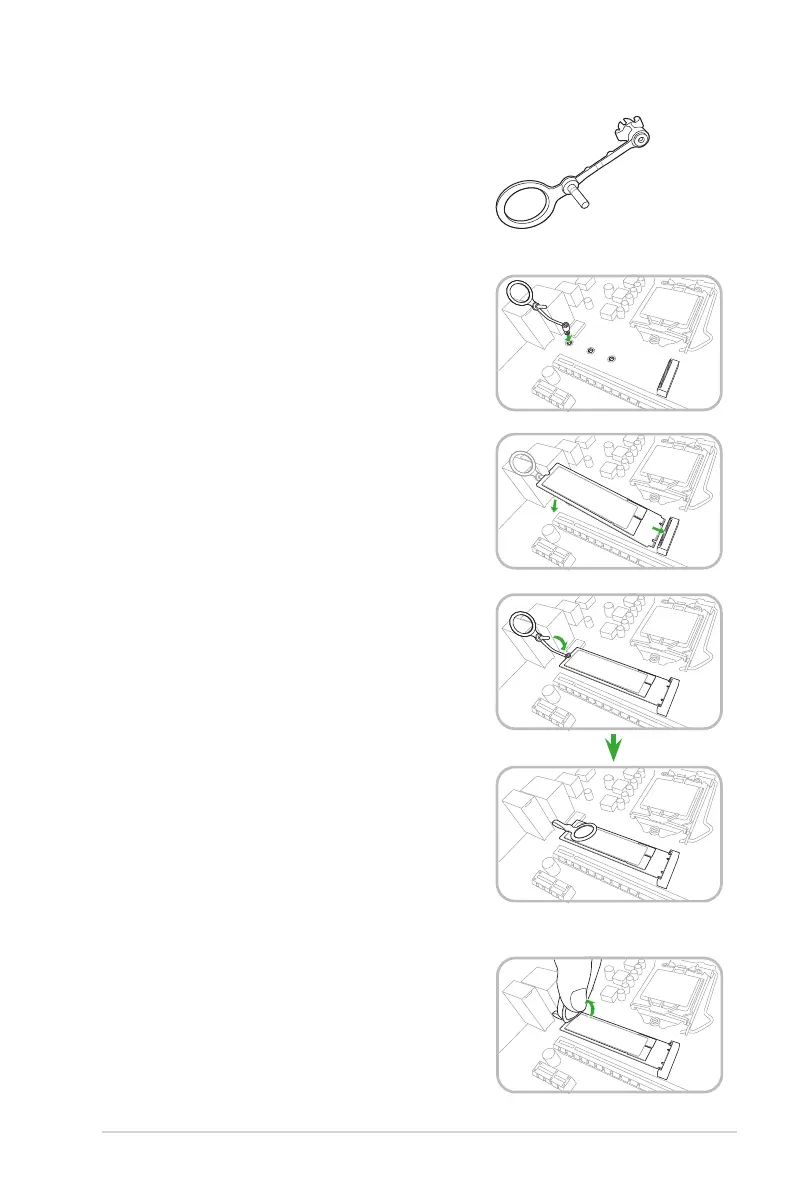
M.2 Anchor Installation
TheM.2Anchorisatool-lessdesigntoeasilyfasten
andsecureyourM.2SSDcardtoyourmotherboard
withoutusingextratools.
To install the M.2 SSD card using the M.2 Anchor:
1. LocatetheM.2mountingholeonyour
motherboardandrmlyinserttheM.2Anchor
intothehole.
2. InserttheM.2SSDcardintotheM.2slot.The
notchattheendoftheM.2SSDcardshallalign
withtherodoftheM.2Anchor.
3. FirmlyinsertthepinontheM.2Anchorintothe
holeonitself.
1. PulluptheringontheM.2Anchoruntilitis
separatedfromthehole.
2. RemovetheM.2SSDcardfromtheM.2slot.
To uninstall the M.2 SSD card:





 To Next Page