ENGLISH
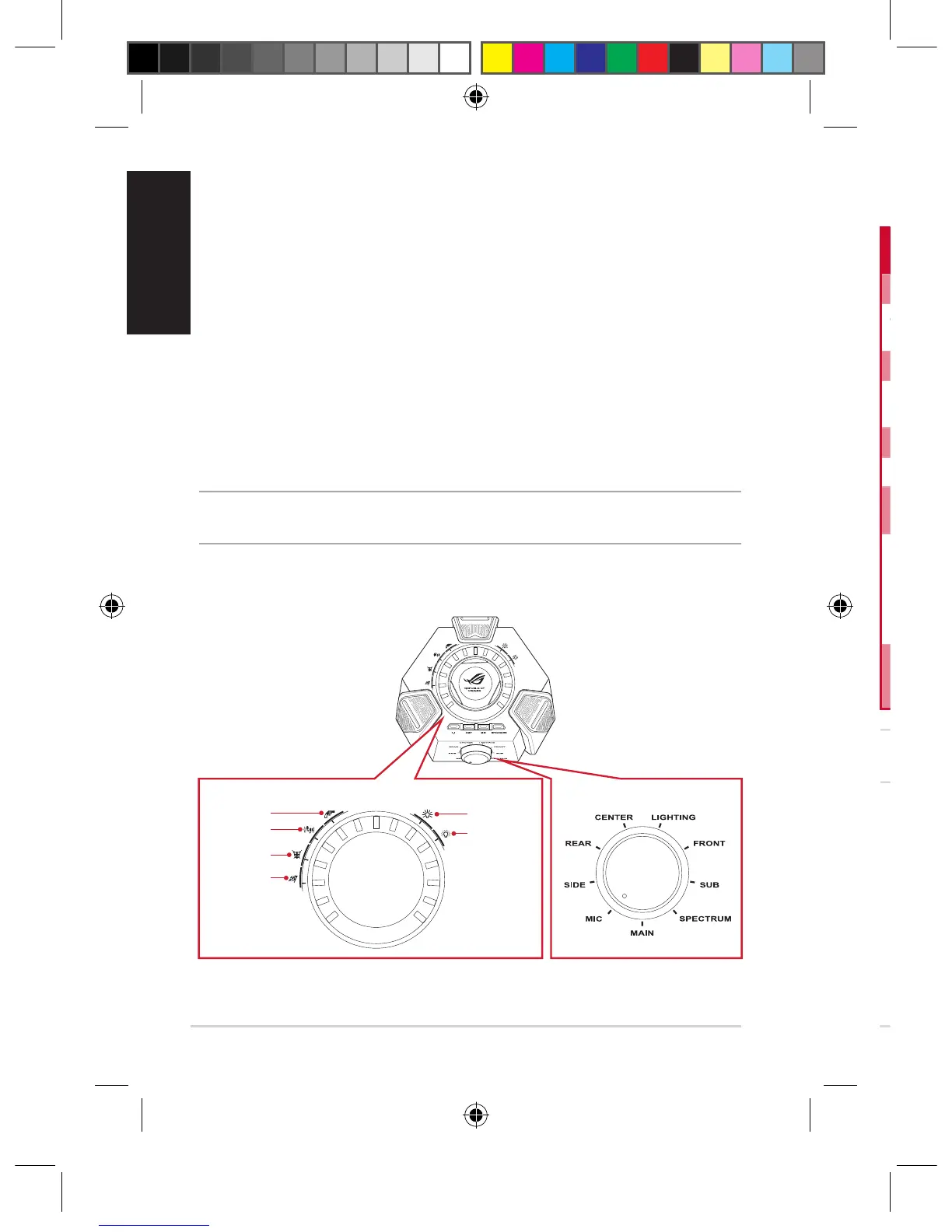
Mode Selector
(Turn)
Mode On/Off Switch (Press) Mode Parameter Control (Turn)
Main Mute/Unmute the headset Adjustthemainlisteningvolume
Center Mute/Unmute the center
channel
Adjustthecenterchannelvolume
Sub Mute/Unmutethesubchannel Adjustthesubchannelvolume
Front Mute/Unmutethefront
channels
Adjustthefrontchannelvolume
Rear Mute/Unmute the rear channels Adjusttherearchannelvolume
Side* Mute/Unmute the side channels Adjustthesidechannelvolume
Mic Mute/Unmute the headset
microphone
Adjustthemicrophonevolume
Spectrum Turn on/off the spectrum
presets
Selectoneofthespectrumpresets:
•FPSimmersion
•FPSFootstep
•Action/RPG
•Racing
Lighting Tune on/off the headset lighting Selectbetweenthelightingmodes:
•Constantlight
•Breathinglight
Fourquick-accessbuttonsarealsoavailablefor:
• Switchingbetween7.1-channelandstereomode
• Turningon/otheheadphoneamplier
• Muting/unmutingthemicrophone
• Switchingbetweenheadsetandspeakers
BelowisthelistoffunctionsoftheModeSelectorandModeOn/OSwitch&
ModeParameterControl:
NOTE: Some contents may only have up to 5�1 (6 channels) and have no sound on the side
channels�
Using the ROG Centurion Control Box
FPS Immersion
FPS Footstep
Action/RPG
Racing
Constant Light
Breathing Light
Mode on/off switch and Mode parameter control Mode selector
8� Modeon/oswitchandModeparametercontrol*
9� 7.1-channel/stereoswitchingbutton
10� Headphone amplifier on/off
11� Mode selector*
12� Quick microphone mute/unmute
13� Headset/speakerswitchingbutton
14� ENC(EnvironmentalNoiseCancellation)on/oswitch
15� HDMIspeakercable
16� USBY-cable
17� Kensingtonlock(holeattheback)
NOTE:*RefertothetableinsectionUsing the ROG Centurion Control Boxforthe
functionsoftheModeSelectorandModeOn/OSwitch&ModeParameterControl.
Q11267_ROG_Centurion_QSG.indb 4 2016/8/15 10:20:22











 To Next Page