Need help?
Do you have a question about the Asus ROG KUNAI 3 and is the answer not in the manual?
Product usage in specified ambient temperatures and charging guidelines.
Guidelines on handling the non-detachable Li-on battery to prevent damage or fire.
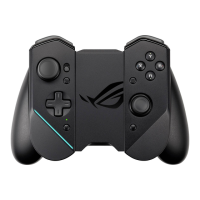
Diagram and labels of the gamepad's front controls and indicators.
Diagram and labels of the gamepad's rear controls and triggers.
Diagram and labels of the gamepad's top USB-C connector and charging indicator.
Steps for installing the ROG Phone 3 into the bumper and attaching controllers.
Instructions for attaching controllers to the ROG Kunai 3 charger for mobility mode.
Instructions for attaching controllers to the ROG Kunai 3 charger for all-in-one mode.
Explains the LED status (solid white/off) for charging.
Details LED status (blinking blue, solid red/yellow/green) and their meanings.
Step-by-step guide for initial Bluetooth pairing with a ROG Phone.
Instructions for re-connecting to an already paired ROG Phone.
Methods to power off the Gamepad in Bluetooth or USB modes.
 General
| Device type | Gamepad |
|---|---|
| Backlight color | Red/Green/Blue |
| Buttons quantity | 12 |
| Reflex vibration | No |
| Analog thumbsticks | Yes |
| Gaming control technology | Analogue / Digital |
| Gaming platforms supported | Android, PC |
| Gaming control function buttons | Back button, D-pad, Home button, Select button |
| Device interface | Bluetooth/USB |
| USB connector type | USB Type-C |
| Connectivity technology | Wired & Wireless |
| Product color | Black |
| Housing material | Polycarbonate (PC) |
| Power source | Battery |
| Battery life (max) | 6 h |
| Cables included | USB Type-C to USB Type-A |
 Weight and Dimensions
| Depth | 66.8 mm |
|---|---|
| Width | 154.8 mm |
| Height | 110.3 mm |
| Weight | 198.8 g |

 To Next Page