2-3
ASUS LCD Monitor PG Series
2.3 Detaching the arm/stand (for VESA wall
mount)
• Avoid damaging the monitor surface. While detaching the
monitor stand, always keep the monitor inside its EPS
packaging.
The detachable stand of this monitor is specially designed for VESA wall
mount.
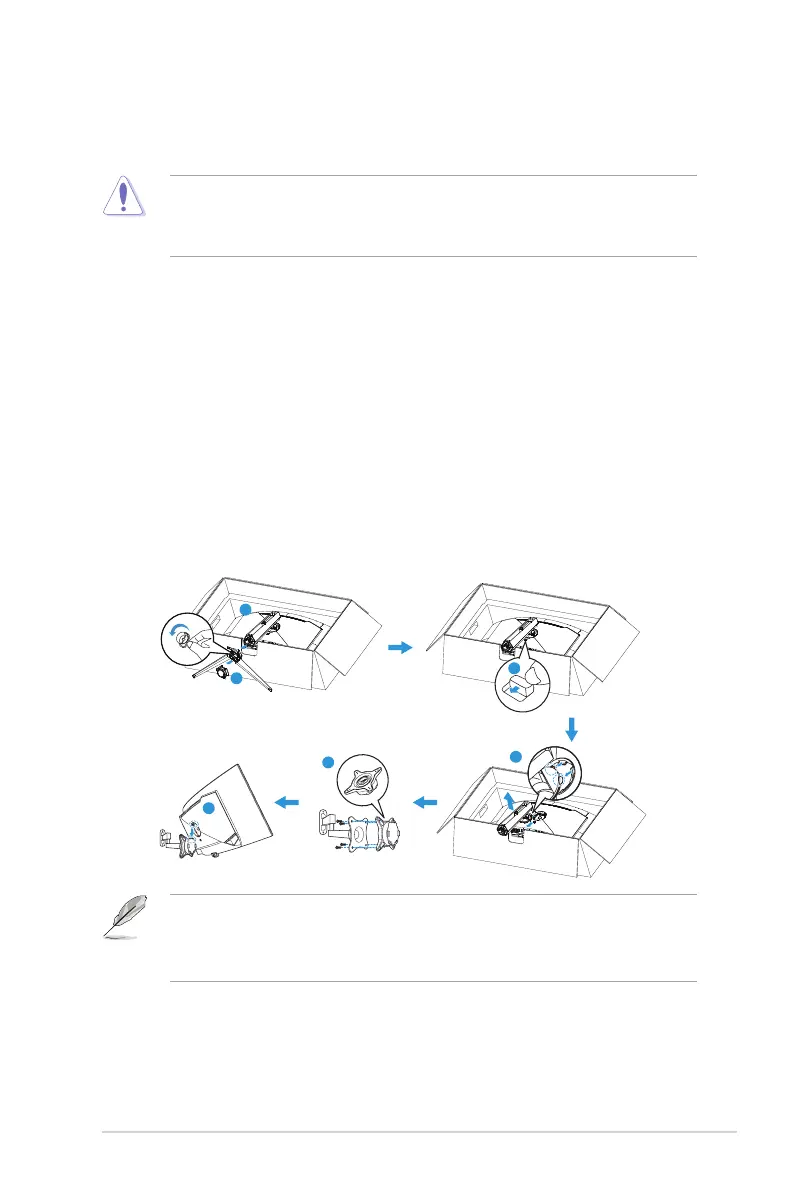
1. Disconnect power and signal cables. Carefully put the monitor
facedown on its EPS packaging.
2. Remove the LED projection cover. Then release the bundled screw
and remove the base from the stand.
3. Press the release button to detach the stand from the monitor.
4. Remove the stand.
5. Attach the ROG wall mount kit to the wall mounting bracket.
6. Then install the monitor to the wall mount.
1
2
3
4
5
6
• The VESA wall mount kit (100 x 100 mm).
• Use only the UL Listed Wall Mount Bracket with minimum
weight/load 28.8 kg (Screw size: M4 x 10 mm).




 To Next Page